Page 1 of 1
Panel Troubles

Posted:
Wed Feb 28, 2007 3:51 pmby FsNovice
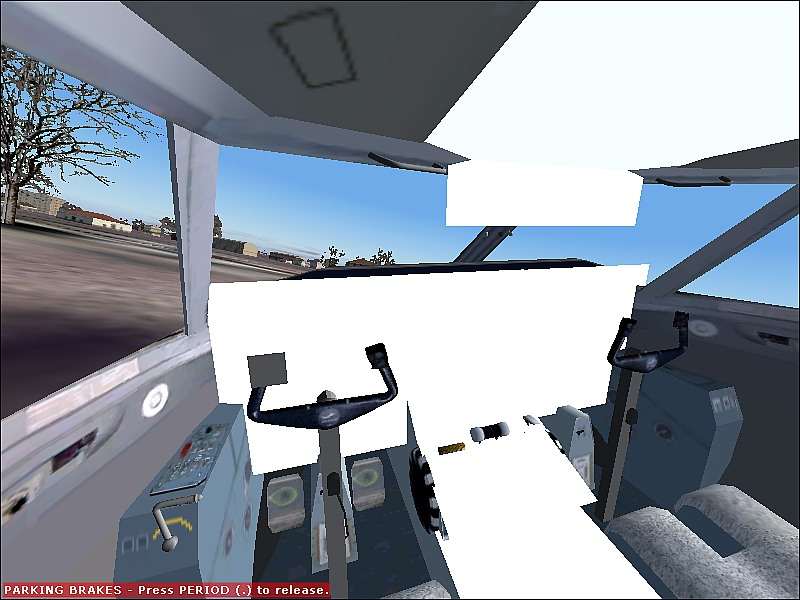
I dl'd this plane today and when i installed it this is what i got. I installed the guages in the guages folder. And all the other parts, effects and sound in their respective folders. I cant figure out what i've done wrong, this is my usual way to install and all other planes i installed like this worked. There is no readme specifiying a differnet way to install it.
Heres the link to the DL. Thanks guys. I bet i've missed something blindingly obvious, like usual!!!
Re: Panel Troubles
Posted:
Wed Feb 28, 2007 4:00 pmby Hagar
Heres the link to the DL. Thanks guys. I bet i've missed something blindingly obvious, like usual!!!
Don't know about that but you seem to have forgotten the link.

If you post it I'll check it out for you.
Re: Panel Troubles
Posted:
Wed Feb 28, 2007 4:10 pmby FsNovice
Re: Panel Troubles
Posted:
Wed Feb 28, 2007 4:37 pmby Hagar
OK. Make sure you pasted the included fsfsconv folder into FS9\Aircraft. Overwrite files/folders if prompted. This contains a folder named DHC82PNL that the panel of this aircraft is aliased to. I think that should fix it.
Re: Panel Troubles
Posted:
Wed Feb 28, 2007 5:06 pmby FsNovice
Thanks Hagar, that works fine now, But if i put AP on the plane sinks, doesnt hold altitude!! Do i need a flight plan setup for it to work or is this just me!!!!
Re: Panel Troubles
Posted:
Wed Feb 28, 2007 5:10 pmby Hagar
Glad that fixed it. Sorry but I know nothing of autopilots & flight plans.
Re: Panel Troubles
Posted:
Sat Mar 03, 2007 6:19 amby FsNovice
Bump. Does anyone with this model experience this problem, and could offer any adivce? Thanks
Re: Panel Troubles
Posted:
Sat Mar 03, 2007 7:10 amby ozzy72
You have to get the aircraft properly trimmed before turning on the AP otherwise it just reverts to doing whatever it should if your joystick is in a neutral position

Re: Panel Troubles
Posted:
Sat Mar 03, 2007 7:32 amby FsNovice
ah ok. will try that.
Re: Panel Troubles
Posted:
Sat Mar 03, 2007 11:49 amby FsNovice
I have tried to trim it and it makes no difference. I trimed it a bit nose up trim and nothing hapened. Does anyone else experience this problem with this plane?
Re: Panel Troubles
Posted:
Sat Mar 03, 2007 5:12 pmby tapiocapudding
try more nose up trim. make sure you set the "hold altitude" thingy to the altitude you're at.
Re: Panel Troubles
Posted:
Sun Mar 04, 2007 4:55 pmby FsNovice
Can anyone else who uses this model get it to hold AP correctly. I tried more nose up trim and it still sank on AP.