Page 1 of 2

Gates out nowhere!

PostPosted: Tue Feb 27, 2007 9:18 am
by gpktm
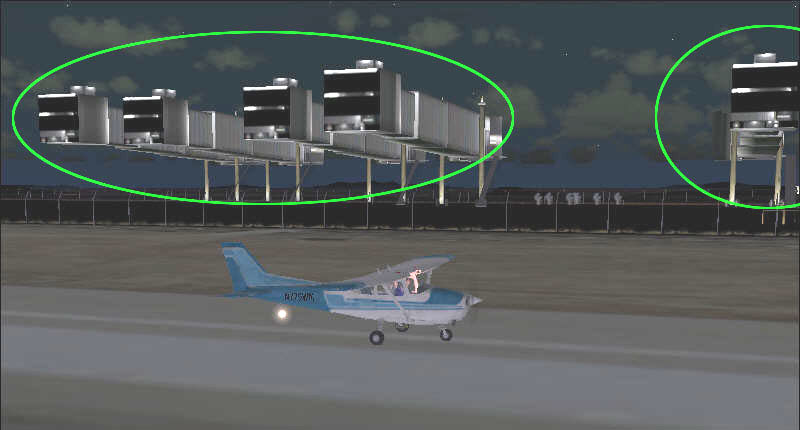
Suddenly some gates came up out nowhere in some airports, I restarted the game but the problem remained.  >:( >:( >:(  Does anyone know why that happened? And how can I remove them?

Image

Re: Gates out nowhere!

PostPosted: Tue Feb 27, 2007 9:21 am
by ashaman
For a moment I thought you inferred to uncle Bill. ;D

Have you tried updating the videocard drivers? :)

Re: Gates out nowhere!

PostPosted: Tue Feb 27, 2007 10:00 am
by gpktm
nah, I don't think it's the drivers. That's happened suddenly I played FS then I took a brake for one hour and after started the game again, those giant ugly things came up!  

Re: Gates out nowhere!

PostPosted: Tue Feb 27, 2007 10:32 am
by eno
Have you added any scenery lately?

Re: Gates out nowhere!

PostPosted: Tue Feb 27, 2007 10:48 am
by gpktm
No, that's the weird!

Re: Gates out nowhere!

PostPosted: Tue Feb 27, 2007 11:20 am
by dave3cu
What were you doin' during your one hour 'brake'?

Re: Gates out nowhere!

PostPosted: Tue Feb 27, 2007 4:37 pm
by gpktm
What were you doin' during your one hour 'brake'?   :)


Unfortunately humans eat, they can't play 24hour  :'(   ;)


I'd still look for an add-on scenery issue. The jetways look like S. Ansari's-Jetways for Rwy12. (from the terminal end)
Why they would 'suddenly' show, I haven't a clue.
Are the jetways 'replacing' other objects that are supposed to be there?
Did you change your 'Scenery Density' slider or make change to the 'Scenery Library'?
What airport in your screenshot? What add-on scenery are you using (or have used) for that airport?

Edit: just an after-thought. Looks like you might be looking from 'inside' the terminal the jetways serve. If you rotate or move your view do you see additional scenery that doesn't belong?


OK. I'll check it and reply tomorrow cause now I'm very very sleepy.

Re: Gates out nowhere!

PostPosted: Wed Feb 28, 2007 6:36 am
by NDSP
ITS THE GATES TO HELL!!!  ;D ;D ;D

I wouldnt drop off any passengers there  :o

I would agree though that you should check for any add-on scenery or just maybe your looking from the wrong angle.

Nick

Re: Gates out nowhere!

PostPosted: Fri Mar 02, 2007 4:11 pm
by gpktm
Hello again. So, are you ready guys to fix these big disgusting things from my game?  8-)

Are the jetways 'replacing' other objects that are supposed to be there?

-I don't remember


Did you change your 'Scenery Density' slider or make change to the 'Scenery Library'?

- I changed the scenery density and added this airport but the problem occurred suddenly not when I installed the airport, I flew in this airport many times and it was OK.  


What airport in your screenshot? What add-on scenery are you using (or have used) for that airport?

-It's the Mikonos airport (LGMK) and I used Hellas Scenery Project (HSP).

Re: Gates out nowhere!

PostPosted: Fri Mar 02, 2007 4:38 pm
by gpktm
AAaaaa!!!  :o

Image
Image
Image

Here they are again in another airport!

My nerves!  >:( >:(

Re: Gates out nowhere!

PostPosted: Fri Mar 02, 2007 8:50 pm
by ashaman
ITS THE GATES TO HELL!!!  ;D ;D ;D

I wouldnt drop off any passengers there  :o


Or rename yourself Caronte and do exactly that. :P

There are a pair of persons whom I'd like to bring on one of those Gates, actually. :-X

Anyway, as first attempt see if deleting (moving away for safekeeping) the old FS9.CFG has any effect. Eventually, try and install updated video drivers. Should it still not have any positive reaction, try and unistall all the add-on scenery packages you have on one at time, beginning from the most recent and going back in time, and then see if the problem is over. One of those sceneries is obviously the culprit.

It's a bother, I know, but really there's no other way, that I know.

Re: Gates out nowhere!

PostPosted: Sat Mar 03, 2007 12:19 am
by gpktm
Oh my God! I hope it's drivers or the CFG file.  

Re: Gates out of nowhere!

PostPosted: Sat Mar 03, 2007 10:27 am
by gpktm
Guess what? I FIXED IT!  :)

The problem was an addon in scenery library called "Addon Scenery". I guess was the whole Addon Scenery folder which included the airport and when I enabled the scenery for the airport the two of them them must be combined. So I disabled the "Addon Scenery" from scenery library and everything is fine now. Whoaaaaaaa!!!  :D

Image

Thanks for your help guys!

Re: Gates out of nowhere!

PostPosted: Sat Mar 03, 2007 10:33 am
by Hagar
[quote]Guess what? I FIXED IT!

Re: Gates out nowhere!

PostPosted: Sat Mar 03, 2007 10:40 am
by ashaman
If you have a lot of AFCAD files (like me) and want to be able to use the working ones, use the explorer function to tell you the date of creation of the .BGL files inside the addon scenery\scenery folder try and delete (move away for safekeeping, until is established the real troublemaker file) one at time the various .blg until you find the culprit. Then terminate with absolute prejudice said culprit and use the other working files.

Or, of course, you can remain things like they are now, if it isn't a bother.