Page 1 of 1

Edit Viocepack error message

PostPosted: Sat Feb 10, 2007 1:21 pm
by gpktm
When I'm trying to run Edit Voicepack I'm receiving the message below  >:(
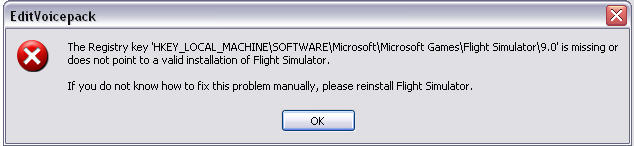
Image

How can I fix this?

Re: Edit Viocepack error message

PostPosted: Sat Feb 10, 2007 2:11 pm
by born_2_fly

Re: Edit Viocepack error message

PostPosted: Sat Feb 10, 2007 2:54 pm
by gpktm


Wheeeee!!!! I fix it!!! Thanks Alex! You ROCK!!

Re: Edit Viocepack error message

PostPosted: Sat Feb 10, 2007 4:05 pm
by born_2_fly
LOL, its what I'm here for  ;)

Re: Edit Viocepack error message

PostPosted: Sun Feb 11, 2007 4:52 am
by FridayChild
I wonder how were the FS9 registry keys eliminated from the registry.

Re: Edit Viocepack error message

PostPosted: Sun Feb 11, 2007 5:10 am
by gpktm
I wonder how were the FS9 registry keys eliminated from the registry.


I don't know, and the most weird is that first I installed EditVoicepack and everything went OK and after few hours I installed it again and that registry problem came up. Fortunately Alex helped me.

Re: Edit Viocepack error message

PostPosted: Sun Feb 11, 2007 6:29 am
by born_2_fly
I wonder how were the FS9 registry keys eliminated from the registry.


The key is not necessarily missing from the registry, but rather pointing to the wrong location of the FS9.exe. This can happen a number of ways, from renaming the .exe, deleting it, or moving it. Some poorly designed automatic installers can have this effect  ;)

Re: Edit Viocepack error message

PostPosted: Sun Feb 11, 2007 8:41 am
by FridayChild
This makes sense.