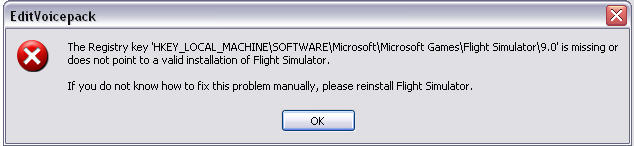

Edit Viocepack error message

Forum dedicated to Microsoft FS2004 - "A Century of Flight".

Edit Viocepack error message

Postby gpktm » Sat Feb 10, 2007 1:21 pm

When I'm trying to run Edit Voicepack I'm receiving the message below  >:(

Image

How can I fix this?
Last edited by gpktm on Sat Feb 10, 2007 1:21 pm, edited 1 time in total.
Image
User avatar
gpktm
2nd Lieutenant
2nd Lieutenant
 
Posts: 79
Joined: Mon Sep 19, 2005 7:56 pm

Re: Edit Viocepack error message

Postby born_2_fly » Sat Feb 10, 2007 2:11 pm

born_2_fly
 

Re: Edit Viocepack error message

Postby gpktm » Sat Feb 10, 2007 2:54 pm


Wheeeee!!!! I fix it!!! Thanks Alex! You ROCK!!
Image
User avatar
gpktm
2nd Lieutenant
2nd Lieutenant
 
Posts: 79
Joined: Mon Sep 19, 2005 7:56 pm

Re: Edit Viocepack error message

Postby born_2_fly » Sat Feb 10, 2007 4:05 pm

LOL, its what I'm here for  ;)
born_2_fly
 

Re: Edit Viocepack error message

Postby FridayChild » Sun Feb 11, 2007 4:52 am

I wonder how were the FS9 registry keys eliminated from the registry.
Founder of A.A.A.A.A.A.A. (Aircraft Amateurs' Association Against Absurd Aviation Acronyms) My system specifications: FLIGHT SIMULATOR 2004 - AMD Athlon 64 3200+ CPU - 3 GB PC-3200 DDR400 dual channel RAM - 500 GB Seagate B
User avatar
FridayChild
Major
Major
 
Posts: 1570
Joined: Thu Dec 23, 2004 11:22 am
Location: Italia

Re: Edit Viocepack error message

Postby gpktm » Sun Feb 11, 2007 5:10 am

I wonder how were the FS9 registry keys eliminated from the registry.


I don't know, and the most weird is that first I installed EditVoicepack and everything went OK and after few hours I installed it again and that registry problem came up. Fortunately Alex helped me.
Image
User avatar
gpktm
2nd Lieutenant
2nd Lieutenant
 
Posts: 79
Joined: Mon Sep 19, 2005 7:56 pm

Re: Edit Viocepack error message

Postby born_2_fly » Sun Feb 11, 2007 6:29 am

I wonder how were the FS9 registry keys eliminated from the registry.


The key is not necessarily missing from the registry, but rather pointing to the wrong location of the FS9.exe. This can happen a number of ways, from renaming the .exe, deleting it, or moving it. Some poorly designed automatic installers can have this effect  ;)
born_2_fly
 

Re: Edit Viocepack error message

Postby FridayChild » Sun Feb 11, 2007 8:41 am

This makes sense.
Founder of A.A.A.A.A.A.A. (Aircraft Amateurs' Association Against Absurd Aviation Acronyms) My system specifications: FLIGHT SIMULATOR 2004 - AMD Athlon 64 3200+ CPU - 3 GB PC-3200 DDR400 dual channel RAM - 500 GB Seagate B
User avatar
FridayChild
Major
Major
 
Posts: 1570
Joined: Thu Dec 23, 2004 11:22 am
Location: Italia


Return to FS 2004 - A Century of Flight

Who is online

Users browsing this forum: No registered users and 365 guests