Page 1 of 1
2 GPS problems.

Posted:
Tue Jan 09, 2007 6:49 pmby gypsymoth
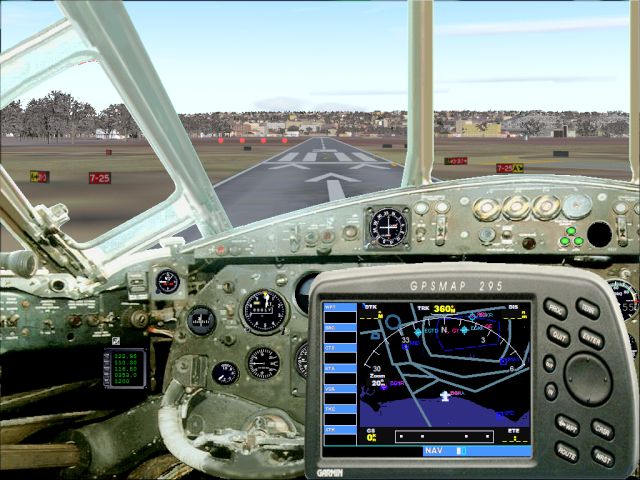
1) I have a Vickers Valiant panel that has GPS in the panel cgf - but I cannot get it to show by the usual method of shift + a number key. The code looks OK.
2) My Airbus panel has a GPS icon but clicking it doesn't bring up the GPS screen. Shift + 5 does
& I was wondering why clicking didn't work?
Thanks,
TW
Re: 2 GPS problems.
Posted:
Tue Jan 09, 2007 7:05 pmby Hagar
Any chance of a link to the pages these panels are posted on?
Re: 2 GPS problems.
Posted:
Wed Jan 10, 2007 4:34 amby gypsymoth
Hello Hagar. The Valiant is on page 31 of Military for 2004 & is a Kazunori Ito production. It flies well
but the panel is very basic & when I got lost yesterday a GPS screen would have been useful to locate my airport. I must learn to navigate properly without it!
I'll get back with the Airbus panel info & link when I've found it.
Thanls,
TerryW.
Re: 2 GPS problems.
Posted:
Wed Jan 10, 2007 5:48 amby gypsymoth
I had another copy of that Airbus panel which when installed has a clickable GPD icon that works :D
I just need that Valiant to work now.......

I MUST learn how to add working icon....... :-?
Re: 2 GPS problems.
Posted:
Wed Jan 10, 2007 6:31 amby Hagar
[quote]Hello Hagar.
Re: 2 GPS problems.
Posted:
Wed Jan 10, 2007 7:05 amby Hagar
OK. I checked out the Valiant. It already has a GPS pop-up which can be toggled from Shift + 2.
To add a clickable GPS button paste the following line below the last gauge entry under [Window00]
gauge34=SimIcons!GPS Icon, 180, 540. 90
This will position it on the left hand side of the panel just above the radio controls. The last digit
90 in the entry defines the size of the gauge.
Re: 2 GPS problems.
Posted:
Wed Jan 10, 2007 11:35 amby gypsymoth
Thank you - what it is to be clever!!!
I read your GPS walk-through ages ago thanks, & have been adding GPS as & when but I was intrigued about the clickable icon & how it was added, etc, so thanks for that particular bit of info. I am busy right now as I have my 93yr old mother here at the moment but will play with things when I have a minute to spare this evening, probably after taking her for a ride in a A380

Re: 2 GPS problems.
Posted:
Wed Jan 10, 2007 11:57 amby Hagar
Thank you - what it is to be clever!!!
Glad to help.
Clever?
No more so than the average person. I simply have an insatiable curiosity & like to know how things work. It's mainly a case of "suck it & see" using the default files as examples. You can't come to much harm
providing you take back-up copies of files you intend modifying. I didn't use it this time but the free trial
FS Panel Studio could come in handy for this sort of thing. You can use it to check out your panels & gauge positions but it won't save anything. If you like it you could purchase the registration key.
Re: 2 GPS problems.
Posted:
Wed Jan 10, 2007 6:50 pmby gypsymoth
My mother was intrigued to see the 747 again after her last trip to Yankee Doodle Land a few years ago, & wonders if I'll be able to handle a real Piper as well the sim one, should I start flying lessons in the
Spring? 8-) She's 93 in August but insists on coming on the Taster Flight :o
I had bookmarked the FS Panel Studio yesterday so Great Minds think alike! I'll get weaving with that tomorrow. The code you gave me worked a treat on the Valiant panel & it's given me the nudge to play with other panel cfgs, etc.
Thanks for your help,
TW
Re: 2 GPS problems.
Posted:
Wed Jan 10, 2007 6:56 pmby Hagar
[quote]My mother was intrigued to see the 747 again after her last trip to Yankee Doodle Land a few years ago, & wonders if I'll be able to handle a real Piper as well the sim one, should I start flying lessons in the
Spring?
Re: 2 GPS problems.
Posted:
Thu Jan 11, 2007 5:21 pmby klaaz
Hagar, thanks for the explaination over the GPS en gps button code!
Very usefull!!