Page 1 of 1

Open Doors ?

PostPosted: Mon Jan 08, 2007 10:29 am
by mipa
Hey everybody!

Somehow i changed the settings of my short cuts for the keyboard.
Now i can

Re: Open Doors ?

PostPosted: Mon Jan 08, 2007 10:45 am
by Hagar
Hi Michael. The easiest way would be to click Reset Defaults.

Re: Open Doors ?

PostPosted: Mon Jan 08, 2007 10:48 am
by mipa
The easiest way would be to click Reset Defaults.


Hi Hagar.

I

Re: Open Doors ?

PostPosted: Mon Jan 08, 2007 10:51 am
by Hagar
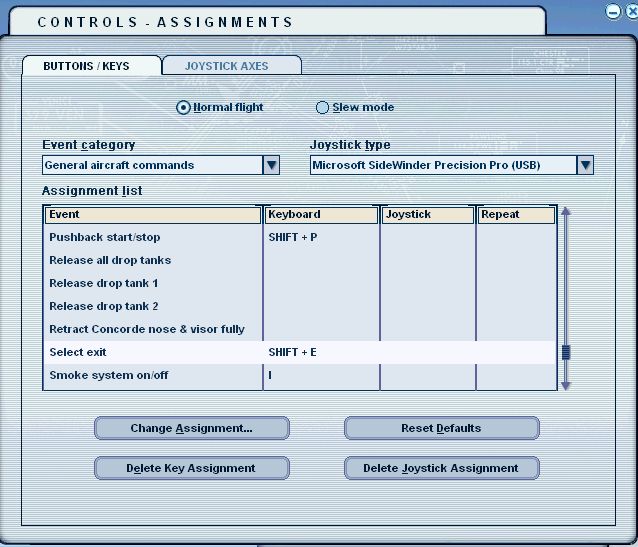
This is how the assignment is set on my FS9..

Image

Re: Open Doors ?

PostPosted: Mon Jan 08, 2007 10:53 am
by murjax
The easiest way would be to click Reset Defaults.


Hi Hagar.

I

Re: Open Doors ?

PostPosted: Mon Jan 08, 2007 10:55 am
by Hagar
[quote]Then you must be having some kind of other problem. Try reinstalling flight simulator.

Re: Open Doors ?

PostPosted: Mon Jan 08, 2007 10:58 am
by mipa
[/quote]Whoa! Hold on a second. :o I would suggest deleting FS9.cfg first.[/quote]


deleting fs9.cfg? and then? where do i find fs9.cfg?

Re: Open Doors ?

PostPosted: Mon Jan 08, 2007 11:03 am
by Hagar
deleting fs9.cfg? and then? where do i find fs9.cfg?

I suggest you check out the sticky FAQ topic at the top of this forum menu. Where is the FS9.cfg located?

When you find FS9.cfg either delete it or rename it to back it up. A new one will be created the next time you run FS9. This should reset all your settings to default.

Re: Open Doors ?

PostPosted: Wed Jan 10, 2007 7:17 am
by mipa
Thanks for your help.

in my setup menu is no task to select the exit.
furtheron i have checked the path of fs9.cfg, but my computer wasn

Re: Open Doors ?

PostPosted: Wed Jan 10, 2007 7:31 am
by Hagar
FS9.cfg is treated as a hidden file. Note this comment on that FS9 FAQ page.

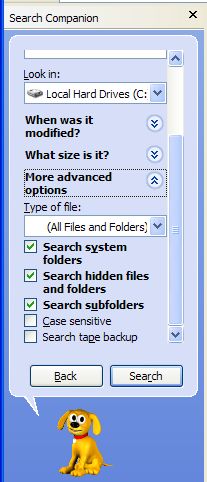
With Windows XP you have to specify a search for hidden files. Just because your folder display options are set for hidden files doesn't mean your search options are.

When searching for a hidden file in XP search you need to click on the "More Advanced Options" in the search dialog and check the box that says "Search Hidden Files and Folders".


Check the Search hidden files and folders box from More advanced options in the Windows search feature.

Image