Page 1 of 1

Anyone know how to.........

PostPosted: Mon Jan 08, 2007 11:06 am
by MIKE JG
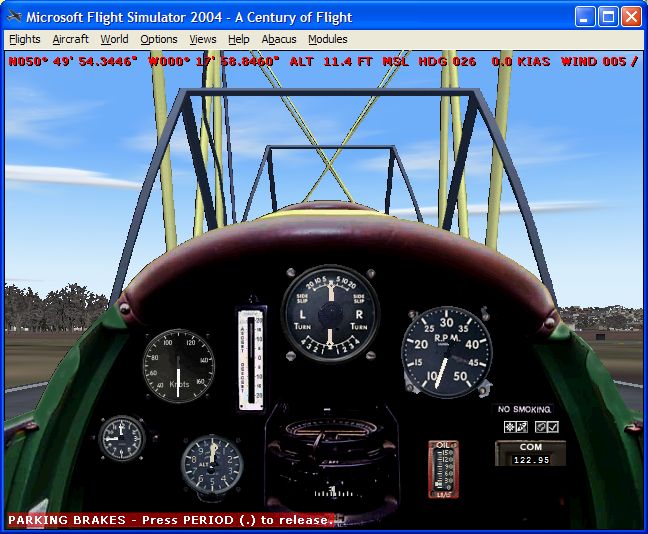
Does anyone know how to modify FS9 so that it will display your position (lat/lon) coordinates out to 4 decimal points in the seconds column?

Image

Notice in the circled area the coordinates only go to two decimals for the minutes section.  Before I did a re-install of FS9 I had modified something, FS9.cfg maybe, to change the coordinates to be more detailed.

I'm trying to place scenery that I've modeled more accurately as only two decimals for the minutes section still leaves too much error in the placement of the objects I've created.
Re: Anyone know how to.........

PostPosted: Mon Jan 08, 2007 1:24 pm
by beaky
Does anyone know how to modify FS9 so that it will display your position (lat/lon) coordinates out to 4 decimal points in the seconds column?

Image

Notice in the circled area the coordinates only go to two decimals for the minutes section.  Before I did a re-install of FS9 I had modified something, FS9.cfg maybe, to change the coordinates to be more detailed.

I'm trying to place scenery that I've modeled more accurately as only two decimals for the minutes section still leaves too much error in the placement of the objects I've created.


I'm pretty sure if you set your aircraft location in Map view, you get more precise coordinates... a little trickier than slewing, but ...

Re: Anyone know how to.........

PostPosted: Mon Jan 08, 2007 1:48 pm
by Hagar
Not sure if this is what you want. An old CFS CFG tweak. I tried it in FS9 & it seems to work.
Image

Add this entry to FS9.cfg under the [MAIN] header:

DISPLAY_FRACTIONAL_MINUTES=0

Re: Anyone know how to.........

PostPosted: Mon Jan 08, 2007 2:04 pm
by Fozzer
Not sure if this is what you want. An old CFS CFG tweak. I tried it in FS9 & it seems to work.
Image

Add this entry to FS9.cfg under the [MAIN] header:

DISPLAY_FRACTIONAL_MINUTES=0


Hello Doug...

Any chance of a similar .cfg entry to enable a more precise "Heading" reading...(Degrees + Minutes).

For the same reason in more accurate placement of runway headings using "Runway 3" runway designer.

Cheers....!

Paul... ;)...!

Re: Anyone know how to.........

PostPosted: Mon Jan 08, 2007 2:14 pm
by Hagar
Hello Doug...

Any chance of a similar .cfg entry to enable a more precise "Heading" reading...(Degrees + Minutes).

For the same reason in more accurate placement of runway headings using "Runway 3" runway designer.

Cheers....!

Paul... ;)...!

Sorry Paul, that's the only one I know. It's used for accurate placement of objects in some scenery design utilities. I suspect what you need is to change the heading to read True or Magnetic degrees. I'm not sure which the default display is in.

Re: Anyone know how to.........

PostPosted: Mon Jan 08, 2007 2:25 pm
by Fozzer
Hello Doug...

Any chance of a similar .cfg entry to enable a more precise "Heading" reading...(Degrees + Minutes).

For the same reason in more accurate placement of runway headings using "Runway 3" runway designer.

Cheers....!

Paul... ;)...!

Sorry Paul, that's the only one I know. It's used for accurate placement of objects in some scenery design utilities. I suspect what you need is to change the heading to read True Or Magnetic degrees. I'm not sure which the default display is in.


Now there's a good tip, Doug...It could explain why my "Runway 3" designed runway's headings in California never seem to be pointing quite in the right direction... :o...!

Paul....Experiment Time!... ;)....!

Re: Anyone know how to.........

PostPosted: Mon Jan 08, 2007 3:31 pm
by MIKE JG
Thanks Doug !!

That's what I wanted, many thanks.  ;)

Re: Anyone know how to.........

PostPosted: Mon Jan 08, 2007 3:46 pm
by beaky
Hello Doug...

Any chance of a similar .cfg entry to enable a more precise "Heading" reading...(Degrees + Minutes).

For the same reason in more accurate placement of runway headings using "Runway 3" runway designer.

Cheers....!

Paul... ;)...!

Sorry Paul, that's the only one I know. It's used for accurate placement of objects in some scenery design utilities. I suspect what you need is to change the heading to read True Or Magnetic degrees. I'm not sure which the default display is in.


Now there's a good tip, Doug...It could explain why my "Runway 3" designed runway's headings in California never seem to be pointing quite in the right direction... :o...!

Paul....Experiment Time!... ;)....!


Don't forget, Foz... runway headings in real life are rounded to the nearest ten... and they are based on local magnetic heading. It should be noted that the isogonic lines on the West coast are a bit more wiggly than in the rest of the USA... much greater East variation.
Not sure if runway 3 takes that into account if you design based on magnetic heading, though... I have barely used that program.