Page 1 of 2

Newby here, looking to take off...

PostPosted: Tue Dec 26, 2006 12:49 pm
by Niblet
Hi, first a speedy intro: I'm 40 years old, been messing around with computer games since my mid 20's or so. Yes, I had an Amiga (the 1200) then a "Megadrive" then a real PC, all of 66Mhz, 4Mb RAM..  :)

Soon I had the "stunning" DX4 chip (100Mhz!) and a thumpin 16 meg of RAM..

Well throughout the years I've tried flight sims, have always had an interest in flying, had a few single-engine "pleasure" flights (rather than lessons as such) and 6 actual lessons in a microlight. The microlight, I'm embarrssed to admit I forget the name of it, was unusual in that it was a fixed wing 3 axis "plane" - yet light enough to class as a microlight. Pretty much a glider with a dinky little engine.

I've never, ever, managed to get MS FS actually working properly. On the rare occasions my PC and FS version actually worked, with sound, it's been too choppy and jerky to play. I insist, demand, at least 25fps, preferably 30+.

Well having just bought a new PC and seeing a new version has come out, I figured my new machine could possibly run the previous version? 2004? Well yes, though it took a new video card to do so. My current setup:

2.66Ghz Duo, 512Mb RAM, ATI Radeon 9550 128Mb. It works!

I now live in Asia (from the UK) and the best joystick I could find locally was a "Rockstar" thing, cheap and plastiky but does have throttle, twist-rudder and a top hat.

OK, so that's me and my set-up. Nice to meet ya  ;D

Have fiddled around a little trying to download and install some extra planes, succeeded with a couple but not really what I was after. Had some that didn't seem to work, including one that crashes the program every time I try and fly it.

So what I'm looking for is the following:

Some genuine "must have" downloads, tried and tested, worth having, won't wreck the program.

A fully functional easy to install plane very similar to the DC3 but a bit more modern. Basically a fairly small twin but bigger than the Bravo for example. Needs a pleasing exhaust note, fairly hi-tech instrument panel, full virtual cockpit etc etc. The full monty.

I'd also like the twin-engine Fokker planes Air Asia uses around Borneo, where I now live. I searched the site and cannot even find Air Asia livery let alone planes?

Any other particularly useful tips, places to look, general advice, suggestions and so on?

I'm trying to get the hang of VOR stuff, I think I know enough to know that I don't have the charts I need for this? Are there charts hiding in the program, available to download from somewhere?

Well that's it for now, hopefully I'll be hanging out here some more  :)

Oh I've also downloaded and installed "FS Passengers" but haven't really figured it out or got to grips with it yet. One thing I would like is a co-pilot that talks, FS Passengers seems to have one but it seems a bit much for a casual flight.

:-/

Re: Newby here, looking to take off...

PostPosted: Tue Dec 26, 2006 1:28 pm
by sk8z27
i would suggest ultimate traffic if you want a more realistic feel with actual traffic.  it puts actual airlines at particular airports.  like united and american in chicago, or american in dallas, or delta in cincinnati.  it's pretty cool, and if you have tcas, it monitors all the airplanes around you. i would recommend any pmdg aircraft, although if your not familiar with heavy jets it may take a while to get a hang of.  it takes a lot of time and patience to learn everything.  anyways, just my two cents, i've got other worries right now.

Re: Newby here, looking to take off...

PostPosted: Tue Dec 26, 2006 2:01 pm
by Niblet
Thanks for that, though sorry to hear you have troubles?

This "pmdg", is this a company, a designer, project of some sort?

One thing I've noticed is that few downloadable planes come with sound files, which is understandable but I'd really rather be picky and just download a few planes, each with everything. I may be unusual from what little I've seen of the FS community but I'm not all that bothered about the external view of the plane, though a good one is obviously nice. I'm more interested in a good cockpit and sounds, along with accurate flying characteristics. I mention this as I downloaded an Airbus model and it used my default 737 instruments, the default 737 sound and 'virtual cockpit' simply didn't exist.

I don't overly care if it LOOKS like an Airbus 330, as when flying I'm not looking at it. It just seemed a 737 but missing the virtual cockpit...

Yeah I'm fussy like that  :)

The traffic thing sounds good but I suspect it would hammer my frame-rates?

Talking of such, any way of starting a 737 flight from a standstill at the passenger bays or somewhere, other than being planted on the runway, everything running? In FS9 it seems I can deliberately start on the wrong runway then taxi to the correct one but that's not really what I'm after... Yet it seems silly to turn the engines off just for the fun of re-starting them  ;)

I doubt I can help but what are your worries?


N

Re: Newby here, looking to take off...

PostPosted: Tue Dec 26, 2006 2:25 pm
by Hai Perso Coyone?
Hi and welcome to SimV Niblet,
Yes, PMDG is a desigener for FS9 and FSX aircraft...unfortunately, they create Payware models meaning you have to pay for their use...The best add-ons can be found on the following link:

http://www.simviation.com/cgi-bin/yabb2 ... 1116250697


Enjoy your stay!

Re: Newby here, looking to take off...

PostPosted: Tue Dec 26, 2006 3:29 pm
by _526th_Fireman
Welcome Niblet.

I would suggest you read Grumpy's tutorial on installing acft. This will give lots of info you will need. You really need to become familiar with properly installing acft., sounds, panels etc. then when something happens, you have a better idea what to look for.

When you start a flight, "Create a Flight", there will be an option on "Where to Start", for example, Active RWY or at a Gate or Ramp. All acft. start out "Hot" or started...but there is a, I think it is a utility or something that allows you to set your flight up with the acft. "Cold". Someone else will have to give you the details on that aspect of the game.

I would suggest that when you have some extra money, get more RAM. Upgrading to at least 1 Gig will help you out a lot. Good Luck and enjoy.

Re: Newby here, looking to take off...

PostPosted: Tue Dec 26, 2006 7:36 pm
by BFMF
When you're done with a flight, and have taxied to the gate/ramp of your choice, shut everything down and save it. The next time you want to fly somewhere, load the flight, and your aircraft is where you left it ;)

Re: Newby here, looking to take off...

PostPosted: Tue Dec 26, 2006 7:39 pm
by Mobius
If you want charts, follow THIS LINK for all the sectional charts for just the United States, but you can find any navigational information you would need on there, or, I just remembered, go to world->map and you can click on any  VOR or airport, or NDB to find it's information.

Re: Newby here, looking to take off...

PostPosted: Tue Dec 26, 2006 7:41 pm
by _526th_Fireman
Ok, I found it.......it is a FS2002 gauge but should work in FS9. It's here at Simviation = http://www.simviation.com/fsgauges_7.htm

Second gauge from the top. You will have to install it but creator says it is very easy.

Good luck.

Re: Newby here, looking to take off...

PostPosted: Tue Dec 26, 2006 7:44 pm
by BFMF
Avsim used to have full sectional charts in Jpg format by Matt Fox. Download them and you can view them on your computer without having to get online ;)

Re: Newby here, looking to take off...

PostPosted: Wed Dec 27, 2006 9:28 am
by Nav
So what I'm looking for is the following:

Some genuine "must have" downloads, tried and tested, worth having, won't wreck the program.

A fully functional easy to install plane very similar to the DC3 but a bit more modern. Basically a fairly small twin but bigger than the Bravo for example. Needs a pleasing exhaust note, fairly hi-tech instrument panel, full virtual cockpit etc etc. The full monty./


Man after me own heart, Niblet - exactly what I've been looking for (without too much success) for years! In particular, like you, I like aeroplanes to have their 'own' panels, if they just use a 'default' one you may as well fly the default one anyway.

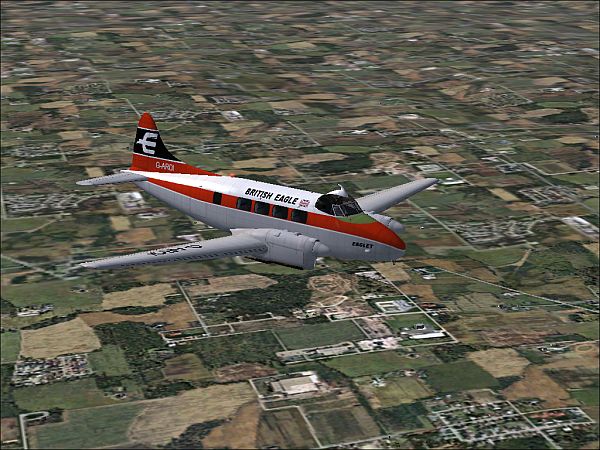
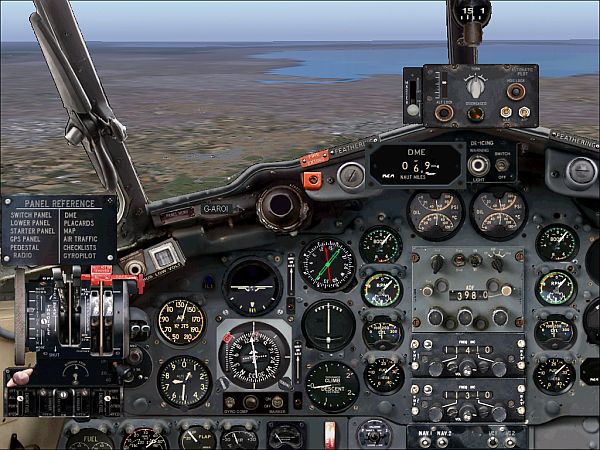
You might try Derek Palmer's DH104 Dove - doesn't meet all your requirements but I've had a lot of fun with it. Installs with no problems. No virtual cockpit but the panel is one of the best-made and challenging I've encountered, and there are 'all-round' views. 'Flies' beautifully but, like a real aeroplane, you'll have to read the manual and practise to fly it well. This is it approaching Melbourne at the end of a round-world trip:-

Image

Image

About 'exhaust notes', these are often 'aliased' to default aeroplanes. This isn't entirely bad, some more complicated models necessitate copying large numbers of sound files over to your sound folder, there's always a risk of something going wrong. In this case the designer found a simple/brilliant solution, he 'aliased' the Dove to the default DH88 Comet (believe it or not, the Dove had the same DH Gipsy engines as the Comet anyway).

Dove available on Simviation (Props Page 89) if you'd like to try it:-

http://www.simviation.com/fs2004props89.htm

Re: Newby here, looking to take off...

PostPosted: Wed Dec 27, 2006 9:51 am
by Niblet
Hi peeps, sorry for the delay repying, as you may have heard there's been an anniversary undersea eathquake round this way, though happily without the tsumani. It has however damaged undersea cables though so my net connection, never good at the best of times, is extremely patchy right now.

Tried both the 2002 gauge thingy (thanx Fireman) and also the save the flight notion, both seem to work :) I didn't realise you could save a flight without the "End flight" dialogue, ie I thought you could only save the planning stage.

Seeing the ALT menu brings back unhappy memories of trying to get MSFS95 working on Windows 95, a hideous combination that crashed the computer before I ever had chance to crash the plane.. Now call me a sad git but I prefer to fly in real time, not using the "16X" type of stuff - knowing I can if need be save it and come back later is extremely useful!  8-)

Yes, have browsed the "Best of" thread but in truth none of it means much to me because I'm just not familiar with the names of all the stuff mentioned. I've no idea what most of them are or what they do? "World Mesh" sounds like a graphical enhancement - but I tend to be wary of anything that dents my precious frame-rate. The only scenery add-on I've used is one for Kuching Airport. I live in Kuching, East Malaysia, on the Island of Borneo. The fact I have to keep popping out the country on Air Asia 737s means I can testify the general views are accurate, especially if you select "Building Storms" which is actually the default weather here! Especially at this time of year, though it was a bit bizarre to be able to select "Snow" - it never, ever, snows in Borneo except at the tip of the tallest mountains.

Sadly, great as the airport now looks, and accurate albeit before the rebuild ( :o ) it does indeed kill my frame rate, even when just a tiny dot on the horizon. If it's on the screen, anywhere, we're talking 10fps. I may have to reinstall the game and get rid of it, which is a shame (backups, what backups?  :-[ )

So how good is this World Mesh, and what does it do?

How about we add to that thread with reviews, descriptions and min specs required, or at least the specs tested with?

Not just for me but for all newbies as a sticky?


BTW, regarding RAM, I've never found RAM to be of much use beyond stopping a program hunting on the hardrive, which so far I've net yet noticed FS9 ever doing?

Re: Newby here, looking to take off...

PostPosted: Wed Dec 27, 2006 10:13 am
by Niblet
Thanks for that Nav, I'll check it out  ;D


N.

Re: Newby here, looking to take off...

PostPosted: Wed Dec 27, 2006 12:00 pm
by beaky
Welcome, Niblet!
Regarding charts: there ain't nothin' in MSFS itself other than the crummy Map view. No VOR roses, not much of anything.
 Better than nothing, but... ::)

There are a number of add-ons that work better for more realistic flight planning (PM Fozzer sometime; he'll fill you in on that better than I can), but it it's real charts you're after, you'll have to hunt around a bit.
The only good source of nicely-scanned VFR sectionals I've found so far is skyvector:

http://skyvector.com/

They only have US charts, but they have all of them, including terminal charts!!
Hi-res, very nice.
What I do is capture chunks of them with Irfanview and piece them together with Paint. Sometimes I'll print small portions, but lately I've had them open on my laptop while flying the sim on my PC (saves a lot of printer ink that way!).

That's the only non-MSFS nav. tool I use, other than pages from atlases for overseas flights, and the occasional outdated IFR enroute chart or approach plate I get for free from the FBO where I rent (excellent source of old charts, BTW- they throw them out when they expire; contact a FBO or flight school near you and tell them to set them aside; you'll come pick them up.

As for that joystick, toss it and get a Saitek X45 or its newfangled successor, the X52. One USB cable but you get throttle, stick, and tons of programmable buttons and pots. No force-feedback, but as a pilot with some real-life hours, you may find FF a little disappointing anyway. I personally don't have much use for FF, so I love my X45 and have been beating the living hell out of it for almost 2 years now with no problems at all.

And the Saitek stick/throttle combos are pretty cheap; lotsa bang for your buck.
http://www.saitekusa.com/USA/prod/x45.htm

Re: Newby here, looking to take off...

PostPosted: Wed Dec 27, 2006 4:14 pm
by FridayChild
I've never been a pilot in real life so far, and yet I find force feedback in FS *extremely* disappointing (it only gets *very* slightly better with FSForce).

Re: Newby here, looking to take off...

PostPosted: Thu Dec 28, 2006 1:17 am
by Niblet
Hi, I've found force feedback to be truly excellent with the right combination of products, such as Touring Car Championship (the earlier TOCA and TOCA2, not the pantsy thng on the Xbox) and Microsoft Sidewinder Pro with feedback. I could tell to the nth degree exactly when the front end was giving up, if the backend was getting twitchy, if the whole car was sliding on gravel... it was quite spooky how realistic and informative those sensation were, though obviously your mind fills in the blanks to some extent.

However in a flight sim? Well I guess a stick going loose just before a stall could be handy and certainly being able to actually feel the touchdown would be nice. But no, I don't use the "Vibration!" effect on this Rockstar thing. There's no force feedback, just vibration, and there's a big difference. The Sidewinder range (wheel or stick) actually resists you moving it when suitable, getting loose and sloppy at other times. It doesn't just do an impression of a cheap dildo like this Rockstar thing does.  ::)

Happily you can switch it (the Rockstar) off, albeit by doing a system restore and getting rid of the supplied driver for the thing. Couldn't find it to uninstall so did a restore. The stick works OK when calibrated through Windows as normal but then I remembered the disk, installed the driver and it all went to pot. Attempting to re-calibrate just gave the message "This device does not need calibrating as it uses dynamic self-calibration during use" or something. Perhaps they weren't thinking of flight sims, for calibrating BEFORE take-off is somewhat crucial, if only because it cannot be done after hitting a tree in the field next to the runway.

Installing the driver also introduced the ridiculous buzzing, which even on the lowest setting was outright noisey with it's cheap construction.

So I'd give force feedback a big thumbs up, but only on the MS Sidewinder range and I haven't used it in FS, aside from that brief buzzing moment.

But please, do tell me more about the Saitek product that I've been dribbling over for the last week... The one I've been pining for, yearning for, composing love letters to... Allow me to repeat myself - just finding a joystick, ANY joystick here in Borneo is tricky. I live in the capital city of Sarawak, the largest state of Malaysia (which is in 2 places, Sarawak and Sabah are on Borneo, the rest of Malaysia is hanging off the end of Thailand, about 2 hours away by 737). In fact I tried a websearch, "Joystick, Kuching" and all i got was stuff about the joystick on some mobile phones and some guy's blog entry saying "I can't believe how hard it is to find a joystick in Kuching", which about sums it up!

It was the Rockstar or a thumbpad, thems were the choices :(

Here ya go:

"I bought a Rockfire joystick. It was quite cheap. You wouldn't believe how hard it is to find a good joystick in Kuching. I went to Wisma Saberkas and out of the 153,215 computer shops there, only ONE carried joysticks.

What's up with that? Kuching people don't play flight sims anymore?"
http://macdyne.blogspot.com/2006_08_01_archive.html

Apparantly not  :-/

In addition i have very little income, the new PC, then a new graphic card, means no more spending on my hobby for at least another 2 months  :'(

So yes, can order one from abroad somewhere, Australia is probably my best bet, but the postal service round here means it may never arrive and will nearly double the price.

Tidak bagus! as they say in Malay.


N.