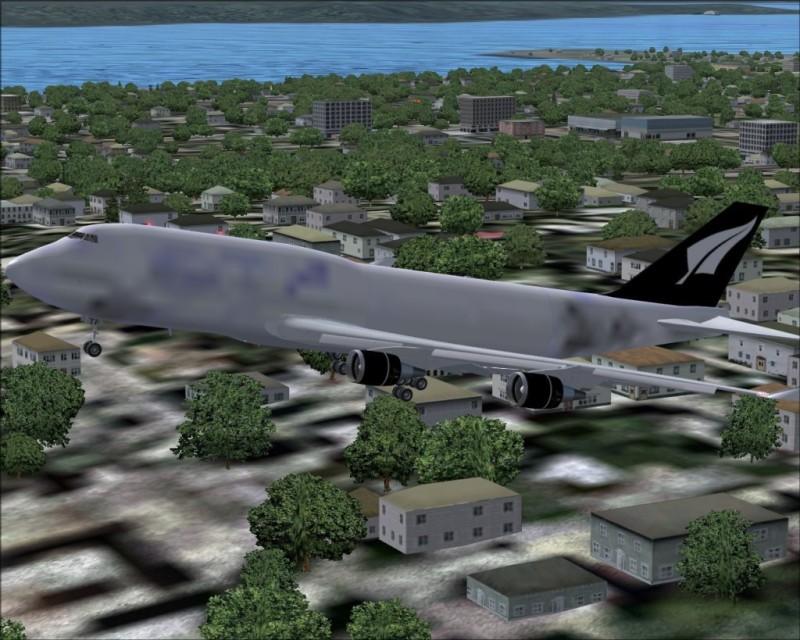
iFLY 747-400 texture problem

Posted:
Fri Dec 08, 2006 5:33 pmby swordfish1227
Re: iFLY 747-400 texture problem
Posted:
Fri Dec 08, 2006 7:45 pmby ashaman
In Settings/display/hardware ensure to have set "Massive" as "Global Max Texture Size".
If you already have or setting this doesn't help you then probably your videocard is clogged up with other work to display mipmaps correctly (happens). A workaround is to open the texture of the plane in DXTBmp, then unselect the field "include mipmaps when saving" (on the right of the window of the tool) and save the texture on the old.
Re: iFLY 747-400 texture problem
Posted:
Sat Dec 09, 2006 3:42 amby Hai Perso Coyone?
If it's only happening on one side, zoom into the plane completely, and then zoom out...that usually works for me...Also try what Ashaman said

Re: iFLY 747-400 texture problem
Posted:
Sat Dec 09, 2006 5:51 amby gypsymoth
I've just got this aircraft & I've not got problems with textures. Mine has the iFly livery 8-)