DC-3 Instruments
 Posted: Fri Nov 17, 2006 5:11 pm
Where can I find an explanation of the use of the panel. It seems to have some type of auto pilot but I can't figure it out.
Flight Simulator and other chat
https://forums.simviation.com/phpBB3/
https://forums.simviation.com/phpBB3/viewtopic.php?f=20&t=54335
Posted: Fri Nov 17, 2006 5:11 pmPosted: Fri Nov 17, 2006 7:09 pmPosted: Fri Nov 17, 2006 9:47 pm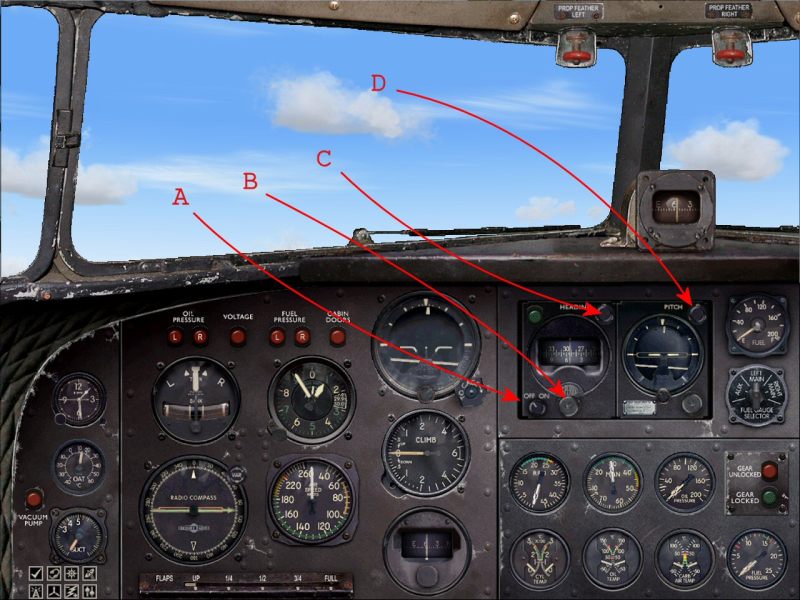 Posted: Fri Nov 17, 2006 10:31 pmPosted: Fri Nov 17, 2006 11:21 pm
 Posted: Sat Nov 18, 2006 12:27 amPosted: Sat Nov 18, 2006 7:55 amPosted: Sat Nov 18, 2006 8:50 amPosted: Sat Nov 18, 2006 9:14 amPosted: Sat Nov 18, 2006 10:06 amPosted: Sun Nov 19, 2006 11:46 am
