Page 1 of 1

Navigational Charts

PostPosted: Tue Nov 07, 2006 10:51 pm
by FLYING_TRUCKER
Hi folks:  :)

Does anyone have a site I can  download Canadian VFR Navigational Charts and Enroute Charts for Flight Sim from?

I checked out Sectional Charts by Matt Fox but all I saw was Montreal and Halifax, the rest were in the United States.

I have SkyVector.com which I think I can make work but I do not know if it has the approach plates as well.

I am trying to combine a Toronto VFR Navigational Chart with approach plates to use with FSBrowser.

I would also like to know if these can be combined with FS Google Earth (free download) to show a track much like you would see on the GPS if a flight plan was entered.

If you think there is something else I might need to download please let me know.  
All help is very much appreciated.  ;)

Cheers...Happy Landings...Doug

Re: Navigational Charts

PostPosted: Wed Nov 08, 2006 5:06 am
by beaky
Hi folks:  :)

Does anyone have a site I can  download Canadian VFR Navigational Charts and Enroute Charts for Flight Sim from?

I checked out Sectional Charts by Matt Fox but all I saw was Montreal and Halifax, the rest were in the United States.

I have SkyVector.com which I think I can make work but I do not know if it has the approach plates as well.

I am trying to combine a Toronto VFR Navigational Chart with approach plates to use with FSBrowser.

I would also like to know if these can be combined with FS Google Earth (free download) to show a track much like you would see on the GPS if a flight plan was entered.

If you think there is something else I might need to download please let me know.  
All help is very much appreciated.  ;)

Cheers...Happy Landings...Doug

Not sure where you can get approach plates online, but I get mine from the FBO before they throw the old ones out... an excellent source of pre-printed, real-sized plates. ;D

As for Google Earth, check out Flips. It converts your FS9 flight plans into a 3-D track in Google Earth (yes, it shows your altitude- very handy for planning MEA, climbs and descents). You can set up the Google Earth "Camera" to sit on your course line, allowing you to "pre-fly" your route, showing everything much as it will look in the sim or RL. Neat little tool.

It's available here; top of this page:

http://www.simviation.com/members/fs2004utilities7.htm

Re: Navigational Charts

PostPosted: Wed Nov 08, 2006 1:28 pm
by FLYING_TRUCKER
Thanks Sean shall have a go at it.  ;)

Cheers....Happy Landings...Doug

Re: Navigational Charts

PostPosted: Thu Nov 09, 2006 12:42 pm
by chief1995
Try skyvector.com

Good luck,

Chief

Re: Navigational Charts

PostPosted: Thu Nov 09, 2006 4:01 pm
by wji
Hi Doug
I have every aeronautical chart know-to-man but that's not doing you much good. I understand you want FREE and ONLINE.

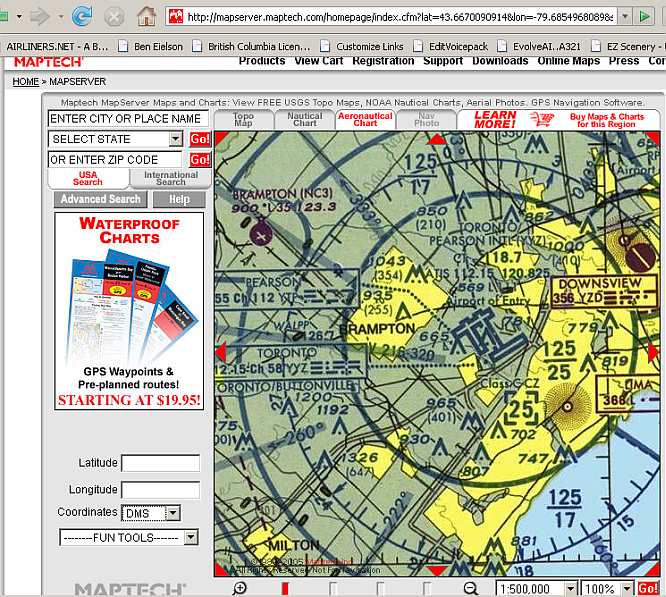
MapTech has FREE ONLINE charts but mostly for the USA. If one wants to view (use, print, copy, purloin) any Canadian MapTech charts (other than owning them on CD, like me) one simply types-in a US location; in this case, Buffalo, NY, and panning north until the requisite Canadian chart is found:

Image

Re: Navigational Charts

PostPosted: Fri Nov 10, 2006 7:11 pm
by FLYING_TRUCKER
Thanks folks...those sites will come in handy.  ;)

Cheers...Happy Landings...Doug

Re: Navigational Charts

PostPosted: Sat Nov 11, 2006 12:02 pm
by wji
Cool . . . MapTech contacted me some years' ago and asked if I would write a press release for them which they published on their site and then sent me CDs containing all their aviation charts including all MapTech Terminal Charts in PDF format. How cool is that? Cool.

Combine all-of-the-above with my entire-world coverage in Jepp's SimCharts, I'm never stuck for a chart. Remember, too, SimCharts has all High&Low Altitude Enroute  Charts.

Another valuable FREE online resource are ALL the worldwide VATsim sites; each center has copious amounts of charts for their sectors -- and they are all FREE.

So, if one writes a lot -- as I have been know to do on occasion -- often vendors will contact you and ask you to write something for them -- and send you postage-paid, several FREE CDs containing good stuff. Good stuff is cool.

Re: Navigational Charts

PostPosted: Sun Nov 12, 2006 7:12 am
by FLYING_TRUCKER
Thanks wji:   :)

I have all the maps I need from Nav Canada for the aircraft as I get them all the time.

But:

For the computer what I am trying to do is bring  up a sectional map lets say Toronto VFR and have it shown on screen with my course plotted through FS Browser and then somehow get that hooked into FS Google Earth.

I would also like to bring up Approach Plates for airports like Toronto to keep my Instrument Rating sharp as a tack.

It would be a lot cheaper than renting a twin or using our own aircraft all the time as there is the two of us. (the old girl and myself)

I am using FS2004 all the time and I also have FSX but have only down loaded it but never used it.

What I am trying to do is get something set up so that in the spring when Microsoft releases the new operating system I shall purchase a new computer (s) and designate one only for Flight Simming.
I would like to build a cockpit with moving chair (s), throttles, radio stacks the whole nine yards if you know what I mean.

I am not computer literate but am slowly learning and that is thanks to many patient folks here.  ;)

So that is what I am trying to do and all the advice and help from anyone is much appreciated.  ;)

Cheers...Happy Landings...Doug