Page 1 of 1

Beechcraft Baron 58

PostPosted: Sat Nov 04, 2006 11:04 am
by FLYING_TRUCKER
Hi folks:  :)

Have tried to download this aircraft from FS 2004 Downloads on page 133 "Props".

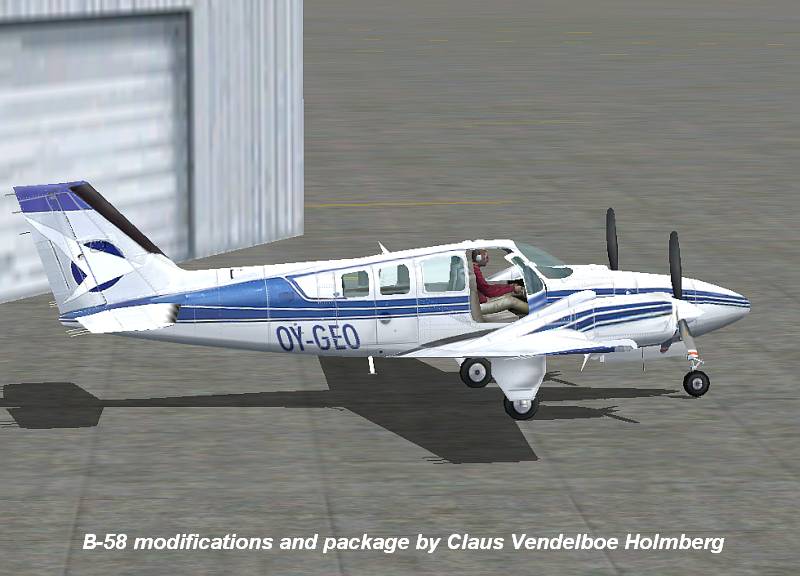
This is the FS 2004 Default Beech Baron 58 by Claus Venedelboc Holmberg 7.5MB.

I have done everything it says (I hope) and I still do not see the new aircraft livery or the yokes and radar.

Any help will be much appreciated. ;)

Cheers...Happy Landings...Doug

Re: Beechcraft Baron 58

PostPosted: Sat Nov 04, 2006 11:11 am
by wji
The most common reason for this is forgetting to sequence the {fltsim.#} after adding the new code to the aircraft.cfg file

The next reason is not giving the new aircraft a unique name in the aircraft.cfg file. FS will not recognize aircraft using duplicate names in title=.

Re: Beechcraft Baron 58

PostPosted: Sat Nov 04, 2006 11:34 am
by FLYING_TRUCKER
Thanks Wji.  :)

Cheers...Happy Landings...Doug

Re: Beechcraft Baron 58

PostPosted: Sun Nov 05, 2006 10:49 am
by FLYING_TRUCKER
Well so much for that idea...still will not show up yet it is in Aircraft Folder.

I know I must be doing something wrong but do not know what it is.  ::)

Cheers...Happy Landings...Doug

Re: Beechcraft Baron 58

PostPosted: Sun Nov 05, 2006 11:02 am
by ozzy72
Doug have you checked that there aren't effects or gauges that need taking to the relevant folders?

Re: Beechcraft Baron 58

PostPosted: Sun Nov 05, 2006 11:57 am
by FLYING_TRUCKER
Yes I did the aircraft to aircraft, the guages to guages and the modules to modules twice and still nothing.

Wonder if I should redownload and try again?

I wonder if I am the only one haveing a problem with this one?

Cheers...Happy Landings...Doug

Re: Beechcraft Baron 58

PostPosted: Sun Nov 05, 2006 12:01 pm
by Hagar
I just downloaded the file to check it out. Make sure you paste the baron_58 folder to FS9\Aircraft. It will be listed on the selection menu under Beechcraft > Baron 58 > White with blue.

I didn't install the gauges or the modules but the aircraft works fine.

Re: Beechcraft Baron 58

PostPosted: Sun Nov 05, 2006 12:19 pm
by FLYING_TRUCKER
Okay shall have another go at it.  ;)

Thanks all!

Cheers...Happy Landings...Doug

Re: Beechcraft Baron 58

PostPosted: Sun Nov 05, 2006 1:56 pm
by FLYING_TRUCKER
Okay I have the aircraft listed separately as Beechcraft Baron 58 white and blue in FS2004.

However the picture is still the same as the white blue and gold default aircraft.

I typed in the changes in the configuration file but left the number the same [.0] and when that did not work I changed it to [.1] and that did not work.

As the original default aircraft in the configuration file should be [.0] I thought  this one should be [.1] but like I said it does not work.

The aircraft does not show the yoke and radar but is essentially the same as the default aircraft even in colour.

I transferred the guages to the main guages folder and the modules to the main module folder.

I had no trouble in downloading the little Piper at the top of the same page but this one is giving me trouble.

When I open the zipped file with the Wizzard it does say they are read only files....not sure what that means but I say ok and I get the Baron 58 file with aircraft, guages and modules in it along with read me files, pictures of the aircraft, picture of cockpit showing yoke etc.

Now I wonder what I am doing wrong besides playing with this computer? ???   ::)   ;D

Cheers...Happy Landings...Doug

Re: Beechcraft Baron 58

PostPosted: Sun Nov 05, 2006 2:33 pm
by wji
I d/l said B-58 and copied the baron_58 folder to my FS9/Aircraft folder and went flying . . .

Image

Perhaps you're not treating this download as a complete aircraft. The only action required to install and fly it is to copy baron_58 folder to one's FS9/Aircraft; everything else is optional; I did not install any modules or gauges and was able to fly from Klamath Falls over Crater Lake and take in the views  :D

Repainted in K-Falls by Bill Irvine

Image

Re: Beechcraft Baron 58

PostPosted: Sun Nov 05, 2006 2:34 pm
by Hagar
Doug. This one is configured as a separate aircraft. To install it simply paste the baron_58 folder into FS9\Aircraft as I told you. You don't need to modify anything or mess around editing CFG files.

Re: Beechcraft Baron 58

PostPosted: Sun Nov 05, 2006 6:23 pm
by FLYING_TRUCKER
Okay shall try again.  ;)

Cheers...Happy Landings...Doug

Re: Beechcraft Baron 58

PostPosted: Sun Nov 05, 2006 7:00 pm
by FLYING_TRUCKER
By gosh it works... :o   ::)   ;DLOL

Thanks one and all.  ;)

Cheers...Happy Landings...Doug

Re: Beechcraft Baron 58

PostPosted: Sun Nov 05, 2006 7:08 pm
by Hagar
Hurrah...........! :D