Page 1 of 1

Downloading Problem

PostPosted: Sun Oct 15, 2006 5:22 pm
by Cessna156
I have tried to follow the downloading instructions published here, and have been successful on other occasions. (And unsuccessful too), but not this time. I am trying to download one of Barry Blaisdell's Dash6_LongNose_Skybus. The aircraft does not show up in FS9 - even though repeated attempts are interrupted with the message that the file already exists and asking whether or not I want to replace the existing files - which I do - but then cannot locate the file in FS9. Very frustrating. Help available?

Cessna 152

Re: Downloading Problem

PostPosted: Sun Oct 15, 2006 5:34 pm
by Kaworu
if i understand you correctly, you are downloading directly to your fs9 root folder. i never never never do this, simply because things tend to dissappere in there. instead, i download to a folder called "aircraft". i don't just download fs9 stuff there ether. this also allows me to control virues by putting them into a folder that is already quarintined.

Re: Downloading Problem

PostPosted: Sun Oct 15, 2006 5:43 pm
by Hagar
First of all let's get this right so we can understand each other. Downloading is saving a file from a website onto your PC.  I suspect you're having problems installing the files once they're downloaded.

You said you followed the instructions but which ones? If you tell me exactly where this file is posted I'll check it out for you.

Re: Downloading Problem

PostPosted: Mon Oct 16, 2006 5:41 am
by Cessna156
Hagar - I am attempting to download the version2 twotter from www.premaircraft.com/gtwotter/index.html

I download the zipped files. Once downloaded, I extract them into a temporary file. From there I locate the file that has the model, guages, panel folders. I select that file and attempt to copy it into the FS9 aircraft folder. When I check, it does not show up in the folder (or the game). If I repeat the process, I get the message that the aircraft folder already has a folder with the same(aircraft) name, and do I want to overwrite this folder. I say yes. But still cannot locate the folder afterwards.

Thoughts?

Cessna

Re: Downloading Problem

PostPosted: Mon Oct 16, 2006 6:30 am
by Hagar
I download the zipped files. Once downloaded, I extract them into a temporary file. From there I locate the file that has the model, guages, panel folders. I select that file and attempt to copy it into the FS9 aircraft folder. When I check, it does not show up in the folder (or the game). If I repeat the process, I get the message that the aircraft folder already has a folder with the same(aircraft) name, and do I want to overwrite this folder. I say yes. But still cannot locate the folder afterwards.

Thoughts?

Cessna

If it's not in the FS9\Aircraft folder my immediate thought is that you're pasting the new folder into the wrong location. I'll download the file later & check it out as promised.

Re: Downloading Problem

PostPosted: Mon Oct 16, 2006 6:55 am
by Hagar
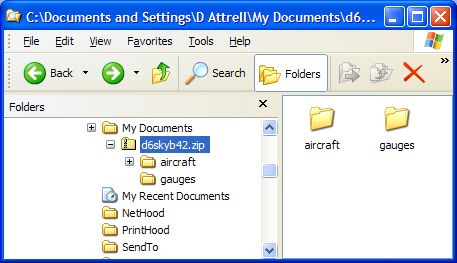
OK, I downloaded the zipfile named d6skyb42.zip from your link. Forget all those complicated instructions. I'll show you the easiest way I know for installing zipped 3rd party files to the MS sims. If you have Windows XP you don't need separate unzipper utilities like WinZip. You can do this without extracting the zipfile.

First, double-click on the downloaded zipfile & you should see two folders named aircraft & gauges. (Note that these correspond to subfolders with the same names in the FS9 root directory.*)
Image

To install the aircraft open the folder named aircraft, select the complete contents (two folders in this case) & paste them into FS9\Aircraft. (Overwrite the fsfsconv folder when prompted. This contains the panel & sound files that your new aircraft is aliased to.)
Image

To install the gauges open the folder named gauges, click Edit/Select All & paste the complete contents (29 GAU files + 1 CAB file) into FS9\Gauges.
Image

The new aircraft is now installed. It should be listed on the FS9 selection menu under DeHavilland as manufacturer.
Image

*PS. If all downloads were configured like this one installing them would be a piece of cake.

Re: Downloading Problem

PostPosted: Mon Oct 16, 2006 7:25 pm
by Cessna156
Hagar - Thank you very much. Download accomplished. Not sur if everything is working properly, however. heading indicator froze after a few minutes, and I crashed on final approach. things just shut down, although pilot error is a real possibility.


We fly the Otter in Grand Cayman once in a while to go to one of the outer islands.

Cessna