Page 1 of 1
F-14

Posted:
Sun Oct 08, 2006 7:47 pmby Rubarb
I recently installed the complete F14 Package (56 megabytes). I think i did everything correctly, but when i try to fly, it just shuts down the game. What is wrong and how can i fix it?
Re: F-14
Posted:
Mon Oct 09, 2006 3:05 amby Hai Perso Coyone?
Which package is this?

Re: F-14
Posted:
Mon Oct 09, 2006 8:53 amby Rubarb
OK. The name of the package is FS2004 F-14B REV D Full Package. It is on Military Page 119.
http://www.simviation.com/fs2004military119.htm
Re: F-14
Posted:
Mon Oct 09, 2006 12:53 pmby commoner
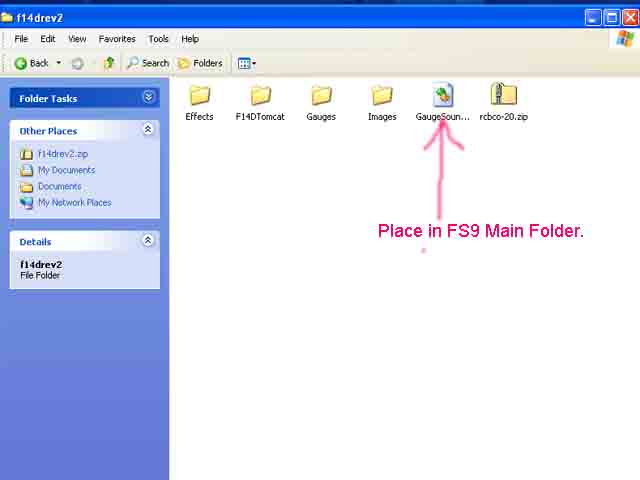
...did you make certain to put the GaugeSound.dll file (which is supplied) into the main FS9 Folder..........very important and would with this package cause the problem you have...........check it now. The GaugeSound.dll comes with the package.................commoner

Re: F-14
Posted:
Mon Oct 09, 2006 3:30 pmby Rubarb
I looked for this file but couldnt find it. Can you give a specific file name?
Re: F-14
Posted:
Mon Oct 09, 2006 5:44 pmby Boca
THATS the name of it...the 'GaugeSound.dll'. Go into your flightsim folder and ensure that that is where it is. If it's elsewhere, it'll be causing problems.
Re: F-14
Posted:
Mon Oct 09, 2006 9:20 pmby Franky_4_Fingers
I have that package and it seems whoever packaged it failed to include instructions or any documentation whatsoever. Should be a requirement for uploading to any site shouldn't it? ::)
Re: F-14
Posted:
Tue Oct 10, 2006 1:07 amby Bad2bone
Just downloaded it. It is all there. There is a file called "All Docs" with
all the instructions. The GaugeSound.dll is included.
The All Docs is in the F-14 folder.

Re: F-14
Posted:
Tue Oct 10, 2006 1:29 amby commoner
...open the Zip and then the first folder you see (f14drev2) ..it's in there. If you don't see it you may have dlls as hidden files. Make sure you Have "Show Hidden Files" checked in your Folder Options..................commoner
Re: F-14
Posted:
Thu Oct 12, 2006 1:24 pmby rootbeer
You gods who can actually install add-on airplanes leave me speechless. I can't do it. Tried and failed abysmally. I can't get Windows Explorer to open in two windows as the install tute says...
Has anybody any experience with WinZip Self-Extractor 3.0? Would something like this put the airplanes into the sim just like happens with Mike Stone's airplanes?
Re: F-14
Posted:
Thu Oct 12, 2006 2:00 pmby Rubarb
Thank you everyone, especially commoner (all i had to do was show the hidden files)!
Re: F-14
Posted:
Fri Oct 13, 2006 11:12 pmby ibhayirob
nice set of wheels that commoner - what is it - gtv ?
matter of interest what exactly is the purpose of the guagesound dll
and can anyone tell me how to kill the orange flames that suddenly appeared behind my fave jets - even with the engine off !
they werent there before
is it something i downloaded without knowing
thanx
rob
Re: F-14
Posted:
Sat Oct 14, 2006 1:43 amby commoner
Hi Rob...........it's a 1972 Alfa Romeo 2000 GTV...........but as for your other questions I don't really know............the dll is like some parts of my Alfa.......don't know what it does but it won't work without it.......the orange flames? could be some effects file that has crept in from another download but hard to say......commoner
Re: F-14
Posted:
Sat Oct 14, 2006 9:37 amby ibhayirob
thanx - yes i traced back the origional zip - effects folder for the plane - and deleted it from the main effects
no more flames
just weird that it was never visable before
strange machine
sweet car that - i had a love affair with a chocloate brown 1970 2000 gtv
have you flown the x35 b yet - something about coming in at 600 and touching down at 5 kts
rob
Re: F-14
Posted:
Sat Oct 14, 2006 10:25 amby eno
You gods who can actually install add-on airplanes leave me speechless. I can't do it. Tried and failed abysmally. I can't get Windows Explorer to open in two windows as the install tute says...
Has anybody any experience with WinZip Self-Extractor 3.0? Would something like this put the airplanes into the sim just like happens with Mike Stone's airplanes?
To open files in a seperate window ........ open a folder and click on Tools/Folder Options/General and highlight the bullet point that says open new folders in a seperate window. As for self extractors some work some don't. I prefer the option of extracting to a folder then manually transfering files.