Page 1 of 1
Need Help With Graphics Ajustments

Posted:
Mon Oct 02, 2006 2:08 pmby Siccmade
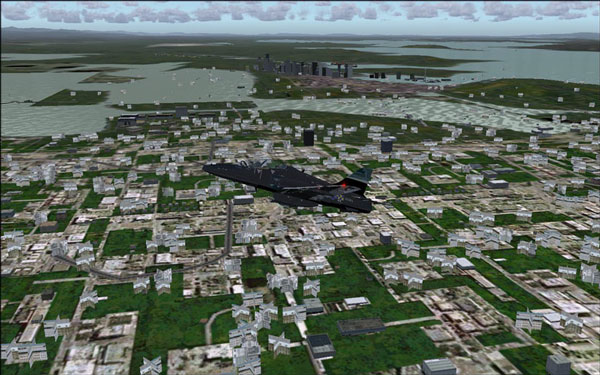
Well heres a pic of me flying and i dont know why my terrain looks like this? in the background u can see were the land should be theres water and the terrain changes right when i ge to it it should stay one terrain from far away but its changing alot of diff colors and stuff from close and far away. The computer this game is on has a 128mb video so it should run fine and it gots dual 64bit pros and 2gigs of ram so that should be fine to. I have another computer with this game on it and it looks fine and i got a 256mb card on this one and the pros is only 869 and i got 512 ram Help Please!!!!! screen res is on 1440 x 900
Re: Need Help With Graphics Ajustments
Posted:
Mon Oct 02, 2006 4:08 pmby BAW0343
re-upload your image as it seems the Sim-v mods founf some problems with yours. Remember that they must be uploaded to Sim-v, not photobucket or somewhere elce and they must be 800x600 or smaller and not exced 100kb
Re: Need Help With Graphics Ajustments
Posted:
Tue Oct 03, 2006 3:43 amby Siccmade
Anyone help?
Re: Need Help With Graphics Ajustments
Posted:
Tue Oct 03, 2006 8:01 amby ashaman
In such a little pic, I can't understand the problem in its whole, but I seem to see there's autogen in the water, so:
Have you installed a scenery later? Or even a texture package?
Did you change your sim configuration in some way? Or did you change you PC configuration? Added a new videocard, updated some driver, or something like that?
Re: Need Help With Graphics Ajustments
Posted:
Tue Oct 03, 2006 12:29 pmby Siccmade
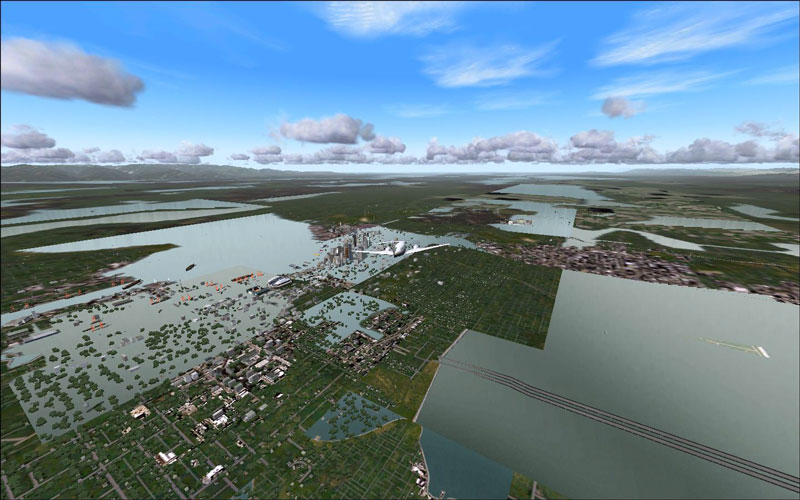
Well i put in a scenery called silver wings and its just changed the textures at low level flight but even before that it was changing texture every 5 secs i was flying like it wasent changing fast enuff when i was flying, like when im near a big city when im about 3 miles away or so the buildings will be under water until i get closer and its not just the water its the land scape. When im flying in the mountains the land wont be all the same one area will be really dark then it will change when im close to it witch is weird cause my system has more than enuff power to play this game
Re: Need Help With Graphics Ajustments
Posted:
Tue Oct 03, 2006 1:52 pmby Siccmade
Heres another pic
Re: Need Help With Graphics Ajustments
Posted:
Tue Oct 03, 2006 4:28 pmby dave3cu
In reference to your screen shot, it's an errant file in the SW install.
Look in the '......\Scenery\World\texture' folder for file '033b2su7.bmp'. You should see that this file is only 33kb, while the others are 43kb (it's missing the mips).
Make a copy of '033b2su6.bmp' and rename it to '033b2su7.bmp' to
Re: Need Help With Graphics Ajustments
Posted:
Tue Oct 03, 2006 4:39 pmby Siccmade
the file already was 42.7kb and i did what u said well i didnt put the bmp on the end cause it wouldnt over right but it didnt do anything
Re: Need Help With Graphics Ajustments
Posted:
Tue Oct 03, 2006 4:40 pmby ashaman
It's either what wrote Dave or your sim is adapting to global warming.

Sorry, could not pass this joke.

Really sorry here, never had any memory of the problem you suffer of. I can only suggest you to do as Dave said.

Re: Need Help With Graphics Ajustments
Posted:
Tue Oct 03, 2006 4:50 pmby Siccmade
on my other computer that file was 32 and i didnt have the graphics problems like on my other computer
Re: Need Help With Graphics Ajustments
Posted:
Tue Oct 03, 2006 6:11 pmby dave3cu
Sorry, my error. The fix I gave you relates to the black textures as seen in the upper right of your second screen shot.
As for the water where land should be: As you said, this was happening before SW, so I dont have a clue. Possibly a terrain add-on that went bad??
SW only changes textures and autogen.
If you've got a 'good' install on the other computer, what did you change or install on this computer that's different?
Dave
Re: Need Help With Graphics Ajustments
Posted:
Tue Oct 03, 2006 6:39 pmby Siccmade
I reinstalled the game on the new computer and its doing the same thing and i didnt put any addons after the reinstall so i guess i am going to have to live with it lol kinda sucks but what can u do and the i didnt change anything on the game from the old computer to the new except turn graphics up cause the new computer is way better