Page 1 of 2

How to remove a VC

PostPosted: Thu Sep 21, 2006 7:18 am
by ashaman
Sorry to bother you people, but after a thorough search in the faq and with the search engine I am still unable to find a thread that I remember having read here about how to remove a VC from a plane.

Fact is, I've found this plane, but its panel is... bleargh ...and its VC is even worse. Seen that for that kind of plane I can find easily a panel to use, I'm stumped because the VC gets in the way something ugly.

Do some of you have the link to the above mentioned thread, or even to rewrite here what was written there, so I can erase the VC from that plane?

Thank you for your time. :)


PS
Before you ask, no, I can't find another plane like that with no VC. Unless you can give me the link for a IL62M (preferably in LOT livery, but not really necessary) that is not an AI and has a understandable panel, that is. ;)

Re: How to remove a VC

PostPosted: Thu Sep 21, 2006 7:33 am
by ozzy72
You can't remove a VC as it is part of the model itself. You can change 2D cockpits however.

V/CRe: How to remove a VC

PostPosted: Thu Sep 21, 2006 7:47 am
by Brett_Henderson
I seem to remember an air-file fix that didn't get rid of the V/C...I know it's actually part of the .mdl file... but can't you make it so it's not displayed ?

Something along the lines of,  "Virtual_cockpit = 0"  ?

Re: How to remove a VC

PostPosted: Thu Sep 21, 2006 7:56 am
by Brett_Henderson
WAIT !

Now I remember...

You have to open the .mdl file with a hex-editor.. search for a certain string, and change it

Re: How to remove a VC

PostPosted: Thu Sep 21, 2006 8:10 am
by Hagar
Copied from another forum. You will obviously need a hex editor.

First make a backup of the model file!

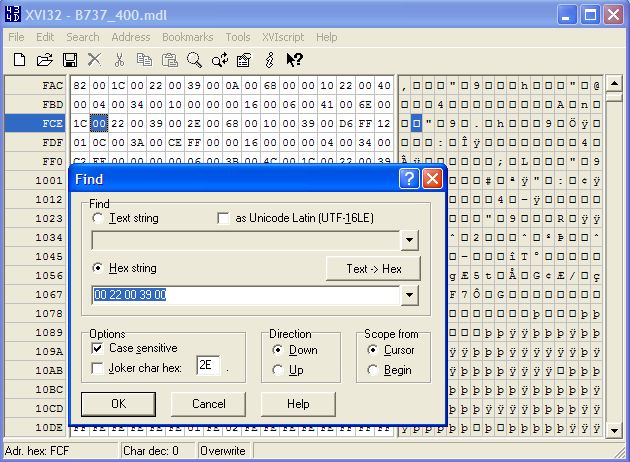
Open the mdl file you want to edit with the Hex Editor and use the Search function to find the following hex value: 00 22 00 39 00 (or you may have to look for it as 0022003900, without the spaces. I haven't done this for a while...) Find the SECOND occurrence of that string - that is the one that you edit. DO NOT EDIT THE FIRST OCCURRENCE of the string or you will find some other part of your aircraft missing.

Now, in the second occurrence of that string, simply change the 39 in 00 22 00 39 00 to 00. It should now look like this: 00 22 00 00 00. Save the changes, and you should find the VC gone.

Re: How to remove a VC

PostPosted: Thu Sep 21, 2006 8:18 am
by alrot
If you find the way out to remove the VC, you tell tell me how to  ???

Re: How to remove a VC

PostPosted: Thu Sep 21, 2006 8:19 am
by Hagar
[quote]If you find the way out to remove the VC, you tell tell me how to

Re: How to remove a VC

PostPosted: Thu Sep 21, 2006 8:46 am
by ashaman
Copied from another forum. You will obviously need a hex editor.


Thank you. I remembered there was a way. The hex ed is not a problem at all with someone like me that began its first experiments on the Commodore 64, way back in the dinosaurs age. :)

Re: How to remove a VC

PostPosted: Thu Sep 21, 2006 8:51 am
by Brett_Henderson
I'm no genius, but I'm no dummy either.

I can't find that value ANYWHERE in a .mdl file.   ::)

Re: How to remove a VC

PostPosted: Thu Sep 21, 2006 8:55 am
by Hagar
[quote]I'm no genius, but I'm no dummy either.

I can't find that value ANYWHERE in a .mdl file.

Re: How to remove a VC

PostPosted: Thu Sep 21, 2006 9:02 am
by Brett_Henderson
I'm sure I'm overlooking something that the original poster took for granted.. but "0022003900",  a 10-place string, is either 5 hex characters, or something I'm completely unfamiliar with.

I tried searching it as a hex value, character string and as a 32 and 64 bit, long, short, signed and unsigned..

Nothing  ???

Re: How to remove a VC

PostPosted: Thu Sep 21, 2006 9:15 am
by Hagar
Try this hex editor. http://www.chmaas.handshake.de/delphi/freeware/xvi32/xvi32.htm

Paste the string < 00 22 00 39 00 > into the Hex String search box.

PS.
Image

Re: How to remove a VC

PostPosted: Thu Sep 21, 2006 10:05 am
by RollerBall
Came in late on this one (I'm house painting..). Yup, Doug's got it dead on - works like a charm and I've done it several times.

A thought I've had for some time now - one of the most useful things that could be built into FS IMO would be for aircraft to be able to use 3rd party VCs. Can't see why it shouldn't be possible. It's a separate visual model anyway.

Then guys like Ito could concentrate on making lovely models sans-VC and VC experts could do what they do best - and then we lucky simmers could combine our choice of VC+ 2D panel with our aircraft.

Can't see why it shouldn't work - just needs VCs to be combined with the rrest of the model in a different way to now.

Now I'm sure all the model makers will tell me it can't be done as things are now - I know that - but it must surely be possible for MS to redefine how the elements of the model come together to make it possible.

Re: How to remove a VC

PostPosted: Thu Sep 21, 2006 10:28 am
by alrot
^ Look up. ^

I just did. ::) :P


Doug your a Genius  :o,this could be a open door to add VC ,I mean do it in viseversa,to some beatiful models wothout VC ,Im the one who can only fly in VC ,This is great  :D...

Re: How to remove a VC

PostPosted: Thu Sep 21, 2006 10:35 am
by Brett_Henderson
Thanks, Doug.. That did the trick !

(now.. what to do with this dangerous, new power)

LOL