Page 1 of 2

My Turn

PostPosted: Fri Mar 10, 2006 4:08 am
by packercolinl
FS9.config and where do you find it!

I cannot locate it in a path and search tells me that it does not exist in any of the permutations I use.

Would someone please be so good as to advise me of the correct form to use.

Thanks,
Col.

http://www.simviation.com/cgi-bin/yabb/Re: My Turn

PostPosted: Fri Mar 10, 2006 4:16 am
by Zaphod

Re: My Turn

PostPosted: Fri Mar 10, 2006 4:21 am
by packercolinl
::)Yeah knew it was something simple-much like me.

Thanks Zaphod for that prompt reply.

Cheers,
Col.

Re: My Turn

PostPosted: Fri Mar 10, 2006 4:48 am
by packercolinl
and it didn't work--hmmm!!

Oh,joy :)

Must be time for a new 'puter 8)

Any excuse--back again soon.

Col.

Re: My Turn

PostPosted: Fri Mar 10, 2006 6:30 am
by Delta_
and it didn't work--hmmm!!

Have you tried making hidden files and folders visible?  Then try it again.

Re: My Turn

PostPosted: Fri Mar 10, 2006 7:30 am
by commoner
...you won't find it by searching for fs9.config.......... look for fs9.cfg and like delta says Show hidden files ....and make a shortcut to it on your desktop when you do find it.It'll come in handy...commoner. ;)

Re: My Turn

PostPosted: Fri Mar 10, 2006 8:31 am
by microlight
Yup - I agree. That's what I did.

;)

Re: My Turn

PostPosted: Fri Mar 10, 2006 8:42 am
by Fozzer
...you won't find it by searching for fs9.config.......... look for fs9.cfg and like delta says Show hidden files ....and make a shortcut to it on your desktop when you do find it.It'll come in handy...commoner. ;)


Definately...!
Always put a "Shortcut" to your fs9.cfg on your desktop... ;)...!
You will always need to get access to it at various times...
...trust me... ;)...!

Paul... ;D...!

Re: My Turn

PostPosted: Fri Mar 10, 2006 8:51 am
by Saitek
Can be tricky. After you have got to Documents and settings try every user there is. It may not be under the one you looked at. I have several on my computer here and there is an application data,microsoft etc etc under every one. But only 1 user has the FS9 in the microsoft folder. ;)

Re: My Turn

PostPosted: Fri Mar 10, 2006 10:26 am
by Hagar
...you won't find it by searching for fs9.config..........

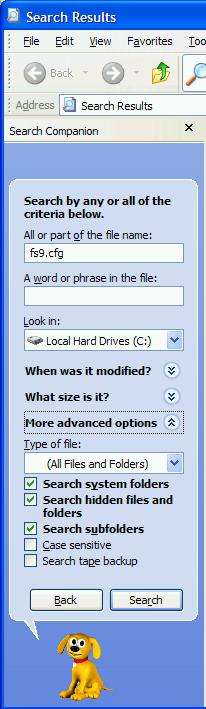
You will if you check the Search Hidden Files & Folders advanced search option.

Image

....and make a shortcut to it on your desktop when you do find it.It'll come in handy...commoner. ;)

Good advice.

Re: My Turn

PostPosted: Fri Mar 10, 2006 11:23 am
by commoner
....LOL...you read me wrong there Hagar I said "you wont find it by searching for fs9.config.".....and you won't....you have to type in fs9.cfg, which is what you have in your pic. Try it for yourself. Col's question was actually "FS9.config and where do you find it!"   Which lead me to believe he might be putting the wrong text in his search..........commoner ;)

Re: My Turn

PostPosted: Fri Mar 10, 2006 11:53 am
by Hagar
....LOL...you read me wrong there Hagar I said "you wont find it by searching for fs9.config.".....and you won't....you have to type in fs9.cfg, which is what you have in your pic.

Right. Now I see what you're getting at. ;)

Re: My Turn

PostPosted: Sat Mar 11, 2006 6:44 am
by packercolinl
Thanks everyone,I've managed to get back this far with nothing else  installed.

This thing is not doing what it should(even after doing all the 'right ' things.)

I believe I have a serious (well not that serious ;D)problem here.

I'm interested to have a play to see what the deal is.

Basically nothing loads properly and even with all the firewalls etc I was hit with a virus. So two formats later I'm not a happy camper(actually this is interesting and a bit of a challenge :),don't attempt this at home without adult supervision)

I also find that presentation has changed and changes as I use the system. This points to a degradation/collapse.

Am I p!ssed off!!

No way!!

Forget the new 'puter(no I'm not)\but this is FUN!! a toy that has no value that I can TOY with--woohoo!!

Col.

Re: My Turn

PostPosted: Sat Mar 11, 2006 10:02 am
by caveman16
      Hey Guys - - - - - And I always thought I was by myself with these dumb problems - - ;D

      Always keep a smile,        caveman

Re: My Turn

PostPosted: Sun Mar 12, 2006 12:53 am
by packercolinl
Gee,caveman,I'm glad to add a little lightness in your life ;D

Still---after doing another format and etc fs9.cfg does not come up.

I had no problems before even with hidden folders activated. This was the reason for the post because I didn't think I was completely brain dead(Ooohh! Some of you think I AM!! WELLLL!!! ;D)

Doesn't matter,I'll plod along and see what I can sort out.

Cheers to all,
Col.