Page 1 of 1

727 guestion?

PostPosted: Sun Mar 05, 2006 4:43 pm
by boyanpilot
well I have downloaded some 727 cargo,from this site,and I cant find out does he have autopilots,cockpit is very realistick,but there are no autopilots,so does 727 have them at all or I have to fly it all manual?


Suche a mess >:( ??? :-[ :-/ :'( >:( :(

Re: 727 guestion?

PostPosted: Sun Mar 05, 2006 5:23 pm
by simonmd
Yes the 727 has an Auto pilot but it would help if you said which model you've got?

Re: 727 guestion?

PostPosted: Sun Mar 05, 2006 5:24 pm
by Viper22
Unfortuneately, some panels don't come with autopilot.

Re: 727 guestion?

PostPosted: Mon Mar 06, 2006 2:21 am
by boyanpilot
I USE 727 200,AND ITS OK I WILL FLY IT MANULAY
THANKS

Re: 727 guestion?

PostPosted: Mon Mar 06, 2006 3:43 am
by ozzy72
Boyan if you go to our downloads page you'll find a Panels section for FS9, just have a browse through as you'll find a number of 727 panels (with A/P). Pick one you like the look of and away you go ;)

Re: 727 guestion?

PostPosted: Mon Mar 06, 2006 9:59 am
by BAW0343
as you said it has a realistic panel   so perhaps you arnt looking for the right thing. I have noticed alot of people use the standard modern boeing AP box in almost any plane,  perhaps if you posted a pic of the panel we could help more

Re: 727 guestion?

PostPosted: Mon Mar 06, 2006 1:25 pm
by simonmd
727-200 is the actual plane model but what we need to know is who made the plane model and panel, then we can help. As BAW said, the 727 won't have a recognisable Autopilot that has it's functions all grouped together like in a 737.

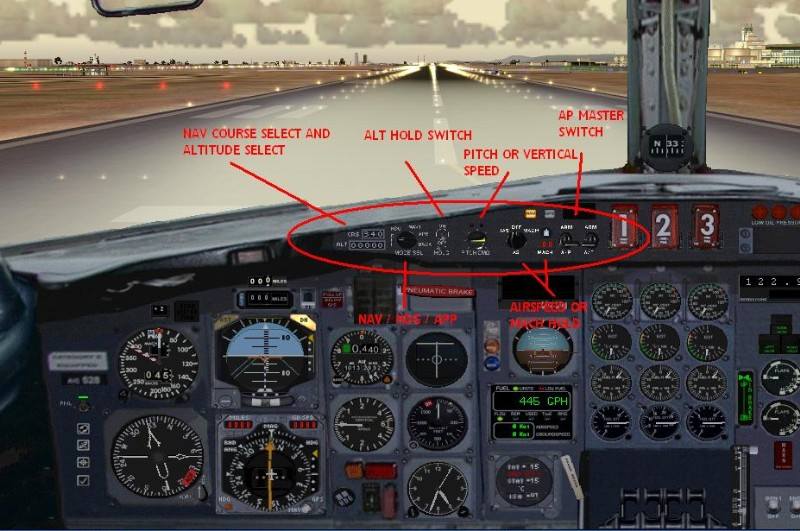
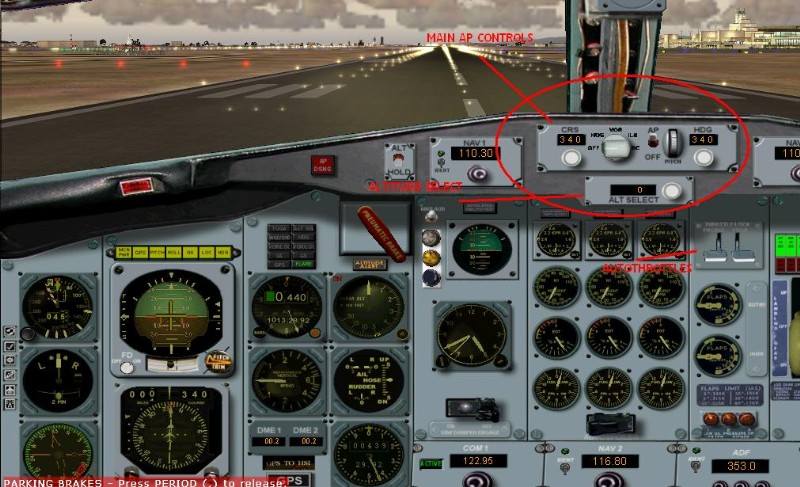
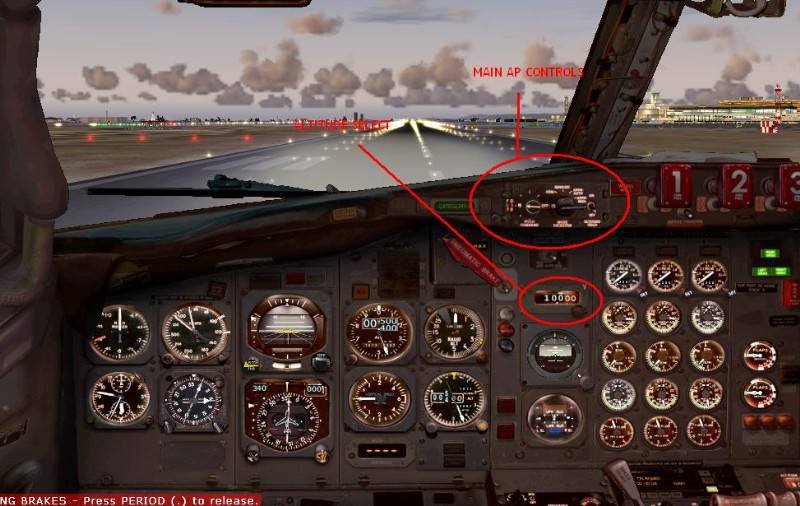
Here are examples of three 727 panels,

Image
Image
Image

The last one is the most acurate representation of a 727 panel, comming from the Payware Captain Sim 727. You can see that in all of them though, the main AP controls are mainly rotary knobs instead of the more common push buttons you'll see in default aircraft.

Re: 727 guestion?

PostPosted: Mon Mar 06, 2006 1:47 pm
by garymbuska
I also have the capt sim B727 aircraft and I must tell you that the auto pilot in it works a little different than auto pilots in other aircraft.
You have to use the pitch knob to get the aircraft to climb to the desired altitude then turn on altitude hold. If you try using altitude hold to climb to the set altitude it will not climb. It also does not have a GPS/NAV SWITCH on the panel you can assign a keystroke to it or put a GPS/NAV switch in the panel which is what I did.
To use auto pilot you set the desired altitude to climb to set you heading then flip the two autopilot switches in a different panel(AP) button then turn the yellow knob with the airplane on it or the pitch control knob in the AP panel to your desired climb rate. When the plane reaches the desired altitude you then turn the pitch control to level and turn on altitude hold.
This capt sim panel is not the only panel for the B727 that operates in this manner, and it will crash every time if you try to use it like other autopliots. 8)

Re: 727 guestion?

PostPosted: Wed Mar 08, 2006 4:34 pm
by boyanpilot
well i dont know how to put photo inside of my topic PLEASE HELP

Re: 727 guestion?

PostPosted: Wed Mar 08, 2006 5:43 pm
by Saitek
First observe picture limits. Otherwise it will be deleted and repeated offenders are banned. ;D
Go to Upload images (on the blue bar that runs at the top of the site under the add).
Browse and upload. Copy the URL with the [img} tags and paste it into your post.

(To take a pic on your computer press Print Scrn. Then go to paint and paste).
Hope that helps. :)