Page 1 of 2
WHAT IS UP WITH THIS!?

Posted:
Mon Mar 06, 2006 10:29 pmby Jakemaster
THESE GROUND TEXTURES! I DONT KNOW WHAT THEY ARE!
Seriously, I had screwed up fs so bad that I renamed it and the FS9.cfg, and installed a fresh install. The only textures i have added are water textures and some forest texture. I dont think that those boxy green textures are default. I think its from when I once had silver wings. The problem is, silverwings was never in the sim that i am using. I dont know what to do, but I want those textures GONE! Im considering getting rid of all of it, my whole flightsim stuff and reinstalling, but I dont want to do that. PLEASE tell me if you know what is going on with these textures.

Re: WHAT IS UP WITH THIS!?
Posted:
Mon Mar 06, 2006 10:31 pmby legoalex2000
lets play chess

that is some weird stuff, i remeber i had a similar problem, only with CFS3. my suggestion is that might be a certain teture block that won't load in FS.

Ramos
Re: WHAT IS UP WITH THIS!?
Posted:
Mon Mar 06, 2006 10:41 pmby Jakemaster
Its not the black necessarily, I mostly HATE those green ones because they are ultra repetitive and look like CRAP!
And, ITS ONLY SUMMER!
FALL:
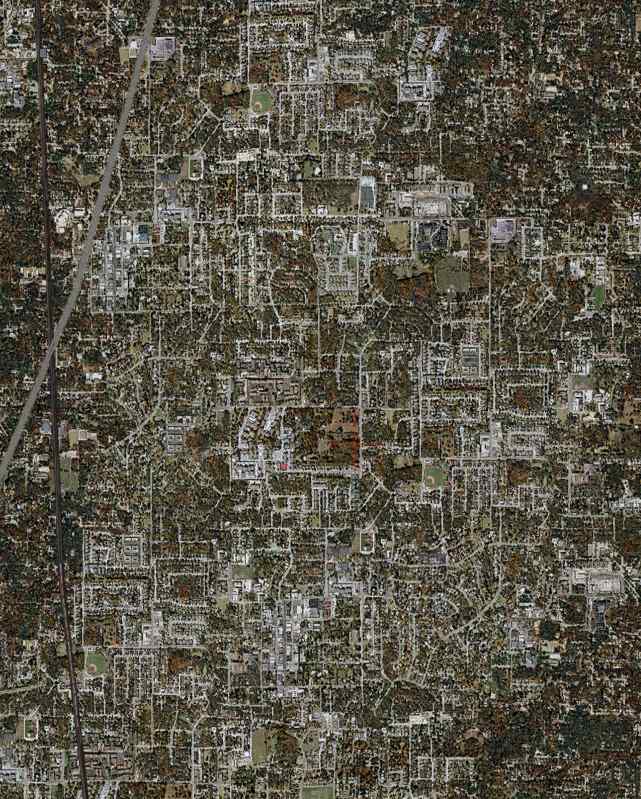
WINTER:

SPRING:
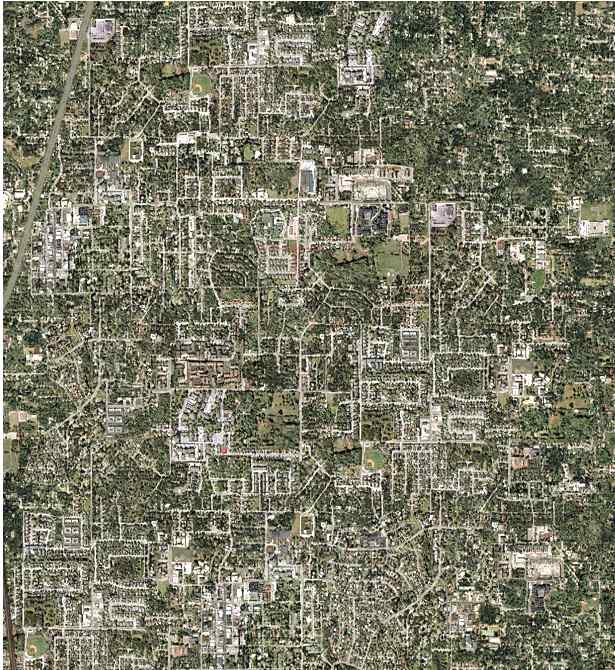
SUMMER:
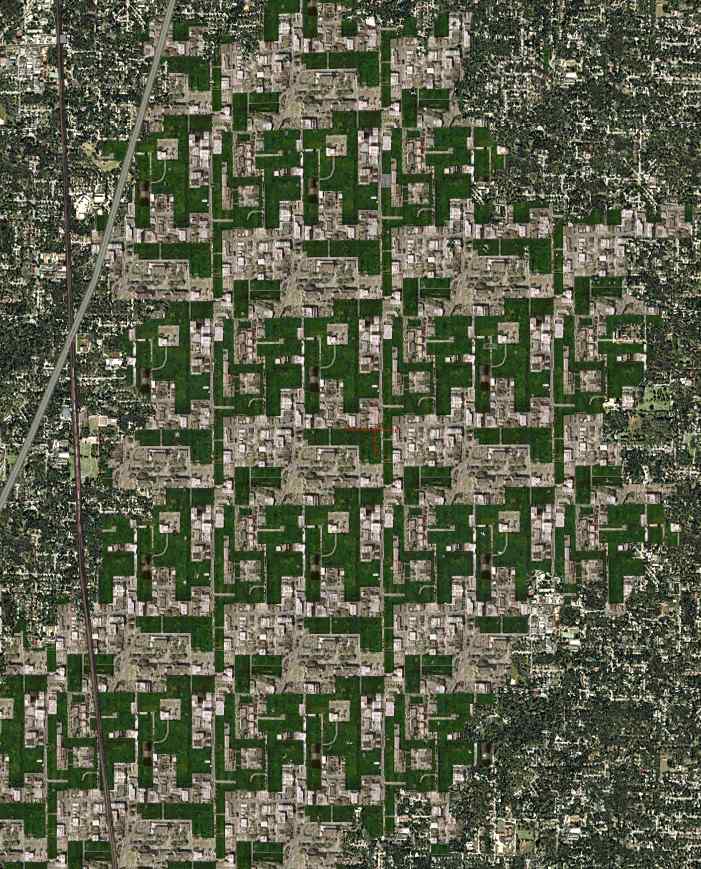
THIS SUCKS! I AM REALLY ANGRY! Why does microsoft make my life so hard?
Re: WHAT IS UP WITH THIS!?
Posted:
Mon Mar 06, 2006 11:14 pmby Foxtrot Sport
Is it isolated, or covering all US, all continent, all world?
Re: WHAT IS UP WITH THIS!?
Posted:
Mon Mar 06, 2006 11:16 pmby Jakemaster
all over the us from what Ive see, I dont fly in europe too often.
Re: WHAT IS UP WITH THIS!?
Posted:
Mon Mar 06, 2006 11:36 pmby beefhole
all over the us from what Ive see, I dont fly in europe too often.
It's important to know if it's limited to one continent, so please check out some other areas of the world

Re: WHAT IS UP WITH THIS!?
Posted:
Mon Mar 06, 2006 11:45 pmby dave3cu
I'm not sure what they are yet either Jake, just noticed them for the first time a couple of days ago.
First noticed them around KSFO. I see I get the same as you around KJFK.
This is on my FS9 with SW installed.
Re: WHAT IS UP WITH THIS!?
Posted:
Tue Mar 07, 2006 12:11 amby beefhole
Whoa Dave, looks like a definite reinstall to me, unless you have a texture backup.
Re: WHAT IS UP WITH THIS!?
Posted:
Tue Mar 07, 2006 2:21 amby dave3cu
Jake, got mine fixed. Although I didn't take the time to find the specific answer, I believe it came from my SW install.
I reverted all the files to default from the CD's.
The SW install overwrites files in 3 folders:
FS2004\scenery\world\texture\... revert from CD4\Scenery\World.cab\
=texture
FS2004\Texture\......CD2\MSGame3.cab\=texture
FS2004\Autogen\....CD1\MSGame1.cab\=autogen, file=default.xml
Everything appears to be back in order.
Dave
Append-2:25am-To confirm the cause a reinstall of SW caused the problem to reappear.
Re: WHAT IS UP WITH THIS!?
Posted:
Tue Mar 07, 2006 8:05 amby Jakemaster
Thanks dave, Ill definately go and get those backups. What I found odd was that I have 3 installations of FS: FSGW, an older installation with a lot of problems and messed up textures, and this new installation that used to be a default for backup. I never installed SW in this one, thus the confusion. Hopefully I can get this problem solved. Im thinking about leaving default ground textures, I just screw things up too much when I change anything

Re: WHAT IS UP WITH THIS!?
Posted:
Tue Mar 07, 2006 8:07 amby Jakemaster
UPDATE: How do I open a CAB extension? Windows just gave me that thing asking for the program.
Re: WHAT IS UP WITH THIS!?
Posted:
Tue Mar 07, 2006 8:16 amby dave3cu
Winzip, or most any other Windows archieve utility, will open .cabs.
I have Winzip Ver 7.0 on my Win98 machine. That or later versions should work.
Dave
Re: WHAT IS UP WITH THIS!?
Posted:
Tue Mar 07, 2006 8:47 amby wombat666
WinRAR will open just about any form of 'zip' file.
As for Silver Wings screwing up your sim, it comes back to following the correct install procedure.
Never had a problem with Silver Wings or Golden Wings 3 .... then again, I always RTFM.

Re: WHAT IS UP WITH THIS!?
Posted:
Tue Mar 07, 2006 11:53 amby n_richardson05
try uninstallinga and taking every trace of fs out of your pc but save the aircraft their effects panels and guages so you dont louse those if like the rest of us you have a huge collection above and beyond the default ac
yah so try re install agin
Re: WHAT IS UP WITH THIS!?
Posted:
Tue Mar 07, 2006 8:22 pmby dave3cu
Jake,
I found that the black squares are the result of a corrupt files in the SW download. ....\FS2004\Scenery\World\texture\033b2su7.bmp. This is the course I took as I want to keep SW.
As for the repeating textures that's the way they come with SW, indicating that somehow you got SW files into your 'clean' install.
If you need further help pm or email me and maybe we can get together on ts.
Dave