Can this be fixed?

Forum dedicated to Microsoft FS2004 - "A Century of Flight".

Can this be fixed?

Postby Robban_Sweden » Mon Feb 27, 2006 3:33 pm

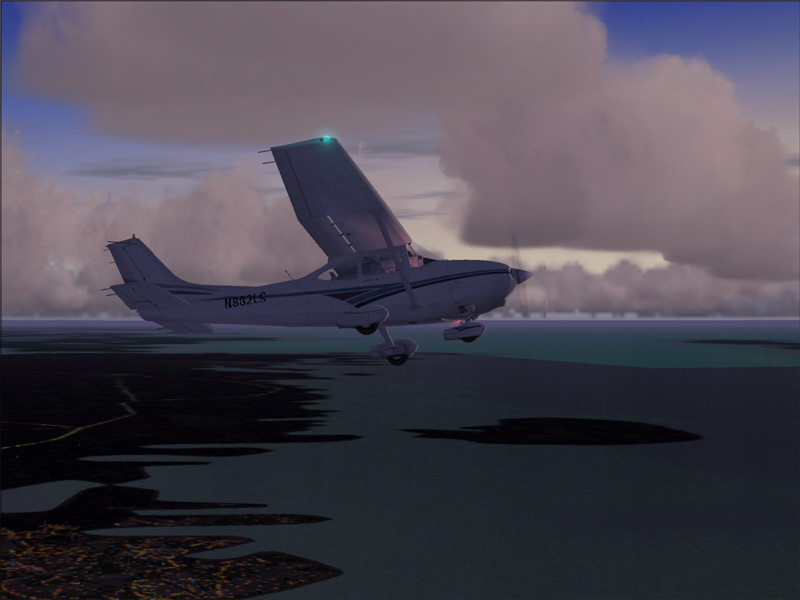
Is there a fix to make the water textures look good overall instead of just a couple of miles around you.
It's not that fun to have that "line" there...

Image
Regards
Robert
Robban_Sweden
2nd Lieutenant
2nd Lieutenant
 
Posts: 80
Joined: Mon Apr 11, 2005 2:05 pm
Location: Kalmar, Sweden

Re: Can this be fixed?

Postby ozzy72 » Mon Feb 27, 2006 3:37 pm

Rob you need to play with the visual ranges in your graphics settings in FS. Max them out and you should cure the problem (but you might lose a couple of FPS) ;)
Image
There are two types of aeroplane, Spitfires and everything else that wishes it was a Spitfire!
User avatar
ozzy72
Administrator
Administrator
 
Posts: 33284
Joined: Fri May 24, 2002 4:45 am
Location: Madsville

Re: Can this be fixed?

Postby Robban_Sweden » Mon Feb 27, 2006 3:43 pm

Exactly which settings to you mean? I have maxed out sight distance and MIP mapping.
Regards
Robert
Robban_Sweden
2nd Lieutenant
2nd Lieutenant
 
Posts: 80
Joined: Mon Apr 11, 2005 2:05 pm
Location: Kalmar, Sweden

Re: Can this be fixed?

Postby beefhole » Mon Feb 27, 2006 5:06 pm

When night falls, I'm pretty sure that's an incurable problem with FS-you can visibly see the "flattened box" detail area (fs spends more resources rendering things within the box, blurs things outside of it)

If there's a fix for this, I'd definitely like to know too.
User avatar
beefhole
Major
Major
 
Posts: 3804
Joined: Thu Jun 05, 2003 8:57 am
Location: Philadelphia

Re: Can this be fixed?

Postby ashaman » Tue Feb 28, 2006 7:17 am

There's no fix.

There's a reason if M$'s original texture for the water are of that nice "smurf's piss" color, and that's because with that color the defect discussed in this thread is almost invisible (if you don't believe me, install the original set of water texture and try it out yourself).

A solution for this behaviour of the water was sought since the publishing of the first freeware alternative colors for the water. Nothing was ever found. Probably it's something that has to do with the poor (derogative) graphic engine of FS9.
There's but one real cure for human stupidity. It's called DEATH.

At the moment mourning the assassination of sarcasm and irony for the good of the "higher".

Proud FSIX user. Active user of FS98, X-plane and novic
User avatar
ashaman
Major
Major
 
Posts: 1741
Joined: Thu Nov 27, 2003 9:08 am
Location: LIRN

Re: Can this be fixed?

Postby Robban_Sweden » Tue Feb 28, 2006 9:42 am

OK. Which files do I have to put back into the Scenery/World/Texture and Texture folders to get the default water back?

I have backups of the entire folders saved but I have other add-on files that I want to keep so I don't want to copy the whole default files back.
Which are related to the water textures?

Would someone be so kind to paste their names here, please?
Regards
Robert
Robban_Sweden
2nd Lieutenant
2nd Lieutenant
 
Posts: 80
Joined: Mon Apr 11, 2005 2:05 pm
Location: Kalmar, Sweden

Re: Can this be fixed?

Postby G-EORGE » Tue Feb 28, 2006 10:00 am

There is a slider in the display settings, which if you hold the cursor over, says 'alters the quality of scenery sen at long range' or something like that; I have it maxed out and it doesnt seem to affect my fpx at all, even with my piss poor gfx card
George
G-EORGE
2nd Lieutenant
2nd Lieutenant
 
Posts: 151
Joined: Mon Mar 07, 2005 9:32 am
Location: England


Return to FS 2004 - A Century of Flight

Who is online

Users browsing this forum: No registered users and 297 guests
