What causes this?

Forum dedicated to Microsoft FS2004 - "A Century of Flight".

What causes this?

Postby BFMF » Fri Feb 03, 2006 12:07 am

Sometimes when I fly certain aircraft, this occurs. Tonight, I installed some new scenery, and as It happened as I was on approach. A few minutes after I took this screenshot, it went back to normal.

Why does this happen, what makes it happen, and how do I stop it from happening?
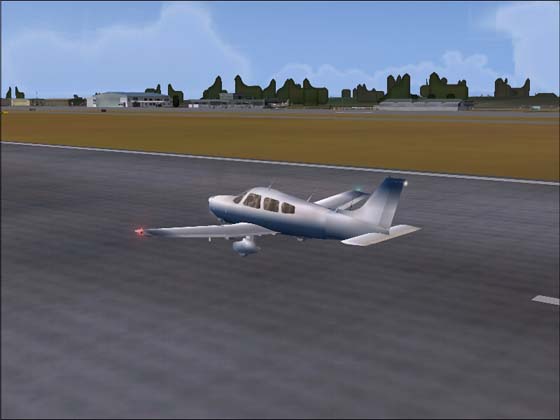

Image
Last edited by BFMF on Fri Feb 03, 2006 12:08 am, edited 1 time in total.
BFMF
Colonel
Colonel
 
Posts: 16266
Joined: Mon Feb 25, 2002 6:06 pm
Location: Pacific Northwest

Re: What causes this?

Postby legoalex2000 » Fri Feb 03, 2006 12:12 am

thats usually associated with bad graphics, the scenery is hogging up all the RAM, becuase of the bushes, the runway, AI, airport sccenery, etc....

but if your Gfx card is good, i couldn't tell you...

:)Ramos
legoalex2000
 

Re: What causes this?

Postby BFMF » Fri Feb 03, 2006 9:46 pm

Is there anything I can do about it?
BFMF
Colonel
Colonel
 
Posts: 16266
Joined: Mon Feb 25, 2002 6:06 pm
Location: Pacific Northwest

Re: What causes this?

Postby Saitek » Sat Feb 04, 2006 3:25 am

Slow loading times I guess. As Ramos said you must not have too much ram. Perhaps turning down the autogen might help?
WHat are you specs?
Windows 7 Pro 64bit
Intel Core 2 Duo E2180 2GHz
GA-P35-DS3L Intel P35
Kingston HyperX 4GB (2x2) DDR2 6400C4 800Mhz
GeForce 8800 GT 512MB
2 x 22" monitors
200GB Sata
Be Quiet! Straight Power 650W

Flying FS
Saitek
Lieutenant Colonel
Lieutenant Colonel
 
Posts: 5274
Joined: Thu Jun 19, 2003 3:04 pm
Location: UK

Re: What causes this?

Postby Jakemaster » Sat Feb 04, 2006 9:24 am

When I had this problem, it was on my integrated chip.  It was overheating.  I opened the PC one time, touched the chip.  It was burning hot.  
Jakemaster
 

Re: What causes this?

Postby BFMF » Sat Feb 04, 2006 10:40 am

Up untill now, I had only seen that happen with a few specific aircrafts. Right before I took that screenshot, I was getting relativily good frame rates too, so it wasn't like my system was being bogged down or anything???

As for my system specs....

Windows XP
AMD Athlon XP 3200+
512 MB of DDR PC2100 Ram
Nvidia GeForce FX 5900XT Video card
Last edited by BFMF on Sat Feb 04, 2006 10:41 am, edited 1 time in total.
BFMF
Colonel
Colonel
 
Posts: 16266
Joined: Mon Feb 25, 2002 6:06 pm
Location: Pacific Northwest

Re: What causes this?

Postby Saitek » Sat Feb 04, 2006 11:13 am

That ram is low isn't it? Is this a recent thing? Or is it ongoing? I'd prefer to see some more ram in there myself.
Windows 7 Pro 64bit
Intel Core 2 Duo E2180 2GHz
GA-P35-DS3L Intel P35
Kingston HyperX 4GB (2x2) DDR2 6400C4 800Mhz
GeForce 8800 GT 512MB
2 x 22" monitors
200GB Sata
Be Quiet! Straight Power 650W

Flying FS
Saitek
Lieutenant Colonel
Lieutenant Colonel
 
Posts: 5274
Joined: Thu Jun 19, 2003 3:04 pm
Location: UK

Re: What causes this?

Postby BFMF » Sat Feb 04, 2006 12:03 pm

Most of the core hardware in my system is low end hardware ;)

Due to some 'stuff', I'm not going to even bother upgrading or even re-building for a long time, so i'm making due with what I have ::)
Last edited by BFMF on Sat Feb 04, 2006 12:04 pm, edited 1 time in total.
BFMF
Colonel
Colonel
 
Posts: 16266
Joined: Mon Feb 25, 2002 6:06 pm
Location: Pacific Northwest


Return to FS 2004 - A Century of Flight

Who is online

Users browsing this forum: No registered users and 151 guests