
FS load up error

Forum dedicated to Microsoft FS2004 - "A Century of Flight".

FS load up error

Postby Saitek » Wed Jan 11, 2006 2:35 pm

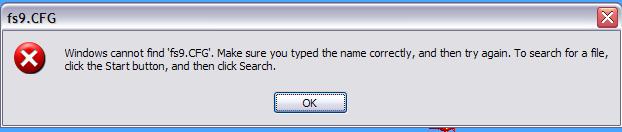
Here we are boys - how do I get rid of this little annoyance?

Cheers

Ben

Image
Windows 7 Pro 64bit
Intel Core 2 Duo E2180 2GHz
GA-P35-DS3L Intel P35
Kingston HyperX 4GB (2x2) DDR2 6400C4 800Mhz
GeForce 8800 GT 512MB
2 x 22" monitors
200GB Sata
Be Quiet! Straight Power 650W

Flying FS
Saitek
Lieutenant Colonel
Lieutenant Colonel
 
Posts: 5274
Joined: Thu Jun 19, 2003 3:04 pm
Location: UK

Re: FS load up error

Postby Papa9571 » Wed Jan 11, 2006 2:59 pm

What that message is telling you is your current default flight no longer exists.

All you have to do is change your default flight to something else.

That should take care of the problem.

If it doesnt preform the usual fix all....delete yoru FS9.cfg file and start FS9. It will rebuild the file with the program defaults.


Dave
User avatar
Papa9571
Captain
Captain
 
Posts: 614
Joined: Mon Feb 07, 2005 11:15 am
Location: Toledo, Ohio

Re: FS load up error

Postby Saitek » Wed Jan 11, 2006 3:08 pm

I thought so - I forgot about the FS9 cfg trick.  ::)
Windows 7 Pro 64bit
Intel Core 2 Duo E2180 2GHz
GA-P35-DS3L Intel P35
Kingston HyperX 4GB (2x2) DDR2 6400C4 800Mhz
GeForce 8800 GT 512MB
2 x 22" monitors
200GB Sata
Be Quiet! Straight Power 650W

Flying FS
Saitek
Lieutenant Colonel
Lieutenant Colonel
 
Posts: 5274
Joined: Thu Jun 19, 2003 3:04 pm
Location: UK

Re: FS load up error

Postby Saitek » Wed Jan 11, 2006 3:17 pm

Now my FS9 cfg has gone walkies! ::) :P

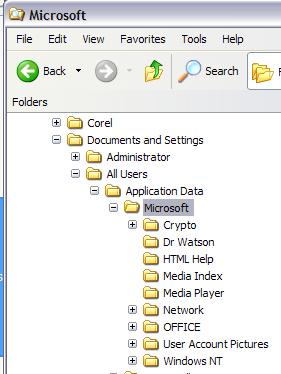
I have the hidden folder files ok button dealt with and I can't see it. It is even in the FAQ here and I checked - I'm in the right place!

Image
Windows 7 Pro 64bit
Intel Core 2 Duo E2180 2GHz
GA-P35-DS3L Intel P35
Kingston HyperX 4GB (2x2) DDR2 6400C4 800Mhz
GeForce 8800 GT 512MB
2 x 22" monitors
200GB Sata
Be Quiet! Straight Power 650W

Flying FS
Saitek
Lieutenant Colonel
Lieutenant Colonel
 
Posts: 5274
Joined: Thu Jun 19, 2003 3:04 pm
Location: UK

Re: FS load up error

Postby Papa9571 » Wed Jan 11, 2006 4:02 pm

Actually you should find it in two places.

Here is the first...

C:\Documents and Settings\**user name here**\Application Data\Microsoft\FS9

and here is the other

C:\Documents and Settings\**user name here**\Recent
User avatar
Papa9571
Captain
Captain
 
Posts: 614
Joined: Mon Feb 07, 2005 11:15 am
Location: Toledo, Ohio

Re: FS load up error

Postby Saitek » Wed Jan 11, 2006 4:55 pm

I can't find it in either.  ::)
Windows 7 Pro 64bit
Intel Core 2 Duo E2180 2GHz
GA-P35-DS3L Intel P35
Kingston HyperX 4GB (2x2) DDR2 6400C4 800Mhz
GeForce 8800 GT 512MB
2 x 22" monitors
200GB Sata
Be Quiet! Straight Power 650W

Flying FS
Saitek
Lieutenant Colonel
Lieutenant Colonel
 
Posts: 5274
Joined: Thu Jun 19, 2003 3:04 pm
Location: UK

Re: FS load up error

Postby Hagar » Wed Jan 11, 2006 5:00 pm

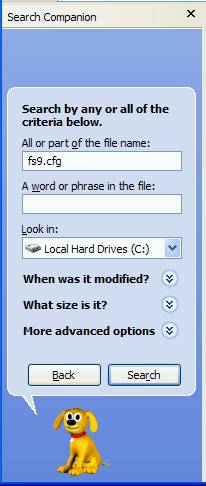
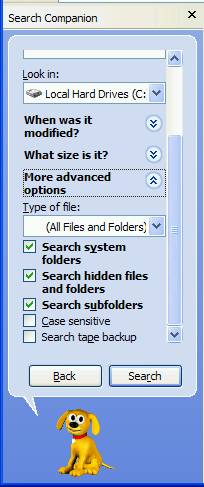
It must be there or FS9 wouldn't run at all. Do a search of your hard drive for fs9.cfg. Make sure the "Search hidden files & folders" box is checked from Advanced search options.
Image

Founder & Sole Member - Grumpy's Over the Hill Club for Veteran Virtual Aviators
Member of the Fox Four Group
My Google Photos albums
My Flickr albums
User avatar
Hagar
Colonel
Colonel
 
Posts: 30868
Joined: Wed Jun 19, 2002 7:15 am
Location: Costa Geriatrica

Re: FS load up error

Postby Saitek » Wed Jan 11, 2006 5:03 pm

Just finished a lovely flight 10 minutes ago - so I know it is somewhere on the 'puter! ::)

The search said this:

Image

EDIT: PLus I also tried the .cfg as well as .CFG
Last edited by Saitek on Wed Jan 11, 2006 5:04 pm, edited 1 time in total.
Windows 7 Pro 64bit
Intel Core 2 Duo E2180 2GHz
GA-P35-DS3L Intel P35
Kingston HyperX 4GB (2x2) DDR2 6400C4 800Mhz
GeForce 8800 GT 512MB
2 x 22" monitors
200GB Sata
Be Quiet! Straight Power 650W

Flying FS
Saitek
Lieutenant Colonel
Lieutenant Colonel
 
Posts: 5274
Joined: Thu Jun 19, 2003 3:04 pm
Location: UK

Re: FS load up error

Postby Hagar » Wed Jan 11, 2006 5:18 pm

Did you check that Advanced search option?

Image Image
Image

Founder & Sole Member - Grumpy's Over the Hill Club for Veteran Virtual Aviators
Member of the Fox Four Group
My Google Photos albums
My Flickr albums
User avatar
Hagar
Colonel
Colonel
 
Posts: 30868
Joined: Wed Jun 19, 2002 7:15 am
Location: Costa Geriatrica

Re: FS load up error

Postby Saitek » Thu Jan 12, 2006 1:41 pm

Thanks Doug - I found it in the end, deleted it and bobs my uncle - everything is fine. ;D
Windows 7 Pro 64bit
Intel Core 2 Duo E2180 2GHz
GA-P35-DS3L Intel P35
Kingston HyperX 4GB (2x2) DDR2 6400C4 800Mhz
GeForce 8800 GT 512MB
2 x 22" monitors
200GB Sata
Be Quiet! Straight Power 650W

Flying FS
Saitek
Lieutenant Colonel
Lieutenant Colonel
 
Posts: 5274
Joined: Thu Jun 19, 2003 3:04 pm
Location: UK


Return to FS 2004 - A Century of Flight

Who is online

Users browsing this forum: No registered users and 387 guests