Page 1 of 2

Screenshots`

PostPosted: Fri Jan 06, 2006 10:14 pm
by gijake
I was wondering what is the best settings for taking good screenshots.  Thanks, Jake

Re: Screenshots`

PostPosted: Fri Jan 06, 2006 10:16 pm
by BFMF
Settings all the way up? ;)

Re: Screenshots`

PostPosted: Fri Jan 06, 2006 10:17 pm
by Papa9571
The higest resoultion your graphics card can handle is usually the best unless you are concerned about frame rates.

Re: Screenshots`

PostPosted: Fri Jan 06, 2006 10:22 pm
by gijake
what I really want is to take away the jaged, pixley edges on my plane

Re: Screenshots`

PostPosted: Fri Jan 06, 2006 10:27 pm
by Papa9571
That is usually taken care of by anti-alias. See if it is set as part of your graphic options on your card. If not there is a hardware setting for it in FS9.

Press the alt key after FS9 has started. This will bring up a menu bar at the top of ypur screen. Go to options, display, and make any necessary changes there.

Re: Screenshots`

PostPosted: Fri Jan 06, 2006 10:32 pm
by gijake
should that be on or off?

Re: Screenshots`

PostPosted: Fri Jan 06, 2006 10:39 pm
by Papa9571
It should be on. That will help smooth put those edges

Re: Screenshots`

PostPosted: Fri Jan 06, 2006 11:24 pm
by gijake
its still sharp (in the bad way :( )

Re: Screenshots`

PostPosted: Fri Jan 06, 2006 11:37 pm
by TacitBlue
Is your screen resolution set to 32bit? for example, if you wanted 1024x768, then you should select the one on the list that says 1024x768x32 instead of x16. I'm not at all sure if that is your problem, it's just one theory. The only other thing I can think of is that maybe your video card actually can't do anti-alaising. What kind of vid card are you running?

Re: Screenshots`

PostPosted: Sat Jan 07, 2006 7:15 am
by Alphajet_Enthusiast
Make sure your screen is set to a high resolution and that the colour is 32Bit, not 16Bit.
Screen resolution is amongst the most important factors in eliminating jaggies.
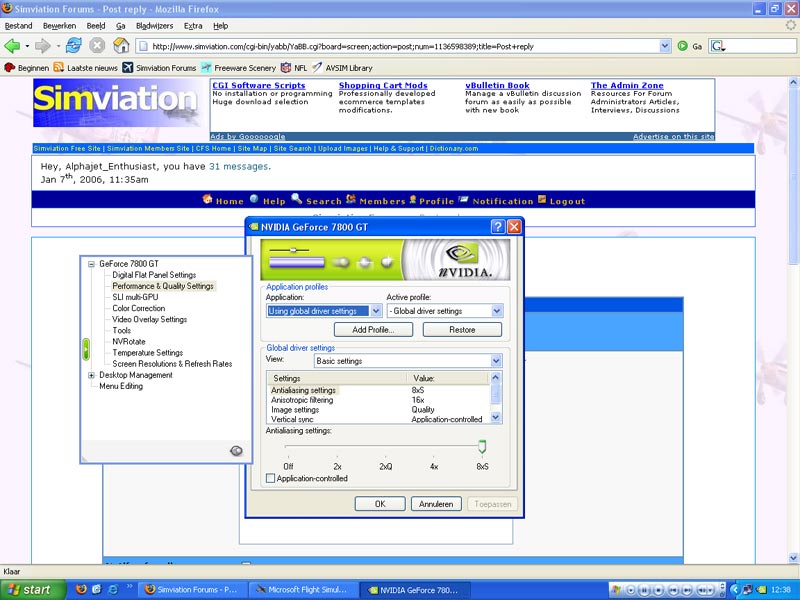
Then, also turn on anti-aliasing on your video card.

Image

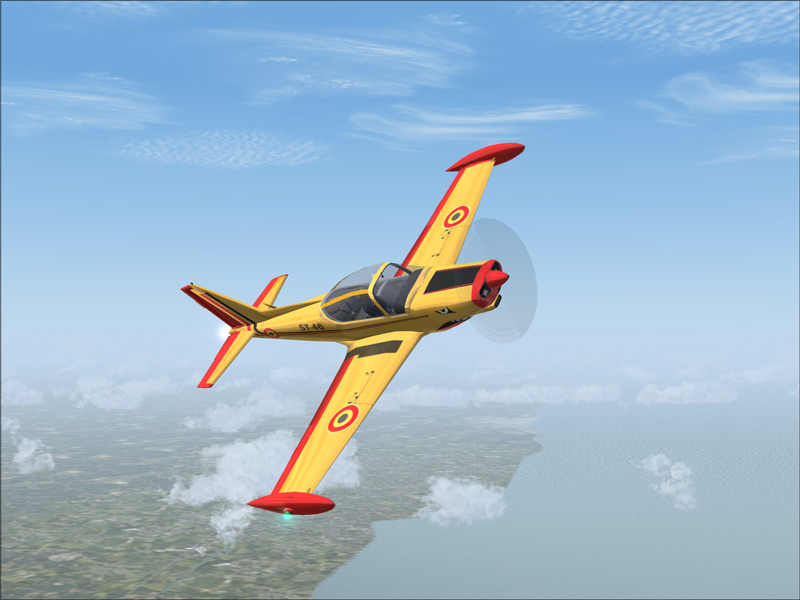
Another tip, having a low colour contrast in your shots will have directly proportional effects on the size of your image and hence also improves the quality you can make them. When there is low contrast you can get the shots really crisp.

Image

No Jaggies whatsoever. Also, I have my antisotrophic filtering turned up to 16x (although not all video cards have this) and also I have the AA turned on in the game, just in case.

Makes for some pretty clear screenies...  :)

Re: Screenshots`

PostPosted: Sat Jan 07, 2006 8:59 am
by KDSM
That shot has got to be more than 100k

Re: Screenshots`

PostPosted: Sat Jan 07, 2006 9:40 am
by Gunny04
No its actually 91..... I'll be damned, somebody perfected good shots at low kilos! Amazing! Cheers, Gunny

Re: Screenshots`

PostPosted: Sat Jan 07, 2006 9:54 am
by C
That shot has got to be more than 100k


Generally, shots with lots of sky are easy to get below 100K

Re: Screenshots`

PostPosted: Sat Jan 07, 2006 10:09 am
by Hagar
That shot has got to be more than 100k

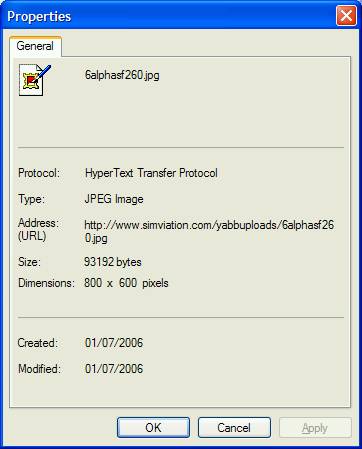
It's easy enough to find out. Right-click on the image & select Properties. As you can see Alphajet's shot is within the forum limit.

Image

Re: Screenshots`

PostPosted: Sat Jan 07, 2006 4:24 pm
by Alphajet_Enthusiast
Thanks, yeah Charlie has a point when theres a lot of sky (ie low colour contrast) you can get smaller filesizes.
Obviously photoshop is also very gentle on quality preservation when resizing.
My shots arent ever over 100k, otherwise they wouldnt be legal here!  ;) ;D