Page 1 of 2

Help - Lost default gauges

PostPosted: Mon Nov 28, 2005 5:17 pm
by woody2
Lost my cabinet folders for the 737 and 777. When I locate them on the discs, they are not in the same format and can't open them back up into cabinet format.
???

Does anyone know how to retrieve them ?

I don't want to reinstall the game if I can help it.

Thanks in hope !

Neil

Re: Help - Lost default gauges

PostPosted: Mon Nov 28, 2005 6:20 pm
by GA_Pilot
They should be on one of the discs, but I am not sure which one, maybe someone else knows...... ???

Re: Help - Lost default gauges

PostPosted: Mon Nov 28, 2005 6:21 pm
by Hagar
Hi Neil. The gauges are in MSGame3.cab on one of the CDs. I can't remember which one without checking myself. If you're using WinXP you can open CAB files by double-clicking on them. It should then be possible to copy the CAB gauges & paste them into FS9\gauges in the usual way. Don't open or extract the CAB gauges.

Alternatively, extract MSGame3.cab to a Temp folder on your HD. Then open the extracted folder & move them from there.

PS. Files on the CD might not have the same icons as when they're on your HD.

Re: Help - Lost default gauges

PostPosted: Tue Nov 29, 2005 10:25 am
by commoner
Hi Woody...not sure just what you are looking for. but neither my HD or discs seem to contain 737 or 777 cab files

Re: Help - Lost default gauges

PostPosted: Tue Nov 29, 2005 12:38 pm
by Hagar
[quote]Hi Woody...not sure just what you are looking for. but neither my HD or discs seem to contain 737 or 777 cab files

Re: Help - Lost default gauges

PostPosted: Tue Nov 29, 2005 1:55 pm
by commoner
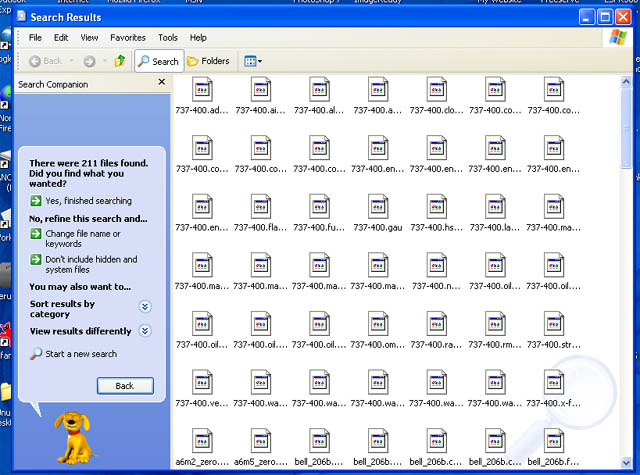
...Yes Hagar they are in MSGame3.cab on disc2...They won't show by just opening the cab even though I have "show hidden files " checked.....the only way I could get to see them (and copy them off there) was to Start/Search the disc for "".gau files or "".cab files depending on which you want and working from there... Funny thing though they don't seem to be drag and droppable (or copy and pastable)  
except singly, which is a bit tedious if you want the whole lot....over 200 files..........commoner.

Re: Help - Lost default gauges

PostPosted: Tue Nov 29, 2005 3:02 pm
by Hagar
[quote]...Yes Hagar they are in MSGame3.cab on disc2...They won't show by just opening the cab even though I have "show hidden files " checked.....the only way I could get to see them (and copy them off there) was to Start/Search the disc for "".gau files or "".cab files depending on which you want and working from there... Funny thing though they don't seem to be drag and droppable (or copy and pastable)

Re: Help - Lost default gauges

PostPosted: Tue Nov 29, 2005 4:00 pm
by woody2
:)
Thanks guys.

I lost the gauges somehow (probably through my gauge removal program). The gauge links in the panel file for my 737 default looked the same as the 747 which has a cabinet file. Now I know that the 737 gauges aren't kept in a cabinet, I am Ok copying them over. Panic over I think !!!!

Thanks again for all your help.

neil

Re: Help - Lost default gauges

PostPosted: Tue Nov 29, 2005 4:18 pm
by Hagar
:)
Thanks guys.

You're welcome. A picture (screenshot in this case) is worth more than 1,000 words. ;)

I lost the gauges somehow (probably through my gauge removal program).

If this is the case I would dump that gauge removal utility PDQ. Unless you're short of HD space, unused gauges will do no harm left where they are & I see no benefit in removing them.

Re: Help - Lost default gauges

PostPosted: Tue Nov 29, 2005 4:18 pm
by woody2
Yep, now reinstalled and working fine.

Cheers

Re: Help - Lost default gauges

PostPosted: Wed Nov 30, 2005 4:14 am
by commoner
Hi Woody, glad you got it sorted......like to just answer Hagar here.....

Hi Hagar that looks simple and was exactly what I expected to happen on my PC.............it's as things SHOULD be, BUT as you know things aren't always as you think they are going to be in this computing business....

..Firstly my pc came with Win XP installed and no disc but a seperate partition containing all the recovery stuff......looking at the "tree" it appears that the DVD drive is also on that partition, or so it looks to me. Why that is I have no idea..........but it makes my structure different to "normal".

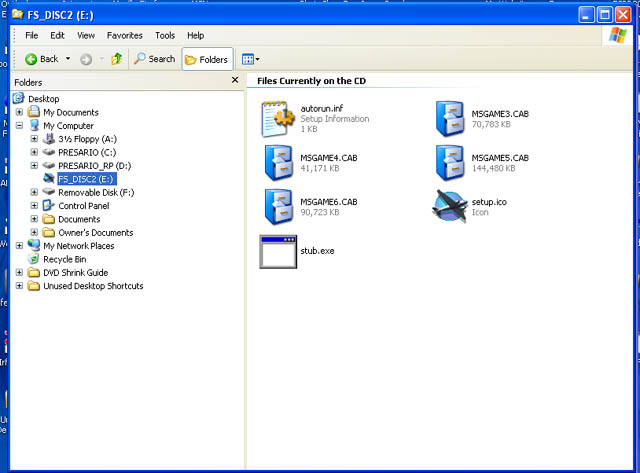
Anyway Hagar here are some pics to compare to yours........


Image


Image


Image


Image


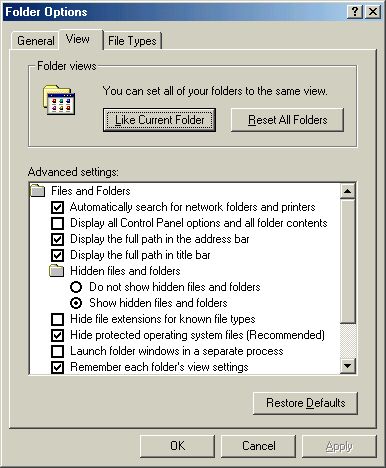
....first three compare to yours and last one is a "search" of the CD which is my way of retreiving them........note the files on the third pic with names like coast etc but no .gau files..........any comments  ???appreciated

Re: Help - Lost default gauges

PostPosted: Wed Nov 30, 2005 5:07 am
by Hagar
Hi Commoner. I'll make this quick as I don't have much time. To answer your last question please read my Windows Basics & Working with Windows articles from the link to my Lair in my sig. From what I've seen so far WinXP is not as different from Win98/Me as some people make out. A lot will depend on how you set the Preferences & various options. These apply to WinXP as for any other version of Windows.

For example: Open any folder in My Computer or Windows Explorer & right-click in an empty space.
Select View/List from the drop-down menu.
From Tools/Folder Options on the Menu Bar, click the View tab & make sure the options are set like those in the shot below. Disable the Hide file extensions for known file types option by unchecking the box.
Image

This will change your display to show the full file names complete with file extensions.

Re: Help - Lost default gauges

PostPosted: Wed Nov 30, 2005 7:16 am
by commoner
Hi Hagar...seems that things aren't the same in WinXP ...the folder options screen as you can see is not the same...some differences there.....still, I've been using Win XP for almost two years now and am used to working things "my way" as the song goes.........thanks for the input......cheers...commoner.  ;)

Image

Re: Help - Lost default gauges

PostPosted: Wed Nov 30, 2005 7:20 am
by beaky
For what it's worth at this point, I had the same problem, and running XP, I was able to open the cab folder like any other zipped folder and copy/paste the files normally.

Re: Help - Lost default gauges

PostPosted: Wed Nov 30, 2005 7:50 am
by Hagar
[quote]Hi Hagar...seems that things aren't the same in WinXP ...the folder options screen as you can see is not the same...some differences there.....still, I've been using Win XP for almost two years now and am used to working things "my way" as the song goes.........thanks for the input......cheers...commoner.