Page 1 of 1
What's this stuff?

Posted:
Thu Nov 17, 2005 11:00 amby FridayChild
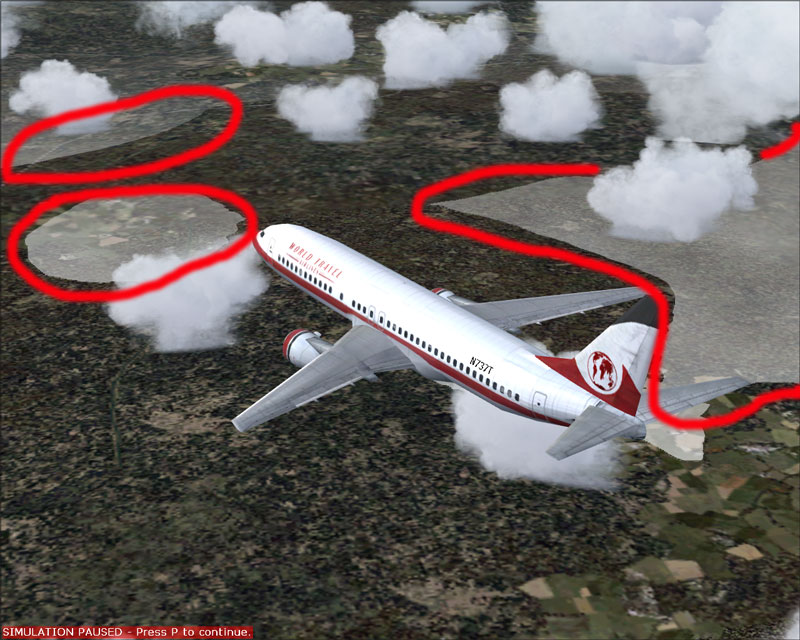
I keep getting this. Look at the areas marked in red. Their borders are frantically shivering. It's horrible.... what causes this issue and how do I try to kill it?
Re: What's this stuff?
Posted:
Thu Nov 17, 2005 11:05 amby TSC.
Looks like low cloud to me, have a look in your advanced weather settings & see what your cloud base is set at (compared to the altitude of the land you are flying over).
Cheers,
TSC.
Re: What's this stuff?
Posted:
Thu Nov 17, 2005 11:17 amby FridayChild
I too think it's a low cloud layer, but it's just horrible! The upper layers are good. How come?
Re: What's this stuff?
Posted:
Thu Nov 17, 2005 11:33 amby TSC.
They are two different types of clouds - if you look in your advanced weather settings you will see two boxes (one blue, one yellow) clicking on each one of these boxes will tell you what type of cloud each box represents. See below:
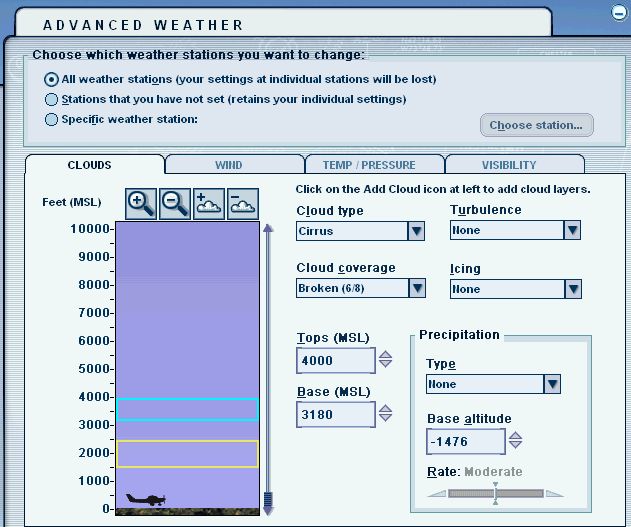
You can also adjust the altitude & the thickness of each cloud layer by dragging or stretching the appropriate box with your mouse cursor. You can have these layers set too any altitude you desire - I have only put them next to each other on my pic to show you what they look like.
Adjust the lower cloud layer by changing it's altitude & also the type of cloud it is.
Cheers,
TSC.
Re: What's this stuff?
Posted:
Thu Nov 17, 2005 11:55 amby Ijineda
I know those! its not the clouds but the visibility. in the advanced weather settings, go to visibility and rise the upper level some 1000 to 2000 foot...this should do.
Re: What's this stuff?
Posted:
Thu Nov 17, 2005 12:19 pmby FridayChild
The problem is that I normally fly with real world weather (Jeppesen). As soon as I switched to custom weather, the nasty effects disappeared, and I wasn't able to modify the single settings to detect the one giving problems.
In all cases, I like to fly with real weather, so I'm stuck, it seems. I wonder why there is a setting, be it visibility or cloud density/type, so ugly looking. Looks like a FS bug or a driver issue. Ijineda, what are your system specs?
Re: What's this stuff?
Posted:
Thu Nov 17, 2005 1:10 pmby Ijineda
Pentium IV, 2.66 GHz, NVidia GeForce 440MX, 128 RAM (upgrade already scheduled! ;))
I dont think its a bug, its simply a point where we hopefully can expect better from fs10. I know there is a fix for these "things" as you call them somewhere in the internet...you may try your chance at avsim.
And I believe that you still can fly with real weather: after downloading the weather just click on user defined weather; the weather is still the same you downloaded, but you are able to adjust things now.
Re: What's this stuff?
Posted:
Thu Nov 17, 2005 3:41 pmby beaky
Pentium IV, 2.66 GHz, NVidia GeForce 440MX, 128 RAM (upgrade already scheduled! ;))
And I believe that you still can fly with real weather: after downloading the weather just click on user defined weather; the weather is still the same you downloaded, but you are able to adjust things now.
Correct-a-mundo... but when the weather updates (if you've selected that) you have to fix it again.
FS is just not very good at portraying "fog" as seen from above.. you get those hard lines where the area of poor vis. bumps into terrain.
I've seen this effectt even while within such a low layer, where terrain is rising above me. There's a very definite line.
Re: What's this stuff?
Posted:
Fri Nov 18, 2005 1:03 amby Ridge_Runner_5
The low level fog clouds are one of the few reasons I have gotten Bluesphere textures...they clean up the edges and make it a bit more transparent...makes it look a lot cleaner, and the shimmer is more or less gone...