Page 1 of 2
Visibility issue

Posted:
Sun Nov 13, 2005 10:22 amby VOHY_VO0I
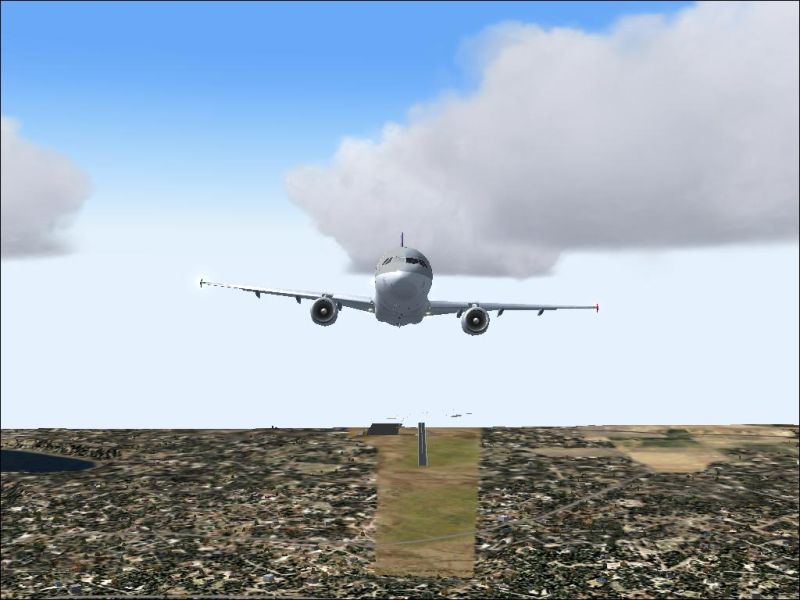
Hope you people have guessed what my problem is by looking at the picture........

Here, the visibility is set to 2 miles and instead of fog covering the scenery, the whole scenery is disappearing. As i fly the scenery gets chopped and this includes the runway (as shown in the pic).
I've experimented with the weather and noticed that when i'm in the visibility layer (between base and top) only then this problem arises.
I never had this problem before and now all of a sudden this happens. I'm really worried :'(
Any help/suggestions.......

Re: Visibility issue
Posted:
Sun Nov 13, 2005 11:32 amby beefhole
What are your specs? (very important here)
Re: Visibility issue
Posted:
Sun Nov 13, 2005 11:47 amby VOHY_VO0I
What are your specs? (very important here)
AMD Athlon XP 2000+
768 MB RAM
290 GB Hard Disk
256 MB ATI Radeon 9250 AGP card
DirectX 9.0
........etc
As i said, i never had this problem before and in less visibility (like 2 miles) the secnery was covered in fog.
I don't suspect a hardware issue for a problem of this sort. Maybe something responsible within FS........i'm guessing
Re: Visibility issue
Posted:
Sun Nov 13, 2005 11:48 amby Delta_
Have you tried the latest drivers for your card?
See my sig for a link to Catalyst 5.11 Official ATI drivers.

Re: Visibility issue
Posted:
Sun Nov 13, 2005 11:54 amby AuMaV
Hi
You could try adding a TableFog=0 to your fs9.cfg add it to the [DISPLAY.Device."Your video card type" .0] section
If that duznt fix it then it could be a few other things like cloud textures wrong format or missing,video card drivers and or directx drives not installed properly and or corrupt
Cheers
Wozza
ps just saw ya latest post yep pretty sure the table fog entry will fix ya prob its a common problem with your type of video card
Re: Visibility issue
Posted:
Sun Nov 13, 2005 12:02 pmby VOHY_VO0I
Have you tried the latest drivers for your card?
See my sig for a link to Catalyst 5.11 Official ATI drivers.
Yes, i got the latest drivers but not the one with "With Catalyst Control Center" at the download site. I'm currently downloading that.
Lets see whether it solves the problem........

Thanks
Re: Visibility issue
Posted:
Sun Nov 13, 2005 12:07 pmby wji
"Have you tried the latest drivers for your card?"
May I suggest using the 'best' drivers as opposed to the latest. The two are not always the same; e.g., Asus G4Ti4200 older drivers work best.
My Fs9 runs perfectly with every slider maxed and without the 'latest' videocard drivers
Re: Visibility issue
Posted:
Sun Nov 13, 2005 12:22 pmby VOHY_VO0I
[quote]
You could try adding a TableFog=0 to your fs9.cfg add it to the [DISPLAY.Device."Your video card type"
Re: Visibility issue
Posted:
Sun Nov 13, 2005 2:42 pmby RollerBall
Hmmm...
I've posted this quite a few times and nobody has yet proven me wrong. Let's try again.
IMO it's a waste of time constantly changing your drivers for the 'latest' ones from your card manufacturer. As drivers are now 'bundled' for all the cards sold by that manufacturer, all that they contain is extra driver coding for cards introduced since your one. Hence .... more code .... bigger programs ... run slower. In the benchmark tests I've done recently with my own card this was indeed the case.
So unless the new drivers are described by the manufacturer as correcting specific problems that affect your actual model card, leave em alone. You are likely to get no benefit - and may indeed get a worse performance.
I found this specifically with an older card I had, a GeForce 3 Ti. It worked well for its generation and still does. However, when I upgraded to newer nVidia drivers I had major panel graphics problems and not only that, with the latest drivers at the time, the aircraft didi not appear in the bottom panel of the 'select aircraft' panel.
You can only pass on advice based on experience in these forums. It's up to other people to decide whether they follow it or not.... ;)
Re: Visibility issue
Posted:
Sun Nov 13, 2005 8:26 pmby MattNW
I have to agree with Roller Ball. New driver releases don't always provide better funciton. Often a new release is only to add support for new features like display resolution or monitor size etc.
Unless a driver release is supposed to fix a problem you have or was specifically released for improved performance you won't get much benefit and of course there's a chance of messing something up in the installation. Driver cleaners can help but still it's not always the best thing to have the latest drivers.
Re: Visibility issue
Posted:
Mon Nov 14, 2005 12:27 amby VOHY_VO0I
Ok, i uninstalled all the recent drivers of my video card (guessing that would have caused the problem) and still nothing.
One more thing i noticed was that the scenary disappears only if the visibility is 2 miles or greater. If the visibility is set to 1 mile or less i get the fog, but above that range i don't get fog and the secnery disappears.
This is weird :P
Any other ideas/suggestions

Re: Visibility issue
Posted:
Mon Nov 14, 2005 8:38 amby garymbuska
If you have not changed the textures for clouds or in this case fog. then this problem may be unique to your system for one reason or another. I have found that sometimes if you alter the cloud textures in any way they might not display correctly in all visability ranges due to video card limits are amount of RAM or other things that effect graphic displays.
Make sure you have not added any new textures for clouds. And if you have the orignal disk for the drivers for your video card make sure that they are the ones you are using.
But it sounds to me like for one reason or the other that your video card is having a problem with that setting. In order to make the fog visable at that range you might have to change slider setting.
Re: Visibility issue
Posted:
Tue Nov 15, 2005 12:49 amby VOHY_VO0I
Alright............ i have identified the problem but yet to find the solution.
The problem is with my newly installed 256 mb ATI Redeon AGP card. I removed the card and then started FS2004 (running it with the 32 mb card provided in the motherboard) and that works fine and there is no chopping of scenery at any visibility level.
Here's the screenshot of the same scenery taken at 3 miles visibility without the ATI card.
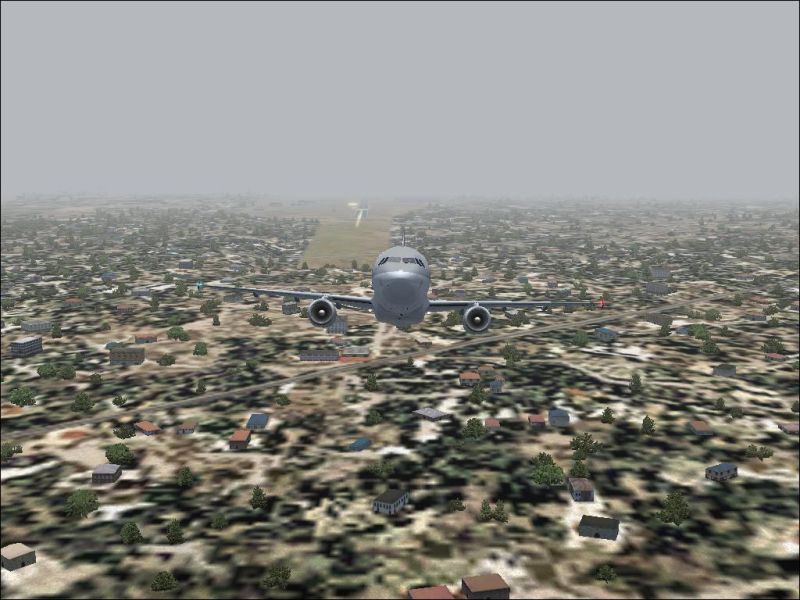
The sad news is that i have yet to find a solution for the problem with my new video card. I tried running the game without the latest drivers and the problem still arises, and after installing the latest drivers there is still no change.
So what can i do now, should i write to ATI and inform them about this problem? Or is there a fix someone has already found??
Re: Visibility issue
Posted:
Tue Nov 15, 2005 12:08 pmby garymbuska
AS STATED HERE IN THE POSTS THE LATEST DRIVERS MIGHT NOT BE THE ONES YOU WANT.
I would advise you to use the drivers that came with the board and not THE LATEST DRIVERS. THAT IS MORE OR LIKELY THE REASON FOR THE PROBLEM THE LATEST DRIVERS ARE CAUSING YOUR VIDEO CARD TO HAVE ISSUES.
9 out of ten times updates are for cards that were relased after yours was. If you use these drivers it can create problems for your card since it is using a different GPU or is not capeable of handling the code in the updated driver so the card is defaulting to some unknown preset value.

As others have stated here the latest drivers are not always better than the ones you have.
Unless the updated drive is designed for your board or model I would not update. Just read the readme file that comes with all updates to see if it is for your card.
Re: Visibility issue
Posted:
Wed Nov 16, 2005 12:07 amby VOHY_VO0I
Garymbuska thanks,
But the problem is not with the latest drivers but with the card itself. As i have mentioned even without the lastest drivers installed (i.e., using the drivers that came along with the card on a CD) also causes the problem.
I have tried the game 'without' the latest drivers and then 'with' the latest but there is no difference.
Also, the updates are for my series of card.
It's a problem with my card what else can i do ???