Page 1 of 2
Cannot get aircraft into FS9.

Posted:
Sat Nov 05, 2005 3:30 pmby timothy
FS 9 will not list aircraft.
Once again I am tearing my hair out trying to get a downloaded aircraft flying in my FS 9 running with XP. I had the same trouble with a downloaded Chinook helicopter which I have, reluctantly , now given up on.
On one of the FlightSim sites a Mosquito aircraft was listed on Freeware which I have downloaded. It has a folder named MOMKIN. UNzipped the aircfaft folder was dragged into my aircraft folder and had sub folders Model, Panel, Sound and Texture along with aircraft .cfg in Notepad and an .air file.
So will the damned thing open in my Flight Sim ? No.
What I fail to understand with this sort of problem is that the folders are all there in Explorer, yet will not run in FS9.
I have downloaded a Supermarine Spitfire which works fine and a Hercules, but the difference was that they were AutoInstall.
I suppose there is something fundamental I am not doing, or not doing correctly. I have checked it is not under one of the other makers name.Anyone any ideas please ?
Re: Cannot get aircraft into FS9.
Posted:
Sat Nov 05, 2005 4:19 pmby ozzy72
Just follow this tutorial
http://www.simviation.com/acinstall.htm and you'll be fine

Re: Cannot get aircraft into FS9.
Posted:
Sun Nov 06, 2005 3:55 amby commoner
...Hi Timothy....it could be something as simple as a typo but if you care to give the exact download and from which site I am sure someone if not me would have a much better idea of what the problem is..........commoner
Re: Cannot get aircraft into FS9.
Posted:
Sun Nov 06, 2005 7:48 amby Staiduk
....and just as a followup; you posted:
I have downloaded a Supermarine Spitfire which works fine and a Hercules, but the difference was that they were AutoInstall.
Don't trust autoinstall features. You're far better off to let it autoinstall to a temporary location and complete the installation manually. I know that sort of seems backwards at the moment; but trust me on this one:
always put addons into FS9 manually.

Re: Cannot get aircraft into FS9.
Posted:
Sun Nov 06, 2005 10:30 amby timothy
Hello, Thanks for these replies. I have downloaded the file and it went as instructed to My Documents and in my FS folder. I then opened this up and transferred the aircraft folder MOMKIV to the FS9 Aircraft folder in IE. The structure in my IE is in the Aircraft drop down has Folder for : plus sign Lockeed Vega, underneath plus sign md83,
underneath plus sign MOMKIV and then sub folders minus MOMKIV, minus MOMKIV, minus MOMKIV, Model, Panel,Sound, Texture. So I guess that is incorrect although how it has come about I do not know. So, O knowledgeable ones, what do I do now ? !
I have printed and read thoroughly the Installation file mentioned which is excellent and has given me an insight into the FS9 structure.
Thanks for your time, I will get there eventually.
Re: Cannot get aircraft into FS9.
Posted:
Sun Nov 06, 2005 10:32 amby timothy
Just had an afterthought, I downloaded this from this site, it was in a section labeled I think Vintage.
Re: Cannot get aircraft into FS9.
Posted:
Sun Nov 06, 2005 3:24 pmby Hagar
[quote]Hello, Thanks for these replies.
Re: Cannot get aircraft into FS9.
Posted:
Sun Nov 06, 2005 4:12 pmby Hagar
I've just tracked down your Mosquito. It extracts just as you described - like this.
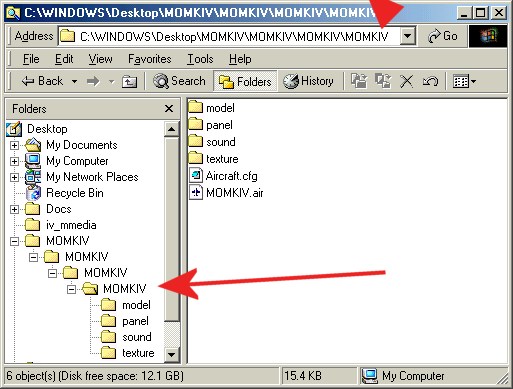
I've marked the Aircraft Container folder with a big red arrow. This is the folder to paste into FS9\Aircraft. It should be listed on the selection menu under DeHavilland as Manufacturer.
Re: Cannot get aircraft into FS9.
Posted:
Mon Nov 07, 2005 4:05 amby commoner
...when you have done as Hagar says and go to fly the aircraft you will find as I did that the wing leveller comes on with the Autopilot. and you can't steer....either click the heading hold on and off or do the following..
Add the following lines in the Autopilot section of the aircraft.cfg file for each airplane you want to change.....
use_no_default_bank=1
use_no_default_pitch=1
cheers...commoner
Re: Cannot get aircraft into FS9.
Posted:
Mon Nov 07, 2005 3:18 pmby timothy
Right oh, thanks to you folks.
I have printed all this off and I will have a go again.
I couldn't ask for clearer instructions.
Many thanks.
Timothy.
Re: Cannot get aircraft into FS9.
Posted:
Mon Nov 07, 2005 7:51 pmby Hagar
OK. Good luck. It's easy once you understand the basic principle. Take my tip & use the right-click Cut & Paste options rather than Drag & Drop to move those folders.
Re: Cannot get aircraft into FS9.
Posted:
Thu Nov 10, 2005 3:30 pmby timothy
Hello, here I am again !
I have exactly the same structure as the above from Hagar, but to no avail. I have the original zip file still in My Documents and Ihave created a new folder in My Documents and downloaded it to there. Then I brought up the Start> Explore>FS9 and file structure in IE and dragged the folder to the Aircraft folder. This didn
Re: Cannot get aircraft into FS9.
Posted:
Thu Nov 10, 2005 3:43 pmby Hagar
I can only assume you didn't understand what I told you or you pasted it into the wrong folder. This is how the Mossie looks in my FS9\Aircraft folder. If yours is the same I can think of no reason why it won't work.
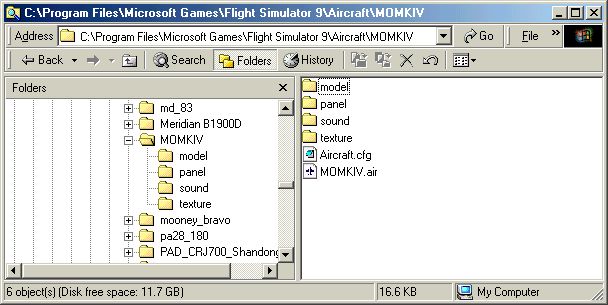
Whenever in doubt, compare your new aircraft with one of the FS9 (flyable) defaults as shown in the installation tute. All aircraft are basically the same although some might have a few more texture folders & text files.
Re: Cannot get aircraft into FS9.
Posted:
Fri Nov 11, 2005 3:21 pmby timothy
OK thanks. Yes mine is the same as your IE. Will just have to go without on this one. Thanks for your help anyway.
Re: Cannot get aircraft into FS9.
Posted:
Fri Nov 11, 2005 3:40 pmby Hagar
If you give up now you will never find out how it's done. I suggest you delete that MOMKIV folder from FS9\Aircraft & start again from the beginning.
PS. Wait a minute. Silly me.

I just realised that the sound of the Mossie is aliased to the FS2002 default Corsair which you won't have in FS9. Find Sound.cfg in the Sound folder of the Mosquito & open it in Notepad. Change it from this:
[fltsim]
alias=F4U1A_CORSAIR\sound
To this:
[fltsim]
alias=c182\sound
Exit Notepad saving changes when prompted. It won't sound right but it should now be selectable. We can fix the sound later.