loadin up scenery

Forum dedicated to Microsoft FS2004 - "A Century of Flight".

loadin up scenery

Postby MCFC » Sat Oct 29, 2005 11:36 am

still stuck wif scenery n ideas of the problem  ???
User avatar
MCFC
Ground hog
Ground hog
 
Posts: 17
Joined: Fri Oct 28, 2005 9:58 am

Re: loadin up scenery

Postby Saitek » Sat Oct 29, 2005 1:11 pm

You really are new to FS. ;)
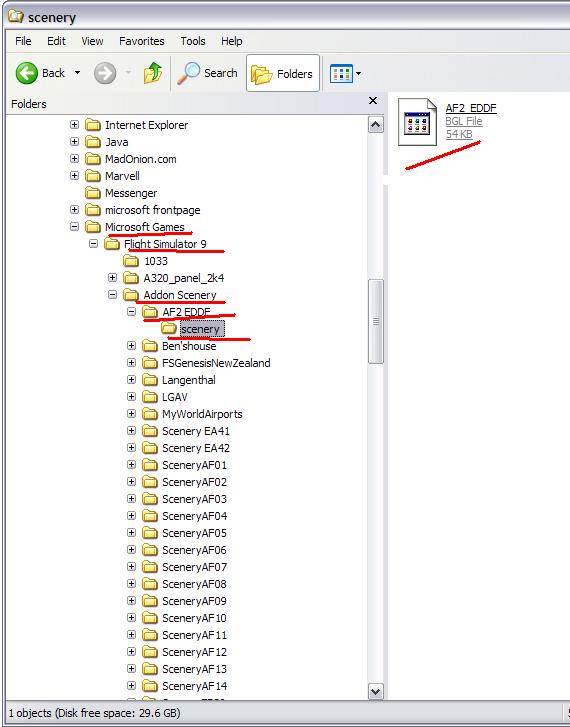
Add your scenery to a folder such as I have. You must have it as follows:

Scenery's namescenery/(a BGL file)

Here we have Microsoft games/Flight simulator 9/Addon Scenery/AF2 EDDF/scenery/(BGL file)


Image
Windows 7 Pro 64bit
Intel Core 2 Duo E2180 2GHz
GA-P35-DS3L Intel P35
Kingston HyperX 4GB (2x2) DDR2 6400C4 800Mhz
GeForce 8800 GT 512MB
2 x 22" monitors
200GB Sata
Be Quiet! Straight Power 650W

Flying FS
Saitek
Lieutenant Colonel
Lieutenant Colonel
 
Posts: 5274
Joined: Thu Jun 19, 2003 3:04 pm
Location: UK

Re: loadin up scenery

Postby Saitek » Sat Oct 29, 2005 1:16 pm

Now go to the simulator....
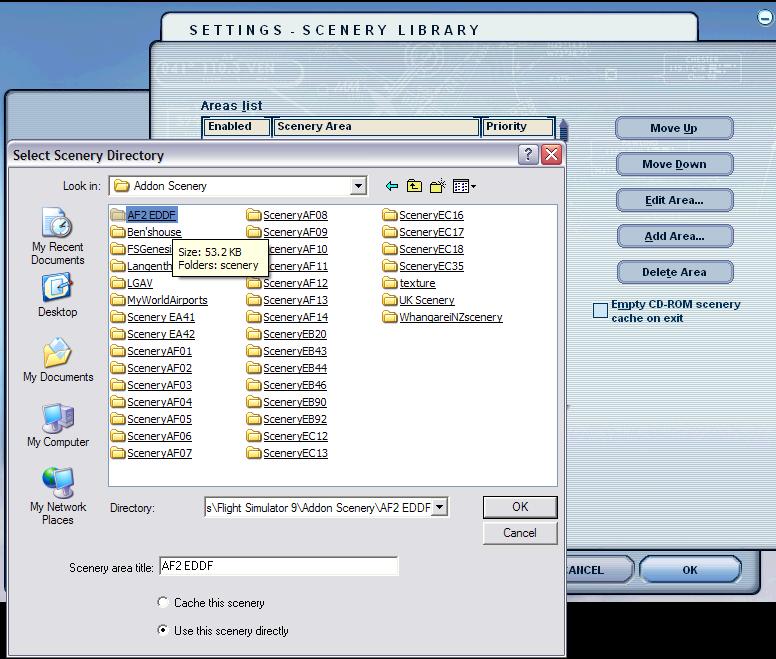
Go to settings, then scenic library and then add area. You'll get this. Find your area and add it. Once you have selected the folder you must click it to bring up the scenery folder. Click ok and restart the sim. 8)

Image
Windows 7 Pro 64bit
Intel Core 2 Duo E2180 2GHz
GA-P35-DS3L Intel P35
Kingston HyperX 4GB (2x2) DDR2 6400C4 800Mhz
GeForce 8800 GT 512MB
2 x 22" monitors
200GB Sata
Be Quiet! Straight Power 650W

Flying FS
Saitek
Lieutenant Colonel
Lieutenant Colonel
 
Posts: 5274
Joined: Thu Jun 19, 2003 3:04 pm
Location: UK

Re: loadin up scenery

Postby MCFC » Sat Oct 29, 2005 2:23 pm

thanks mate got it all sorted ;D
User avatar
MCFC
Ground hog
Ground hog
 
Posts: 17
Joined: Fri Oct 28, 2005 9:58 am


Return to FS 2004 - A Century of Flight

Who is online

Users browsing this forum: No registered users and 205 guests