Page 1 of 2

CPU's On Constant Overdrive/ Normal?

PostPosted: Wed Oct 12, 2005 4:20 pm
by Clipper
Hello again y'all, it's Wednesday, so it must be time for an FS9 glitch... ;)
I've come up with yet another aggrevating situation when running FS9. I don't know if you recall, but a couple of weeks ago I mentioned that my fs9 was stuttering after months of super smooth flying.. I still haven't solved it, but I think I may have stumbled onto something. I opened the task manager recently and saw that as soon as I boot up FS9, the cpu flatlines at 100% and stays there. I'm running a P4 2.8 with a 256k nvidea so ram has never been an issue. Is it normal that the cpu is using 100% constantly when running FS9? Your help, as usual would be invaluable and greatly appreciated.

Re: CPU's On Constant Overdrive/ Normal?

PostPosted: Wed Oct 12, 2005 4:25 pm
by legoalex2000
I run a p4 2.6, and i get the same problem. it usually occurs with a program like AIM (or trillian in my case), sometimes the firewall, or sometimes a small program that runs in the taskbar.

use fsautostart, it has reduced CPU usage. but be cafeful what you tell FSAutostart to shutdown... (personal experience...)

:)Ramos

Re: CPU's On Constant Overdrive/ Normal?

PostPosted: Wed Oct 12, 2005 4:41 pm
by Clipper
Ramos, thanks for the help. I do use Autostart and it's the same thing either with or without it. I'm considering a complete FS9 re-install at this point. What happened when you closed Autostart?..Clipper

Re: CPU's On Constant Overdrive/ Normal?

PostPosted: Wed Oct 12, 2005 9:06 pm
by beefhole
Just thought I'd chuck in that I have a decent system and, on average, with AIM and Mozilla open, I'm getting 15% usage.  I don't understand how FS is even remotely playable when CPU is at 100%, considering it's next to impossible to even open a single folder.

Re: CPU's On Constant Overdrive/ Normal?

PostPosted: Wed Oct 12, 2005 9:44 pm
by JBaymore
Look for multiple instances of fs9.exe running when it is flatlined.  I have seen this happen for some reason... when you exit the program... it doesn't really "end".

best,

...................john

Re: CPU's On Constant Overdrive/ Normal?

PostPosted: Wed Oct 12, 2005 9:51 pm
by hatter
Do you have hyper-threading enabled?

Re: CPU's On Constant Overdrive/ Normal?

PostPosted: Thu Oct 13, 2005 5:05 am
by Clipper
JBaymore, no multiples running. Hatter, I don't have hyper-threading. Beefhole, FS9 actually runs fairly well aside from the stuttering issue. I'm still working on resolving the issue....Thank you for your suggestions so far!

Re: CPU's On Constant Overdrive/ Normal?

PostPosted: Sat Oct 15, 2005 11:07 am
by Fozzer
...the continuing saga of the overworked processor...!

I've had this problem for months now...;;)...!
...(also problems with my computer)...;)...!
LOL...!
Often when I change views; full screen to windowed screen, or back again, swopping over to a different aircraft, etc, via the Menu....
...even trying to close-down the program...!

The widow goes completely black and the program hangs, with the processor running at 100%...!
It can only be cancelled by Ctrl-Alt-Del, and shutting the program down.

On other occasions the program will shut-down, followed by the usual Microsoft report....often pointing to a "weather.dll", or a "panels.dll", etc, fault.

I've re-installed FS 2004, (which includes a new "weather.dll"), and using the original FS9.exe, (rather than the No-CD crack).
I have just downloaded the later FS9.1 update and installed it, but this has not cured the problem!
This is really annoying, especially when the program hangs during a long flight, or during a Multiplayer flight...!

Browsing through the 'Net, and also peeking here, it seems to be a problem which some users suffer...:'(...!
...and I hate suffering...>:(...!!
LOL...!

Any ideas, Chaps...?

Paul...

P.S. NO probs with overheating, overloading, etc... ;D...!
8)...!

...('puter spec's below)...

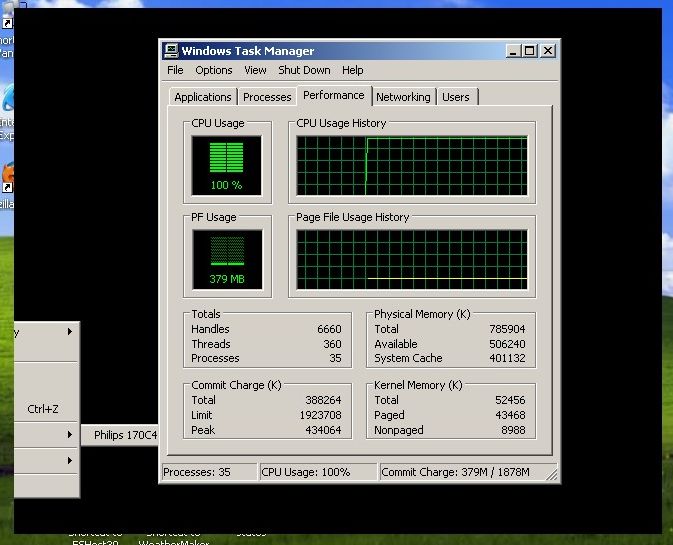
Processor running at 100%...!!!

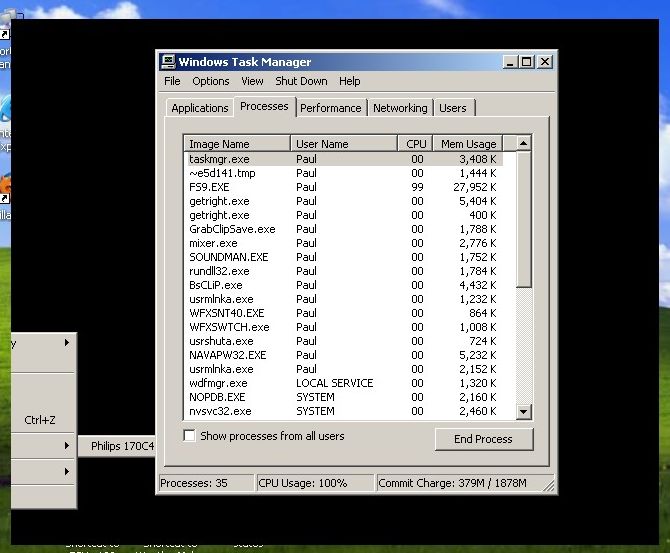
(The black window you see in the background is the result of trying to swop from widow mode to full-screen mode...it has forced the processor into supercharged mode)...!!

Image

Image

...it's a bit of a buggar... :'(...!
... ;)... ;D...!

Re: CPU's On Constant Overdrive/ Normal?

PostPosted: Sat Oct 15, 2005 11:17 am
by JBaymore
Hum..........

What is  "~e5d141.tmp" ?

best,

............john

Re: CPU's On Constant Overdrive/ Normal?

PostPosted: Sat Oct 15, 2005 11:20 am
by Katahu
My processor got overworked whenever I started FS9 as well and that was AFTER I started to fill the sim with all the cr@b in the SimV world [too many addons]. ;D

I was flying online with Skype [a VOIP program] and someone told me that my computer's internal fan sounded like a C-130 taking off. ;D LOL

Re: CPU's On Constant Overdrive/ Normal?

PostPosted: Sat Oct 15, 2005 11:24 am
by Fozzer
Hum..........

What is  "~e5d141.tmp" ?

best,

............john


Gawd knows... ::)...!

Whatever it is, it's running at zero speed... ::)...!

...while FS9 is hurrying along at 99% in 5th. gear... :'(...!

LOL...!

Paul... 8)...!

...with the mouse pointer hovering over the black window, the hour glass pointer flickers into overdrive mode...including the hard drive light... :o...!

Re: CPU's On Constant Overdrive/ Normal?

PostPosted: Sat Oct 15, 2005 12:44 pm
by Pablo
Hum..........

What is  "~e5d141.tmp" ?

best,

............john


Hi John...!

That process starts at the same time that FS 2004 loads.
If I shut it down, (Ctrl+Alt+Del), FS 2004 also closes down to the desktop... ;)...!

..interesting...?

Paul.

Re: CPU's On Constant Overdrive/ Normal?

PostPosted: Sat Oct 15, 2005 1:09 pm
by Marlin
Here is something real basic, have you ran a defrag lately? How about spyware?????

Re: CPU's On Constant Overdrive/ Normal?

PostPosted: Sat Oct 15, 2005 2:02 pm
by JBaymore
OK... I didn't remember seeing it on my machine... but I just checked... it is there too.

Marlin is heading where I am thinkling... you have something that should NOT be running that IS running.  Likely it is a corrupt program that is "hanging", spyware, or a virus.

best,

...............john

Re: CPU's On Constant Overdrive/ Normal?

PostPosted: Sat Oct 15, 2005 2:27 pm
by Zaphod
I just did a quick search on "e5d141" and one thread states it's something to do with a "copy protection" temp file which I assume is generated by FS9. I don't think this file is the problem.

Zaphod.