Page 1 of 1
Catagorising planes

Posted:
Mon Oct 03, 2005 4:50 amby Elrith
Hello peoples!
I like downloading new planes from this site, but there is one annoying fact about it.
When I download a new plane, i have to look through all of my planes to find it.
Is there some way of making catagories to sort all my planes into so that I can find them easily?

eg.
Airbus: a380
a340
a320
Boeing: 747
737
777
Something like that?
Re: Catagorising planes
Posted:
Mon Oct 03, 2005 5:21 amby ozzy72
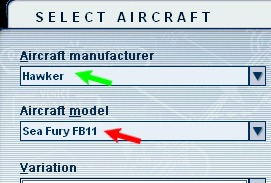
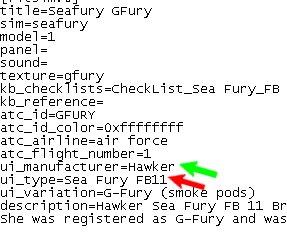
Open the aircraft.cfg file you wish to change in notepad. Then ammend ui_manufacturer=AVRO to whatever you want it to be and save

Re: Catagorising planes
Posted:
Mon Oct 03, 2005 7:12 amby Tweek
It would help if the people who made the planes would categorise the planes correctly in the first place, instead of putting the manufacturer as the design team who made it.
e.g.
-Panavia
--Tornado GR4
---RAF (617 Squadron)
Re: Catagorising planes
Posted:
Mon Oct 03, 2005 12:38 pmby TSC.
Each time I download a new plane I have a peek in the CFG file just so that I know what manufacturer I am looking for when I fire up FS9.
TSC.
Re: Catagorising planes
Posted:
Mon Oct 03, 2005 12:46 pmby Midnight_LS1
Everytime I install an aircraft, I sort it out by real world manufactor's names.
Like Boeing, then the variation would be 777-240LR
Or Lockheed, variation would be L-1011
Re: Catagorising planes
Posted:
Mon Oct 03, 2005 2:22 pmby Hai Perso Coyone?
Each time I download a new plane I have a peek in the CFG file just so that I know what manufacturer I am looking for when I fire up FS9.
TSC.
Exactly what I do

Re: Catagorising planes
Posted:
Mon Oct 03, 2005 5:11 pmby Foxtrot Sport
Each time I download a new plane I have a peek in the CFG file just so that I know what manufacturer I am looking for when I fire up FS9.
TSC.
I second that, as I do that as well. I hate it when I get a Posky craft and it's under "Project opensky" rather than "Boeing"
-HF
Re: Catagorising planes
Posted:
Mon Oct 03, 2005 10:21 pmby Elrith
It says that the path name is invalid and to choose a different destination.
Then I go through c:drive and all that and its the wrong format.
What do I do?
Re: Catagorising planes
Posted:
Mon Oct 03, 2005 10:43 pmby Jakemaster
if you don't have too many, I find that if you can't find the plane youre looking for, click on ANY and scroll down till you find it.
Re: Catagorising planes
Posted:
Tue Oct 04, 2005 2:12 amby Elrith
if you don't have too many, I find that if you can't find the plane youre looking for, click on ANY and scroll down till you find it.
Thats what I do, but it takes a while for me.
Re: Catagorising planes
Posted:
Tue Oct 04, 2005 3:05 amby Hagar
It says that the path name is invalid and to choose a different destination.
Then I go through c:drive and all that and its the wrong format.
What do I do?
Which path do you mean? If you can be a little more specific I'm sure somone here can help.
Going back to your original question, all this is covered in this tute.
http://www.simviation.com/acinstall.htmYou can change the Manufacturer name to whatever you wish.
Re: Catagorising planes
Posted:
Fri Oct 07, 2005 11:59 pmby chrisco17
I change catagories on all of my aircraft (using UI_MANUFACTURER: in the aircraft.cfg ) by aircraft type;
General Aviation Highwing
General Aviation Lowwing
Aerobatic
Airliners
Military Fighters
Military Jumbos
Military Props
Helicopters
etc.
That way if I'm in the mood to fly, say, aerobatic, I just go to "Aerobatic" in the aircraft select window and then choose from there.
This is just one possible way to do it, but it was easiest for me. :)