Catagorising planes

Forum dedicated to Microsoft FS2004 - "A Century of Flight".

Catagorising planes

Postby Elrith » Mon Oct 03, 2005 4:50 am

Hello peoples!

I like downloading new planes from this site, but there is one annoying fact about it.

When I download a new plane, i have to look through all of my planes to find it.

Is there some way of making catagories to sort all my planes into so that I can find them easily?
???
eg.
Airbus: a380
           a340
           a320

Boeing: 747
            737
            777

Something like that?
User avatar
Elrith
Ground hog
Ground hog
 
Posts: 22
Joined: Sun Oct 02, 2005 10:01 pm

Re: Catagorising planes

Postby ozzy72 » Mon Oct 03, 2005 5:21 am

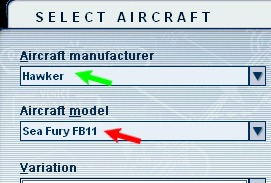
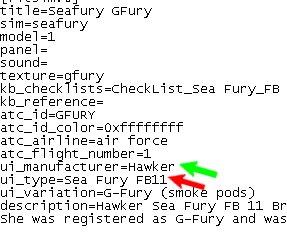
Open the aircraft.cfg file you wish to change in notepad. Then ammend ui_manufacturer=AVRO to whatever you want it to be and save ;)
Image
There are two types of aeroplane, Spitfires and everything else that wishes it was a Spitfire!
User avatar
ozzy72
Administrator
Administrator
 
Posts: 33284
Joined: Fri May 24, 2002 4:45 am
Location: Madsville

Re: Catagorising planes

Postby Tweek » Mon Oct 03, 2005 7:12 am

It would help if the people who made the planes would categorise the planes correctly in the first place, instead of putting the manufacturer as the design team who made it.

e.g.

-Panavia
--Tornado GR4
---RAF (617 Squadron)
Tweek
 

Re: Catagorising planes

Postby TSC. » Mon Oct 03, 2005 12:38 pm

Each time I download a new plane I have a peek in the CFG file just so that I know what manufacturer I am looking for when I fire up FS9.

TSC.
Image

'Only two things are infinite.......The Universe and Human stupidity........and I'm not too sure about the Universe' - Einstein
User avatar
TSC.
Major
Major
 
Posts: 4273
Joined: Wed Nov 03, 2004 11:11 am
Location: Torquay, Devon, England.

Re: Catagorising planes

Postby Midnight_LS1 » Mon Oct 03, 2005 12:46 pm

Everytime I install an aircraft, I sort it out by real world manufactor's names.  
Like Boeing, then the variation would be 777-240LR

Or Lockheed, variation would be L-1011
-Chris
Active Camera Pro
MegaScenery NY
PSS 777-200LR
Aerosoft Scenery Manhattan
TrackIR3 Pro with Vector
ActiveSky 6
PMDG 747 'Queen of the Skies'
AlphaSim F-117
Midnight_LS1
1st Lieutenant
1st Lieutenant
 
Posts: 394
Joined: Mon Apr 05, 2004 2:30 pm

Re: Catagorising planes

Postby Hai Perso Coyone? » Mon Oct 03, 2005 2:22 pm

Each time I download a new plane I have a peek in the CFG file just so that I know what manufacturer I am looking for when I fire up FS9.

TSC.


Exactly what I do :)
User avatar
Hai Perso Coyone?
Ground hog
Ground hog
 
Posts: 0
Joined: Fri Jan 12, 2007 7:31 pm
Location: Rome, Italy

Re: Catagorising planes

Postby Foxtrot Sport » Mon Oct 03, 2005 5:11 pm

Each time I download a new plane I have a peek in the CFG file just so that I know what manufacturer I am looking for when I fire up FS9.

TSC.

I second that, as I do that as well.  I hate it when I get a Posky craft and it's under "Project opensky" rather than "Boeing"

-HF
Image
Formerly HighFlyer24
User avatar
Foxtrot Sport
Major
Major
 
Posts: 1027
Joined: Wed Jun 30, 2004 12:33 pm
Location: Sacramento, California

Re: Catagorising planes

Postby Elrith » Mon Oct 03, 2005 10:21 pm

It says that the path name is invalid and to choose a different destination.

Then I go through c:drive and all that and its the wrong format.

What do I do? ???
Last edited by Elrith on Mon Oct 03, 2005 10:39 pm, edited 1 time in total.
User avatar
Elrith
Ground hog
Ground hog
 
Posts: 22
Joined: Sun Oct 02, 2005 10:01 pm

Re: Catagorising planes

Postby Jakemaster » Mon Oct 03, 2005 10:43 pm

if you don't have too many, I find that if you can't find the plane youre looking for, click on ANY and scroll down till you find it.
Jakemaster
 

Re: Catagorising planes

Postby Elrith » Tue Oct 04, 2005 2:12 am

if you don't have too many, I find that if you can't find the plane youre looking for, click on ANY and scroll down till you find it.


Thats what I do, but it takes a while for me.
User avatar
Elrith
Ground hog
Ground hog
 
Posts: 22
Joined: Sun Oct 02, 2005 10:01 pm

Re: Catagorising planes

Postby Hagar » Tue Oct 04, 2005 3:05 am

It says that the path name is invalid and to choose a different destination.

Then I go through c:drive and all that and its the wrong format.

What do I do? ???

Which path do you mean? If you can be a little more specific I'm sure somone here can help.

Going back to your original question, all this is covered in this tute. http://www.simviation.com/acinstall.htm
You can change the Manufacturer name to whatever you wish.

Image Image
Last edited by Hagar on Tue Oct 04, 2005 3:08 am, edited 1 time in total.
Image

Founder & Sole Member - Grumpy's Over the Hill Club for Veteran Virtual Aviators
Member of the Fox Four Group
My Google Photos albums
My Flickr albums
User avatar
Hagar
Colonel
Colonel
 
Posts: 30869
Joined: Wed Jun 19, 2002 7:15 am
Location: Costa Geriatrica

Re: Catagorising planes

Postby chrisco17 » Fri Oct 07, 2005 11:59 pm

I change catagories on all of my aircraft (using UI_MANUFACTURER: in the aircraft.cfg ) by aircraft type;
General Aviation Highwing
General Aviation Lowwing
Aerobatic
Airliners
Military Fighters
Military Jumbos
Military Props
Helicopters
etc.

   That way if I'm in the mood to fly, say, aerobatic, I just go to "Aerobatic" in the aircraft select window and then choose from there.

This is just one possible way to do it, but it was easiest for me.  :)
Image
Scratch built PC: 2.8G P4HT, 250G 7200RPM Hard drive, 1024 RAM ,GForce FX 5200 128,
TrackIR3 Pro with Vector 6DOF Expansion
Vo
User avatar
chrisco17
1st Lieutenant
1st Lieutenant
 
Posts: 322
Joined: Tue Apr 12, 2005 1:00 am
Location: Westerly, RI USA


Return to FS 2004 - A Century of Flight

Who is online

Users browsing this forum: No registered users and 262 guests