How do I find the frequency of a VOR station??

Forum dedicated to Microsoft FS2004 - "A Century of Flight".

How do I find the frequency of a VOR station??

Postby edzmen » Wed Oct 05, 2005 11:05 am

Hello.

I cant find the VOR stations or their frequencies on my Map in FS9.

Where are these located in the sim?

Thanks! ;)
Last edited by edzmen on Wed Oct 05, 2005 11:06 am, edited 1 time in total.
User avatar
edzmen
Captain
Captain
 
Posts: 536
Joined: Wed Nov 05, 2003 7:19 am
Location: United Kingdom

Re: How do I find the frequency of a VOR station??

Postby garymbuska » Wed Oct 05, 2005 11:25 am

What you need to do is to go to the fs9cfg file scroll down untill you come across the entries that control what you see on the GPS and the map. By default most of the selections are set off or to 0 you can set them on by changing them to 1 you can decide what you do or do not want to see.
If this is not clear enough let me know I can send you a sample of the exact lines you need to change. I am at work right now so I do not have access to my files 8)
Gary M Buska
SYSTEM Specs ASUS P8Z68 V/GEN 3 mother board: INTELL I7 2600k 3.48 ghz Quad core CPU with Sandy bridge: 12 Gigs of 1800hz ram:
GTX 950 OVER CLOCKED: 2 Gigs Ram Windows 10 Home 64 bit Operating system. 750W Dedicated modular power supply. Two Internal 1TB hard drives 1 External 1TB 3.2 USB hard drive. SAITEK Cessna flight Yoke with throttles.
CH Rudder Peddles 27 inch Wide screen Monitor
User avatar
garymbuska
Major
Major
 
Posts: 4415
Joined: Tue Dec 30, 2003 11:10 am
Location: Jacksonville, Florida

Re: How do I find the frequency of a VOR station??

Postby edzmen » Wed Oct 05, 2005 11:32 am

Hi Gary,

Thanks for that information!  :D

Ive had a look in the cfg file and I found a number of entries for VOR display and they are all set to 0.

Im not sure which to change to '1' though, could you show me a copy of the VOR in your cfg?

Thanks!
Last edited by edzmen on Wed Oct 05, 2005 11:33 am, edited 1 time in total.
User avatar
edzmen
Captain
Captain
 
Posts: 536
Joined: Wed Nov 05, 2003 7:19 am
Location: United Kingdom

Re: How do I find the frequency of a VOR station??

Postby Pablo » Wed Oct 05, 2005 1:14 pm

Break into your piggy-bank and purchase FS Navigator...
..all the VOR's and NDB's and everything else you could ever wish for... ;)...!
..trust me...!

http://www.fsnavigator.com.

Paul
Image
Beauty in the "B"
User avatar
Pablo
2nd Lieutenant
2nd Lieutenant
 
Posts: 117
Joined: Thu Sep 22, 2005 6:28 am

Re: How do I find the frequency of a VOR station??

Postby beaky » Wed Oct 05, 2005 1:47 pm

The freqs are right there on the Map- they'll pop up if you mouse over the VOR icon, and if you click on it, another window opens with the information as well. If it doesn't work well, zoom in a bit, so you can click more accurately.
I didn't have to change the cfg file at all to enable this, but if mousing and clicking don't work, I'd try gary's tip.
Image
User avatar
beaky
Global Moderator
Global Moderator
 
Posts: 12877
Joined: Thu Dec 16, 2004 8:00 am
Location: Shenandoah, PA USA

Re: How do I find the frequency of a VOR station??

Postby TacitBlue » Wed Oct 05, 2005 2:26 pm

Isn't there an option on the map screen to display VORs or not to display them? or is that in the flight planner.
Image
A&P Mechanic, Rankin Aircraft 78Y

Aircraft are naturally beautiful because form follows function. -TB
User avatar
TacitBlue
Major
Major
 
Posts: 3856
Joined: Mon Nov 08, 2004 12:33 pm
Location: Saint Joseph, Missouri, USA

Re: How do I find the frequency of a VOR station??

Postby edzmen » Wed Oct 05, 2005 4:43 pm

What does the VOR icon look like?
User avatar
edzmen
Captain
Captain
 
Posts: 536
Joined: Wed Nov 05, 2003 7:19 am
Location: United Kingdom

Re: How do I find the frequency of a VOR station??

Postby beefhole » Wed Oct 05, 2005 6:08 pm

A hexagon with a dot on the inside, it'll have a square around it if it has a DME (distance measuring equipment) too.

edit: oh yeah its blue too ;)
Last edited by beefhole on Wed Oct 05, 2005 6:08 pm, edited 1 time in total.
User avatar
beefhole
Major
Major
 
Posts: 3804
Joined: Thu Jun 05, 2003 8:57 am
Location: Philadelphia

Re: How do I find the frequency of a VOR station??

Postby BFMF » Wed Oct 05, 2005 7:31 pm

Open up the map, click on a VOR, and it will show you it's frequency ;)
BFMF
Colonel
Colonel
 
Posts: 16266
Joined: Mon Feb 25, 2002 6:06 pm
Location: Pacific Northwest

Re: How do I find the frequency of a VOR station??

Postby Wingo » Thu Oct 06, 2005 4:54 am

Open the map. Look for a hexagon. if you can't see any make sure the the view btuoon for VORs is turned on (check up the top). when you find one click on it and the freq. will com up
Image
User avatar
Wingo
Major
Major
 
Posts: 1174
Joined: Thu Jun 23, 2005 2:12 am
Location: YSBK. Back where I belong.

Re: How do I find the frequency of a VOR station??

Postby Jared » Thu Oct 06, 2005 5:15 pm

VOR's are blue on the map and can be turned on/off from there..;)
User avatar
Jared
Lieutenant Colonel
Lieutenant Colonel
 
Posts: 9976
Joined: Sun Jul 13, 2003 11:18 am
Location: Uniontown, Ohio

Re: How do I find the frequency of a VOR station??

Postby beaky » Thu Oct 06, 2005 5:21 pm
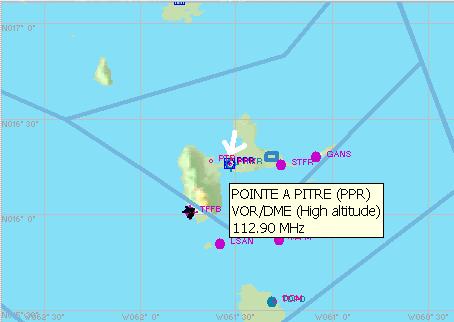
Thought this might help, if you're still having trouble...BTW, all of this stuff can be found in the Learning Center (but pictures help).


first pic shows the toolbar at the top of the Map. Irfanview won't capture the mouse cursor, so i've drawn a white arrow. It's pointing at the button that enables/disables the display of VORs on the map.


Image


If you see the blue hexagons, youve got it enabled. a square around the hexagon denotes a VOR with DME (Distance Measuring Equipment). To get the lowdown on the station, just mouse over it, and a window opens.


Image


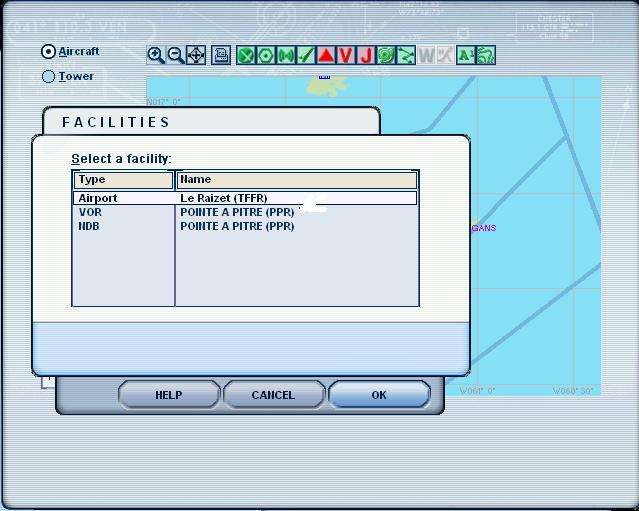
Click on the VOR, and a different window opens. Here, because i'm zoomed way out, it's showing a list of everything there: the airport, the VOR, and the NDB. Scroll down to your VOR and click again.


Image


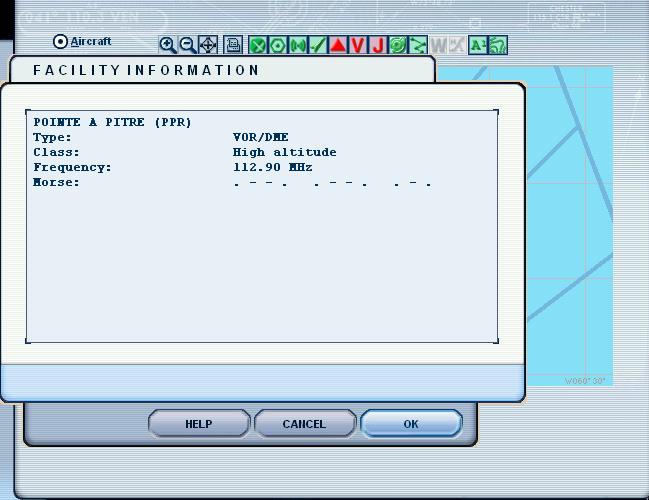
And you get this. Name, type, freq, and Morse ID.


Image


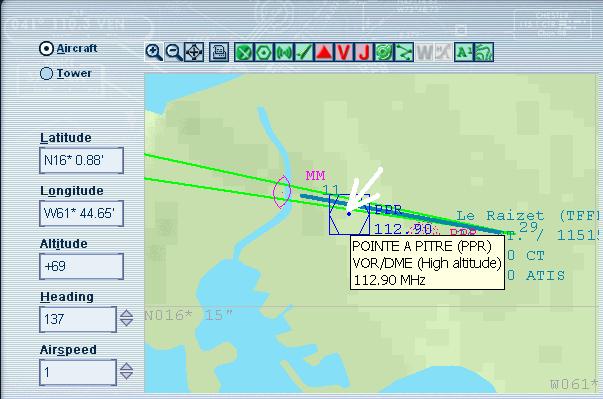
Here I've zoomed in to show the various things better. Note that I've simply moused over the VOR to get a peek at the info...same rules apply to any other icon on the map, including airspace boundaries.

Image
Image
User avatar
beaky
Global Moderator
Global Moderator
 
Posts: 12877
Joined: Thu Dec 16, 2004 8:00 am
Location: Shenandoah, PA USA

Re: How do I find the frequency of a VOR station??

Postby edzmen » Fri Oct 07, 2005 5:20 am

Wow, thanks for taking the time to do all that Rotty! :o

[I'd actually worked it out before you made the post, but thanks all the same!  ;) ]
User avatar
edzmen
Captain
Captain
 
Posts: 536
Joined: Wed Nov 05, 2003 7:19 am
Location: United Kingdom

Re: How do I find the frequency of a VOR station??

Postby beaky » Fri Oct 07, 2005 9:45 am

Wow, thanks for taking the time to do all that Rotty! :o

[I'd actually worked it out before you made the post, but thanks all the same!  ;) ]


No big, I've become a whiz at formatting and posting screenies while covering my RTW flight... figured you'd get it all figured out anyway, but what the hey. Maybe somebody else will be spared some grief later by checking this thread...
;D
Image
User avatar
beaky
Global Moderator
Global Moderator
 
Posts: 12877
Joined: Thu Dec 16, 2004 8:00 am
Location: Shenandoah, PA USA

Re: How do I find the frequency of a VOR station??

Postby Gary R. » Fri Oct 07, 2005 5:29 pm

I use genuine charts.  High altitude, Low, enroute, sectionals, and approach plates.  As for fs navigator it seems nice for those that don;t want to spend time and clutter their desk.  I would like to see somebody develope a flight planner in which the main interface resembles a FMC cdu through which you would click on the keys to enter your route pages which would then be imported to FS flight planner to allow for atc services. In fact, such an add-on could also have a garmin looking interface as well which one could choose when selecting a GA aircraft.  I just think having a flight planner that resembles actual avionics on your screen would help with the immersion a bit rather than the current crop which resemble just another piece of software.
AMD 2800xp on gigabyte vt600l k7 triton overclocked @ 2.3 ghz, 768 PC 3200, 128 DDR 6600GT AGP, 60 gig,5200 rpm maxtor, 160gig 7200rpm WD, Sony FD Trinitron 19
Gary R.
Captain
Captain
 
Posts: 793
Joined: Sat Aug 16, 2003 10:51 am
Location: PA, USA

Next

Return to FS 2004 - A Century of Flight

Who is online

Users browsing this forum: No registered users and 155 guests