Page 1 of 2
AlphaJet problem

Posted:
Sat Sep 17, 2005 4:12 pmby Tweek
I'm having trouble starting the engines on the Alpha Bleu Ciel AlphaJet. If I start the flight as normal (with engines running), they soon cut out, with no time to increase throttle. If I try to restart the engines, it shows some sign of life, but then quickly cuts out again. The 'Engine Control Failure' gauge lights up when I go to start the engines, but I don't know what is causing this.
Any help would be appreciated

-Tweek
Re: AlphaJet problem
Posted:
Sat Sep 17, 2005 4:23 pmby C
Welcome to SimV Tweek.
I've often had the same problem in the past. It's a similar type of problem to the situation you get when on some multi engine aircraft you are unable to select all engines.
I've used two solutions in the past (I last used the ABC Alpha Jet about 4 or 5 months ago)...
1) Select a different aircraft, get it running, the change back (should work)
2) Spend a little while playing with the "Engine Control" pop up panel. Select all switches to the on position (up if I remember correctly), then click and hold (press) the round start buttons in the middle of the panel, and hold until the engine has ignited...
Re: AlphaJet problem
Posted:
Sat Sep 17, 2005 4:27 pmby Tweek
I tried switching between aircraft, Extra 300 to AlphaJet, but it still cut out afterwards. I'll try the engine control panel now, hopefully it will work! Thanks anyway!
edit: still no luck. Also tried going into slew mode and giving it a 'jump' from mid air, which usually works too, and of course didn't! >:(
Re: AlphaJet problem
Posted:
Sat Sep 17, 2005 4:40 pmby C
[quote]I tried switching between aircraft, Extra 300 to AlphaJet, but it still cut out afterwards. I'll try the engine control panel now, hopefully it will work! Thanks anyway!
edit: still no luck. Also tried going into slew mode and giving it a 'jump' from mid air, which usually works too, and of course didn't!
Re: AlphaJet problem
Posted:
Sat Sep 17, 2005 5:24 pmby Ecko
On the engine control panel, there is these 'flip' buttons, flip em up, press the button underneath, and youre ready to go!
I know it sounds weird, but it's kindda hard to explain.

Re: AlphaJet problem
Posted:
Sun Sep 18, 2005 3:53 amby Tweek
The panel which I tried was labelled the 'starter' panel, but would that be the engine control panel?
Re: AlphaJet problem
Posted:
Sun Sep 18, 2005 5:48 amby Ecko
Okay, we try again:
1 Get the throttle panel up, by pressing this button;
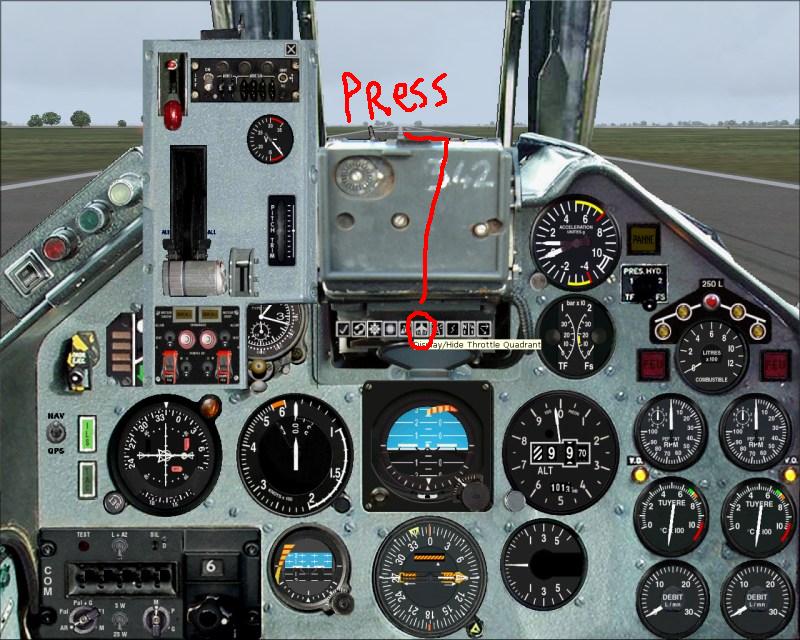
Press the flip button on the throttle panel;
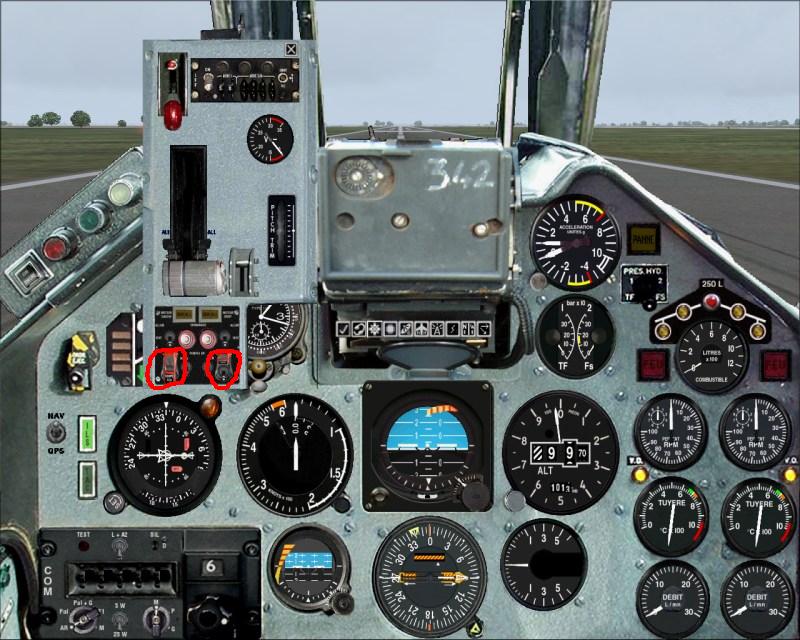
Press the button located under the flip button;
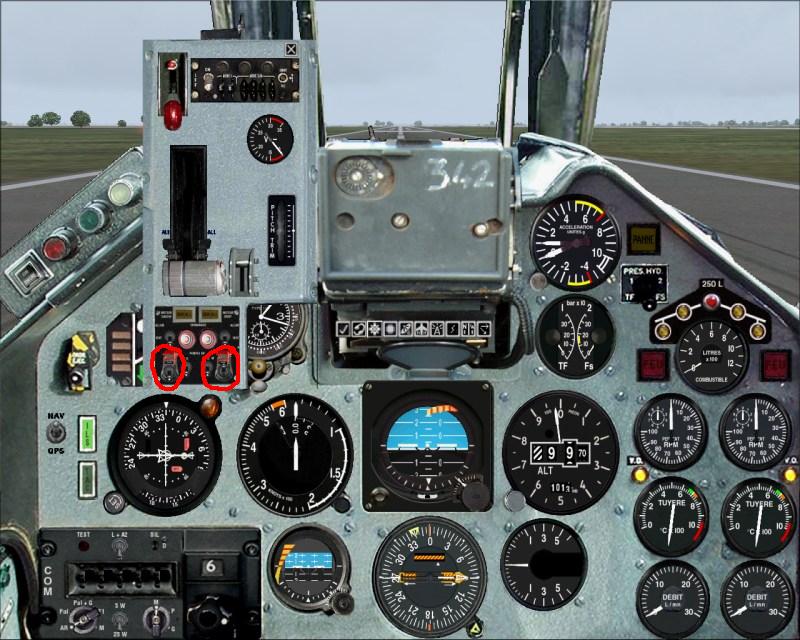
A picture says more than a thousand words (hopefully), so here are 3000 words!
Re: AlphaJet problem
Posted:
Sun Sep 18, 2005 6:32 amby Tweek
Hehe :) I'll try that again, I've been on that panel before, but I dunno what buttons were meant to be switched/how many, etc etc...
Edit: Still no luck. The 'Engine Control Failure' gauges are still lighting up the moment I press Ctrl + E. ... hmph...
Re: AlphaJet problem
Posted:
Sun Sep 18, 2005 6:57 amby Ecko
You have to tell me exactly what you do then..
Re: AlphaJet problem
Posted:
Sun Sep 18, 2005 7:08 amby Tweek
OK. At first, when I loaded the plane up, the engines just cut out. I thought 'fair enough' and pressed CTRL + E to start them. It got up to the stage where you are about to hear the final 'kick' of the engine, ready to open the throttles, but instead it just died out. The only way I can get the engine to start, is when in mid air with a different aircraft, then change to the AlphaJet, which is rather annoying, as I would actually like to take off under the AJets own power.
I've been on the starter panel, flicked all the switches, flicked none of the switches, flicked both of the switches you labelled, and still, I get the same results. I dunno whether there is something wrong with it, or the start up procedure is a bit more advanced than just CTRL + E.
Re: AlphaJet problem
Posted:
Sun Sep 18, 2005 8:21 amby commoner
Hi Tweek...mmm...does it HAVE to be something so complicated I wonder? maybe just increasing the minimum throttle limit in the aircraft.cfg General Engine Data section would help...yours will look a bit different to this but will have the line.. min_throttle_limit=0.000000 or something similar, like this.......
[GeneralEngineData]
//0=Piston, 1=Jet, 2=None, 3=Helo-Turbine, 4=Rocket, 5=Turboprop
engine_type = 0
fuel_flow_scalar = 0.880
engine.0 = 3.700, 0.000, 0.000
min_throttle_limit=0.000000
...if it is 0.000000 make it 0.100000 or if it is already 0.100000 then increase it to 0.200000...
.......I've seen that work many times before...commoner
Re: AlphaJet problem
Posted:
Sun Sep 18, 2005 8:45 amby Tweek
And it STILL doesn't work >:( I can't see what the hell is wrong with it! I just want to start the engines! Oh curs
Re: AlphaJet problem
Posted:
Sun Sep 18, 2005 9:05 amby commoner
ok Tweek give us the EXACT download...where from and the zip file name........lets have a proper look what's going on.....commoner
Re: AlphaJet problem
Posted:
Sun Sep 18, 2005 9:24 amby Tweek
http://www.francesim.com/fichiers/exter ... ha_FS9.zipThats where I downloaded it from. At first, do not edit/try anything, just start a flight with it, see if it does the same.
Re: AlphaJet problem
Posted:
Sun Sep 18, 2005 10:54 amby RollerBall
It won't start until you open the throttle to the starting position. You'll know it's open enough when the yellow light comes on on the engine starting panel.
BTW You'll also have to change the steering angle in the contact points from 180 to max 80 (60/70 should be fine) otherwise you can only taxi in a straight line