
No problem. Just go into the SimV download section and get hold of a Program called AirdEd.exe. You can then use it to edit the air file of each plane. It's not difficult, here's a pic of the air file for the Dash 8.
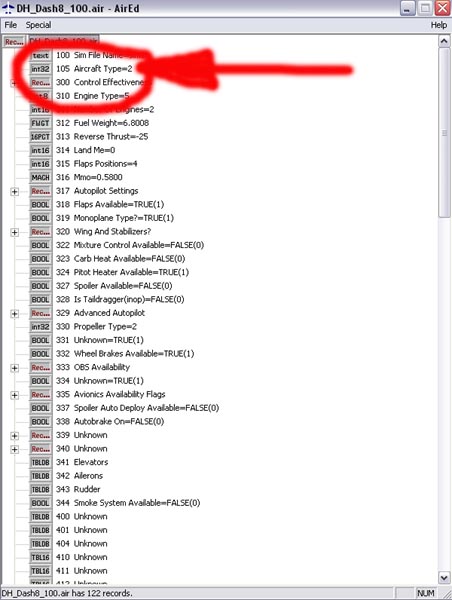
All you have to do is change the aircraft type from 2 to 0 and save the file. Then as well as being suitable for AI, the aircraft becomes visible in your list and therefore flyable. All you need to do is add a suitable panel.
But you're not done yet. There are edited files already available in one or two places where this work has been done for you but in all of the ones I've seen, they've missed the undercarriage problem!
As default aircraft they are only used as AI, so the undercarriage is set to lower/retract at a ridiculously low speed - in the case of the MD83 at only 120 knots ie below the speed you would touch down at flying the plane yourself! So you need to edit the aircraft.cfg file of each plane.
Do that with Notepad or Wordpad. Scroll down to the Contact_Points section and look for the numbers marked in red below (the MD83 file).
[contact_points]
point.0 = 1, -9.20, 0.00, -8.0, 1500, 0, 1.08, 25.0, 1.00, 2.5, 0.9, 7.0, 5.0, 0,
120, 250
point.1 = 1, -83.10, -8.33, -9.4, 3000, 1, 1.85, 0.0, 1.50, 2.5, 0.8, 7.0, 7.0, 2,
120, 250
point.2 = 1, -83.10, 8.33, -9.4, 3000, 2, 1.85, 0.0, 1.50, 2.5, 0.8, 7.0, 7.0, 3,
120, 250
point.3 = 2, -95.75, -53.92, -1.0, 1200, 0, 0.00, 0.0, 0.00, 0.0, 0.0, 0.0, 0.0, 5
point.4 = 2, -98.75, 53.92, -1.0, 1200, 0, 0.00, 0.0, 0.00, 0.0, 0.0, 0.0, 0.0, 6
point.5 = 2, -139.00, 0.00, 3.0, 1200, 0, 0.00, 0.0, 0.00, 0.0, 0.0, 0.0, 0.0, 9
point.6 = 2, -3.00, 0.00, 0.0, 1200, 0, 0.00, 0.0, 0.00, 0.0, 0.0, 0.0, 0.0, 4
Increase them to say 220 and save the file. Do the same with the Dash 8 except change the numbers to something like 160.
There ya go - all done ;)
BTW
In FS2002, the flight dynamics of the default planes were not very good. Howver, this is not the case in FS2004 - they fly pretty well.

 by Boeing727 » Sun Sep 18, 2005 11:44 am
