Page 1 of 2
Default aircraft carrier

Posted:
Wed Aug 31, 2005 9:03 pmby Henry_Yeh
CV63 Kitty Hawk off San Francisco. She doesn't appear on the airfield list. How do I start a flight on her (that is, without having to try to land on her first)?
Is she merely ornamental?
Re: Default aircraft carrier
Posted:
Thu Sep 01, 2005 2:28 amby ozzy72
Hi Henry, well you could cheat and slew the aircraft onto the deck (press Y to go into slew mode and then move the aircraft onto the deck using your joystick). Once there just save the flight and you can start on the deck everytime

Failing that just land a helicopter (or the default Cessna 152) on, it is nice and easy.
A good program to get for deck work is 3Wire, we don't have it here but you'll find it at Avsim, that'll give you arrestor cables and stuff making deck landings heaps easier and more realistic
Re: Default aircraft carrier
Posted:
Thu Sep 01, 2005 1:41 pmby Henry_Yeh
Thanks! So without 3wire, the carrier is just a useless chunk of scrap metal, even if I'm flying a fully carrier-compatible F/A-18, I still won't be able to land on it?
Re: Default aircraft carrier
Posted:
Thu Sep 01, 2005 1:57 pmby ozzy72
Without some kind of arrestor cable program landing an F-18 on the deck will be rather difficult. I've seen a B-26 landed without arrestors however, great bit of flying by our own Rifleman during a multiplayer session.
If I were you I'd put 3Wire on your system, nice and simple to install and use
Re: Default aircraft carrier
Posted:
Thu Sep 01, 2005 3:45 pmby cspyro21
There's a default carrier? Wow!
Re: Default aircraft carrier
Posted:
Thu Sep 01, 2005 3:46 pmby Ben_M_K
There's a default carrier? Wow!
Yup, it's in the San Fransisco bay...

Re: Default aircraft carrier
Posted:
Thu Sep 01, 2005 4:22 pmby Souichiro
Try Landing on it with a Meteor! It's tricky but It cane be done! (without 3wire and stuff)
Re: Default aircraft carrier
Posted:
Thu Sep 01, 2005 4:37 pmby Hai Perso Coyone?
Try Landing on it with a Meteor! It's tricky but It cane be done! (without 3wire and stuff)
I have tried to land a 747 and I made it...even though I clipped the tower

Here is photographic proof...it was taken in FS2002 so the quality isn't the greatest...but hey!
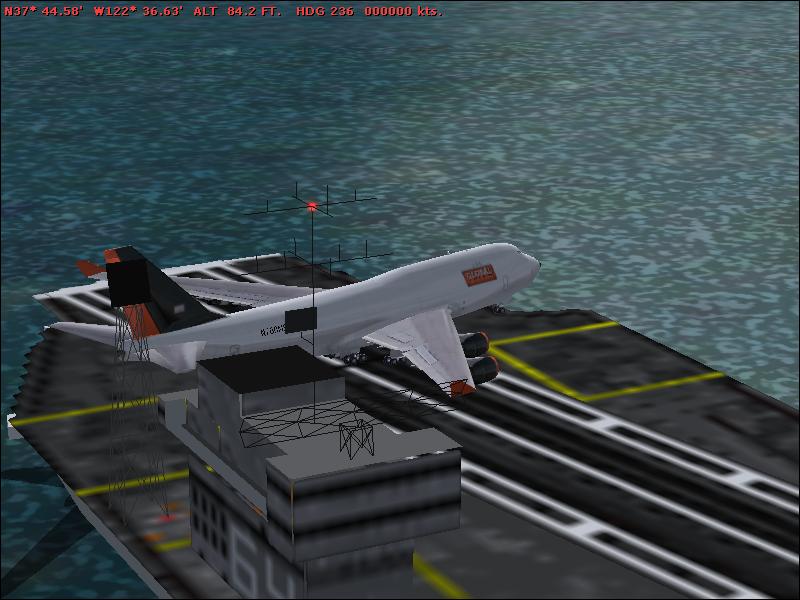
Cheers all,
Ashar
Re: Default aircraft carrier
Posted:
Thu Sep 01, 2005 4:44 pmby Henry_Yeh
Alright, 3Wire it is

, good to know it also comes with catapults.
Re: Default aircraft carrier
Posted:
Thu Sep 01, 2005 6:45 pmby Henry_Yeh
OK, downloaded 3Wire & FSIUP v3.5, updated my MS.Net Framework. Installed the sucker, & nothing happened. The installer extracted the folder to C:\Program Files. Is that the wrong destination? Do I need to do something else, like placing individual files in their corresponding folders that I have no clue where they are?
The default carrier still doesn't appear on the list of airfields.
Re: Default aircraft carrier
Posted:
Fri Sep 02, 2005 1:54 amby ozzy72
I've got an An-225 on deck using ArrCab back in my 2k2 days. But again chopped the island in half


Re: Default aircraft carrier
Posted:
Fri Sep 02, 2005 9:01 amby Zaphod
Has anybody else noticed that the ILS "cone" shown on GPS is at an angle of 90 degress to the flight deck, or is it me?
Zaphod
Re: Default aircraft carrier
Posted:
Fri Sep 02, 2005 11:33 amby Henry_Yeh
Guys, I need help here.

Can't get 3Wire to work.
Re: Default aircraft carrier
Posted:
Fri Sep 02, 2005 11:37 amby Tom_M
You need 3Wire running (and set the values in it) then open FS. Press Connect then on 3Wire if it isn't already connected. Then takeoff from an airport near the carrier, find it and land

With downloaded carriers, 3Wire's help file explains how to catapult-launch.

Re: Default aircraft carrier
Posted:
Fri Sep 02, 2005 11:47 amby Henry_Yeh
Tried to land on CV63 off Frisco, but still only touch 'n go, no trap.