Page 1 of 1

A Tiny Problem/FIXED!!

PostPosted: Wed Aug 31, 2005 1:50 pm
by Hai Perso Coyone?
Sorry to pester you all with these problems...but they just occur for no apparent reason. I have a DC-8 by the Historic Jetliners Group. I read all the instructions on how to install the aircraft at their website, the read-me with the file and even Grumpy's Lair...but still the aircraft does not appear in the select aircraft menu...I have never seen this happen and I am pretty good at installing aircraft in FS9. I have installed all of my planes and all of them appear. Just this DC-8 does not want to however hard I try...
Regards,
Ashar :'( :'(

Re: A Tiny Problem

PostPosted: Wed Aug 31, 2005 2:19 pm
by Mynameisnemo
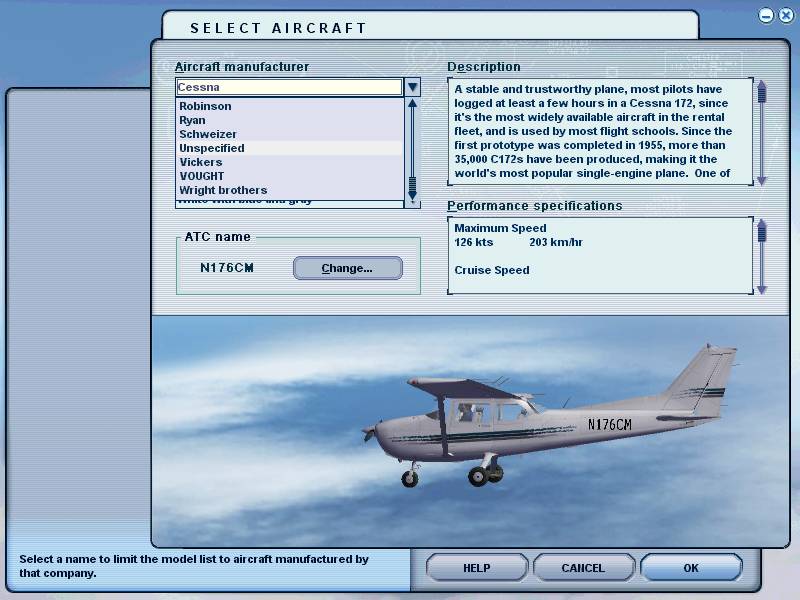
I sometimes find that it will show up in this foloder:
Image
Thats where some of the aircraft that FS9 doesn't recognise go.

Nemo

Re: A Tiny Problem

PostPosted: Wed Aug 31, 2005 2:29 pm
by Hai Perso Coyone?
It's not there either I checked :-/

Re: A Tiny Problem

PostPosted: Wed Aug 31, 2005 2:39 pm
by Jared
Can you point use in the direction of where you got the file? perhaps a link?

That way we can then download and investigate for you! ;)

Re: A Tiny Problem

PostPosted: Wed Aug 31, 2005 3:33 pm
by microlight
Post the name of your .air file and copy the [fltsim] sections of the aircraft.cfg here - that'll give us a start.

;)

Re: A Tiny Problem

PostPosted: Wed Aug 31, 2005 4:56 pm
by Mees
Check the manufacturer of you aircraft in your aircraft.cfg ;)
Otherwise send an angry e-mail to HGJ ;D
Cheers Ashar.

Mayer

Re: A Tiny Problem

PostPosted: Wed Aug 31, 2005 5:21 pm
by Hagar
Ashar. Tell me exactly where you downloaded this file so I can check it out for you. I need the file name & the exact page it's posted on, not a direct link to the file.

PS. I just downloaded the DC-8-52 here http://81.208.92.5/hjg/fake/airlines/twa.htm
Panel.cfg is aliased to one of the generic panels in the Flight Simulator 9\Aircraft\fsfsconv folder. Check the FS9\Aircraft folder & look for a folder named fsfsconv. It's possible you deleted it. If it's not there re-alias Panel.cfg to the default b747_400. I haven't installed it but that should fix the problem.

Re: A Tiny Problem

PostPosted: Thu Sep 01, 2005 2:01 am
by Hai Perso Coyone?
Ashar. Tell me exactly where you downloaded this file so I can check it out for you. I need the file name & the exact page it's posted on, not a direct link to the file.

PS. I just downloaded the DC-8-52 here http://81.208.92.5/hjg/fake/airlines/twa.htm
Panel.cfg is aliased to one of the generic panels in the Flight Simulator 9\Aircraft\fsfsconv folder. Check the FS9\Aircraft folder & look for a folder named fsfsconv. It's possible you deleted it. If it's not there re-alias Panel.cfg to the default b747_400. I haven't installed it but that should fix the problem.


Doug,
The Iberia DC-8 Caargo variant I found can be looked for here:

http://81.208.92.5/hjg/airlines/i/iberia.htm

It's the first aircraft on the list. There is a folder in my aircraft folder called fsfsconv. However, when I got the panel for the DC-8 from the historic jetliners group, the instructions stated that when you un-zip the panel folder you should end up with the files inside the fsfsconv folder. I checked and it turns out it isn't there. So I installed the panel manually, meaning that I copied the files in the panel folder to the aircraft's panel folder...
Thanks,
Ashar :)

Re: A Tiny Problem

PostPosted: Thu Sep 01, 2005 2:05 am
by Hai Perso Coyone?
Post the name of your .air file and copy the [fltsim] sections of the aircraft.cfg here - that'll give us a start.

;)


Micro,
The .air file's name is as follows:

DC-8-62F_2k4.air

The [fltsim] section of the .cfg file:

[fltsim.0]
title=DC-8-62F Iberia
sim=DC-8-62_2k4
model=
panel=
sound=
texture=
checklists=DC8_Checklist
atc_id=EC_EMD
atc_airline=IBERIA
atc_flight_number=100
atc_type=DOUGLAS
atc_model=DC-8
ui_manufacturer=Douglas
ui_type=DC-8-62F
ui_variation=Iberia
description=McDonnell Douglas DC-8 Super 62, version 5 master file, 11\/02\n180 pax plus crew of 9-10 typical.\nHistoric Jetliners Group\n

I also noticed in the .cfg file that there is no effects section which usually specifies touchdown, contrails, etc effects...shall I add those by hand after backing up the original .cfg?
Cheers,
Ashar :'(

Re: A Tiny Problem

PostPosted: Thu Sep 01, 2005 2:22 am
by Hagar
There is a folder in my aircraft folder called fsfsconv. However, when I got the panel for the DC-8 from the historic jetliners group, the instructions stated that when you un-zip the panel folder you should end up with the files inside the fsfsconv folder. I checked and it turns out it isn't there. So I installed the panel manually, meaning that I copied the files in the panel folder to the aircraft's panel folder...
Thanks,
Ashar :)

Does that mean you fixed the problem? Please take my tip & ignore all advice/instructions to unzip files direct to the sim. This is one of the most common causes of installation problems as you found out.

Re: A Tiny Problem

PostPosted: Thu Sep 01, 2005 2:40 am
by microlight
Woozy,
I think I see your problem - the .air file name is not the same as the 'sim' line in the aircraft.cfg [fltsim] section, so the plane won't show up as it doesn't have an air file that it recognises.

Add an 'F' into the sim line (that is,  DC-8-62F_2k4') or remove the F from the air file name and this should fix your problem.

;)

Re: A Tiny Problem

PostPosted: Thu Sep 01, 2005 2:50 am
by Hai Perso Coyone?
Does that mean you fixed the problem? Please take my tip & ignore all advice/instructions to unzip files direct to the sim. This is one of the most common causes of installation problems as you found out.


Sorry Doug,
I think I placed the wrong emoticon...I was saying that did not help. I have replaced everything in the panel folder by aliasing the panel to the default 747....
Thanks,
Ashar

Re: A Tiny Problem

PostPosted: Thu Sep 01, 2005 4:09 am
by commoner
..mmm....microlight's solution will certainly make the plane show..BUT ...there may be a problem with the panel not displaying correctly....not sure why.....commoner :)

Re: A Tiny Problem/FIXED!!

PostPosted: Thu Sep 01, 2005 4:51 am
by Hai Perso Coyone?
Thanks alot guys!! I got the DC-8 working...turns out Micro was right about the .air file...and my IGfly Tu-154 works too...I had to edit the .cfg in that one!!
Thanks alot everyone!!
Regards,
Ashar