File Name

Forum dedicated to Microsoft FS2004 - "A Century of Flight".

File Name

Postby Bubblehead » Sat Aug 13, 2005 11:19 am

There are two or three file names used to ID an aircraft.  The name used in the Windows Explorer is different from the name in the FS Aircraft and different from the name I see in  CFG File in Notepad. Which one should I use  for example when I "alias" or "search" , etc.?

Bubblehead

User avatar
Bubblehead
Captain
Captain
 
Posts: 851
Joined: Fri Dec 19, 2003 1:35 am
Location: San Diego, California USA

Re: File Name

Postby legoalex2000 » Sat Aug 13, 2005 11:26 am

i think i understand what your saying. that aircraft names in FS differ from the folder names in the "aircraft" folder. they do that to make the aircraft unique, so you can find it. now to what your asking... im kinda lost...

:)Ramos
legoalex2000
 

Re: File Name

Postby WebbPA » Sat Aug 13, 2005 12:41 pm

To alias a panel or sound file use the Windows Explorer folder name.

To search use the manufacturer (ui_manufacturer), model (ui_type) and livery (ui_variation) in the aircraft.cfg file.
WebbPA
Ground hog
Ground hog
 
Posts: 0
Joined: Sat Sep 25, 2010 6:01 pm

Re: File Name

Postby Bubblehead » Wed Aug 17, 2005 10:37 am

??? ??? ??? ??? ??? ???

Drumlineramos:

Thanks for the input. Sorry if I was not clear in my description. What I meant was the there were three different names in the game :

In the Window Explorer (Flight Simulator 9/Aircraft) the plane was listed as "Corendon Airlines Boeing 737-800"

The Model CFG file when opened with Notepad list it as"B737-800"

In the game itself under Aircraft Model  it is listed as "Boeing 737-800"

My point is at times I need to alias a model's sound or panel. I just want to make sure I use the correct file name.

Hope this clears up my original question.

Bubblehead
User avatar
Bubblehead
Captain
Captain
 
Posts: 851
Joined: Fri Dec 19, 2003 1:35 am
Location: San Diego, California USA

Re: File Name

Postby Hagar » Wed Aug 17, 2005 10:44 am

Bubblehead. Webb already answered your question. To alias panel or sound use the exact folder name of the aircraft. My Aliasing article might help. http://www.simviation.com/lair/aliasing1.htm

[quote]In the game itself under Aircraft Model
Last edited by Hagar on Wed Aug 17, 2005 10:48 am, edited 1 time in total.
Image

Founder & Sole Member - Grumpy's Over the Hill Club for Veteran Virtual Aviators
Member of the Fox Four Group
My Google Photos albums
My Flickr albums
User avatar
Hagar
Colonel
Colonel
 
Posts: 30868
Joined: Wed Jun 19, 2002 7:15 am
Location: Costa Geriatrica

Re: File Name

Postby Bubblehead » Thu Aug 18, 2005 3:40 pm

??? ??? ??? ??? ??? ???

In Aircraft Config in Notepad, I sometimes see a "normal=B737-_700"  for example. then  how can I edit files if all I see listed in the Notepad is the description above . What if I want to edit some of the files, where can I get a complete readout of the sample aircraft?

Bubblehead
User avatar
Bubblehead
Captain
Captain
 
Posts: 851
Joined: Fri Dec 19, 2003 1:35 am
Location: San Diego, California USA

Re: File Name

Postby Hagar » Thu Aug 18, 2005 5:04 pm

In Aircraft Config in Notepad, I sometimes see a "normal=B737-_700"  for example.

That's Model.cfg in the Model folder. You're opening the wrong file. The file named Aircraft.cfg is in the main folder of each aircraft.
Image

Founder & Sole Member - Grumpy's Over the Hill Club for Veteran Virtual Aviators
Member of the Fox Four Group
My Google Photos albums
My Flickr albums
User avatar
Hagar
Colonel
Colonel
 
Posts: 30868
Joined: Wed Jun 19, 2002 7:15 am
Location: Costa Geriatrica

Re: File Name

Postby Bubblehead » Thu Aug 18, 2005 8:55 pm

:o :o :o :o :o :o :o

Duh! and how can I get in the "Aircraft.CFG" of each aircraft since generally the aircraft lists only Model, Panel, Sound and Texture.

Bubblehead
User avatar
Bubblehead
Captain
Captain
 
Posts: 851
Joined: Fri Dec 19, 2003 1:35 am
Location: San Diego, California USA

Re: File Name

Postby Hagar » Fri Aug 19, 2005 9:18 am

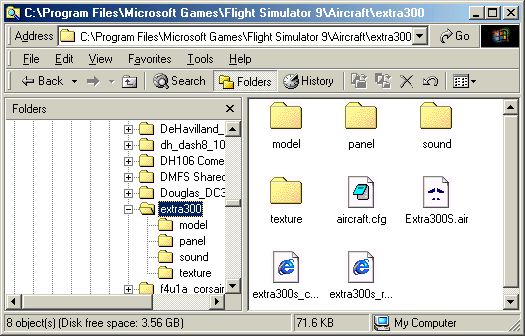
You're confusing files & folders. Files are identified with various icons & folders are yellow. The main folders of flyable FS aircraft all have subfolders named Model, Panel, Sound & at least one named Texture plus an AIR (xxxx.air) & Aircraft.cfg file. This is how the main folder of a typical FS aircraft should look when opened in Windows Explorer.

Image

The Model, Panel & Sound folders also contain appropriately named CFG files. Model.cfg is in the Model folder. It might look slightly different in WinXP but if the files don't display with their AIR & CFG file extensions as in my shot, visit my Lair & read my Working with Windows article. http://www.simviation.com/lair/windows.htm
Last edited by Hagar on Fri Aug 19, 2005 9:38 am, edited 1 time in total.
Image

Founder & Sole Member - Grumpy's Over the Hill Club for Veteran Virtual Aviators
Member of the Fox Four Group
My Google Photos albums
My Flickr albums
User avatar
Hagar
Colonel
Colonel
 
Posts: 30868
Joined: Wed Jun 19, 2002 7:15 am
Location: Costa Geriatrica

Re: File Name

Postby Wing Nut » Fri Aug 19, 2005 11:09 am

To add to that, when you open the Aircraft.cfg (right-click on it and choose 'open with notepad) you will see something like this...

Image

The Yellow is important when assigning new textures.

The Green is the directory the plane resides in, and is important for aliasing.

The Purple is used to customize that plane's entry in the aircraft menu in the sim...
[img]http://www.simviation.com/phpupload/uploads/1440377488.jpg[/img]
User avatar
Wing Nut
Colonel
Colonel
 
Posts: 12720
Joined: Tue Jan 01, 2002 6:25 am

Re: File Name

Postby Hagar » Fri Aug 19, 2005 12:37 pm

To add to that, when you open the Aircraft.cfg (right-click on it and choose 'open with notepad) you will see something like this...

The Yellow is important when assigning new textures.

The Green is the directory the plane resides in, and is important for aliasing.

Not sure I agree with that Kevin.
The yellow is the name the aircraft is recognised by when used as AI traffic. Texture folders are defined by the texture= line.

The green entry defines the file prefix of the AIR file in use. This is not necessarily the same as the folder name of the aircraft (which is used for aliasing to) or the MDL file prefix which is defined in Model.cfg.

Please read my tutes. It's all explained there.
Last edited by Hagar on Fri Aug 19, 2005 12:42 pm, edited 1 time in total.
Image

Founder & Sole Member - Grumpy's Over the Hill Club for Veteran Virtual Aviators
Member of the Fox Four Group
My Google Photos albums
My Flickr albums
User avatar
Hagar
Colonel
Colonel
 
Posts: 30868
Joined: Wed Jun 19, 2002 7:15 am
Location: Costa Geriatrica

Re: File Name

Postby Wing Nut » Fri Aug 19, 2005 1:54 pm

That's what I get for not doing aliasing for a long time...  :-/  I hate it when I look like a moron...  ::)
[img]http://www.simviation.com/phpupload/uploads/1440377488.jpg[/img]
User avatar
Wing Nut
Colonel
Colonel
 
Posts: 12720
Joined: Tue Jan 01, 2002 6:25 am

Re: File Name

Postby Hagar » Fri Aug 19, 2005 2:50 pm

Sorry Kevin. It's not my intention to make anyone look silly. Apart from the basics most people know more than me about FS nowadays. This is all basic stuff & I simply wanted to clarify things. I thought poor Bubblehead was confused enough already.
Image

Founder & Sole Member - Grumpy's Over the Hill Club for Veteran Virtual Aviators
Member of the Fox Four Group
My Google Photos albums
My Flickr albums
User avatar
Hagar
Colonel
Colonel
 
Posts: 30868
Joined: Wed Jun 19, 2002 7:15 am
Location: Costa Geriatrica

Re: File Name

Postby Wing Nut » Fri Aug 19, 2005 3:18 pm

Doug, I would have been more disappointed if you hadn't pointed it out and I realized later (and I would have) that I was wrong.  I've been lazy about my FS over the last few months, and haven't done more inside the sim than install new stuff.  Guess I need to get with it again...  ::)

Some days you get the bear, some days the bear gets you...
[img]http://www.simviation.com/phpupload/uploads/1440377488.jpg[/img]
User avatar
Wing Nut
Colonel
Colonel
 
Posts: 12720
Joined: Tue Jan 01, 2002 6:25 am

Re: File Name

Postby Bubblehead » Fri Aug 19, 2005 10:55 pm

:D :D :D :D :D :D

Kevin, Hagar:

Although still somewhat "cornfused", I'll figure it out. Thanks for the input.

Bubblehead
User avatar
Bubblehead
Captain
Captain
 
Posts: 851
Joined: Fri Dec 19, 2003 1:35 am
Location: San Diego, California USA


Return to FS 2004 - A Century of Flight

Who is online

Users browsing this forum: No registered users and 212 guests