Page 1 of 2
Combining aircraft folders

Posted:
Wed Aug 03, 2005 7:25 amby town
In a similar vein to my last post has anybody managed to get there flight sim programs (FS9 CFS2 CFS3 etc.) to share the same aircraft folder instead of having multiples of the same files?
Re: Combining aircraft folders
Posted:
Wed Aug 03, 2005 8:27 amby Hagar
It's theoretically possible using the Aliasing principle but I've never tried it. You would need to use the same folder structure plus a separate AIR file & Aircraft.cfg for each version. I don't see the advantage.
PS. Not practical as not all CFS2 aircraft are compatible with FS9 or vice versa. CFS3 aircraft are not compatible with any other version of CFS/FS.
Re: Combining aircraft folders
Posted:
Wed Aug 03, 2005 8:34 amby town
Ah... I suppose that would make it a rather redundant idea then.

Re: Combining aircraft folders
Posted:
Wed Aug 03, 2005 11:28 amby TacitBlue
But, just out of curiosity: what about making shortcuts to the files/folders you do need, and then placing the shortcuts in the aircraft folder for the other sim? Would the sim be able to access the files via a shortcut?
I don't have two fully compatible versions of FS, and I'm at work, or I would try it myself.
Re: Combining aircraft folders
Posted:
Wed Aug 03, 2005 11:48 amby Hagar
It should work but I haven't tried it. I did a lot of experimenting with this back in the days of CFS1. You can alias all the CFG files including Model.cfg. Then point the texture= line in Aircraft cfg to the texture folders in the usual way. You would obviously need to use the full path to each CFG entry rather than just the folder name extension. As I said before, I see no advantage to it.
This reminds me. I recall activating the complete FS98 World from the CFS1 Scenery library. Not sure quite how but it was a very simple procedure. I could then select FS98 World or CFS1 World, effectively giving me two completely different versions of CFS1 in one install of the sim. You naturally needed a full install of FS98 for it to work. I don't think this is possible with the current Scenery Library first introduced with FS2000.
Re: Combining aircraft folders
Posted:
Wed Aug 03, 2005 12:10 pmby Wing Nut
It doesn't work. I tried this several years ago with CFS2 and FS2002, but no joy... :(
Re: Combining aircraft folders
Posted:
Wed Aug 03, 2005 12:48 pmby Hagar
It does work if you use the correct path. I just confirmed it in 2 separate versions of CFS2. I don't have a Panther installed to the version I'm using in this shot.
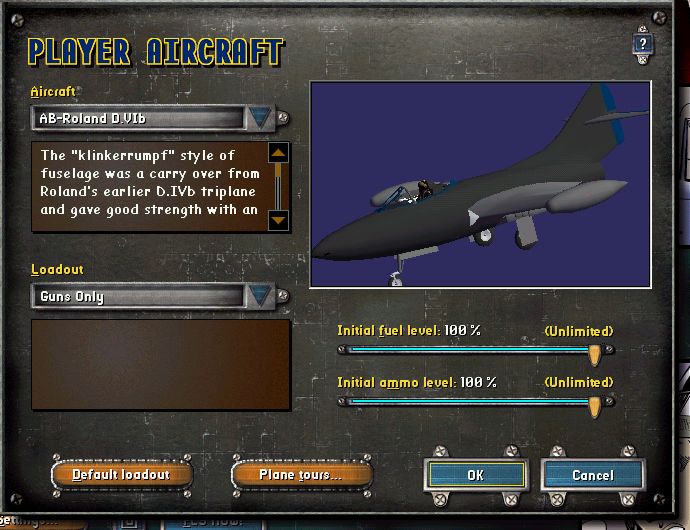
The Model.cfg of the Roland is aliased to the Panther like this.
CFS2 is the folder name of the version of CFS2 the Panther is installed to.[models]
normal=C:\Program Files\Microsoft Games\CFS2\AIRCRAFT\ALPHA F9F-2 Panther\model\F9F-2 Panther USN
It could be aliased to the MDL of any aircraft in any version of FS/CFS you have installed. It could also be used to alias to a MDL file located anywhere on your PC, providing you use the correct path. I didn't edit the other CFG files so the textures don't display.
This is fiddly, time-consuming & of no practical value. It might have been useful when the size of the average HD was measured in Mb rather than Gb.
Re: Combining aircraft folders
Posted:
Wed Aug 03, 2005 1:40 pmby TacitBlue
Exactly what I was thinking! If you had a couple of small hard drives, then you could keep all of your aircraft on one drive, and the rest of the sim on another. But yeah, it looks like entirely to much work for that little bit of convenience.
Re: Combining aircraft folders
Posted:
Wed Aug 03, 2005 1:57 pmby Wing Nut
Actually, if you could keep your ac on one drive and the sim on another, it might improve performance significantly...
Re: Combining aircraft folders
Posted:
Wed Aug 03, 2005 2:23 pmby Hagar
I suspect you would have to leave the default aircraft where they are. It's not a good idea to mess with default files.
Re: Combining aircraft folders
Posted:
Wed Aug 03, 2005 2:59 pmby TacitBlue
Improve it? I would think the opposite, because if you did that, the computer would have to access one drive for all of the scenerey, and then access the other for the aircraft. Seems to me that it would be quicker if it all came from the same place.
Re: Combining aircraft folders
Posted:
Wed Aug 03, 2005 3:03 pmby TacitBlue
Ooh, I just had a thought. It would be easy to keep your scenery on a seperate drive because of the way you install it. You have to point out the full path of the file anyway, so you could keep in anywhere you want. If keeping the aircraft on a seperate drive would improve performance, I suspect that doing the same only with scenery instead would improve it too.
Re: Combining aircraft folders
Posted:
Wed Aug 03, 2005 3:19 pmby Hagar
I would think that having all files in the same root directory should be the most efficient. At the speed it all works these days I doubt it would make much difference. Once the directory for the selected aircraft has been found that should be it. Not that I know much about these things but I always thought the shorter the path the better. The aircraft could be in a directory named D:\Aircraft. Short & sweet.
This is all very interesting but quite frankly it's a waste of time & effort. I've conformed it can be done but as I mentioned before, with the large capacity hard drives in use these days I see no practical advantage. There could be problems I haven't thought about like how this would affect aircraft used as AI Traffic. FS9 is far more complicated than FS98 or CFS1. Aliasing panel & sound was very useful in the early days when HD space was at a premium. It also reduced the size of the downloads but that's been no problem since broadband became available.
Re: Combining aircraft folders
Posted:
Wed Aug 03, 2005 3:22 pmby Hagar
Ooh, I just had a thought. It would be easy to keep your scenery on a seperate drive because of the way you install it. You have to point out the full path of the file anyway, so you could keep in anywhere you want. If keeping the aircraft on a seperate drive would improve performance, I suspect that doing the same only with scenery instead would improve it too.
Read my Scenery Clinics.
 http://www.simviation.com/lair/fs2004sc.htm
Providing it's configured as shown above, 3rd party scenery can be activated from any location & any drive on your PC.
You can use the remote Scenery Directory described in my original FS98 Scenery Clinic if preferred.
The important thing is that you know where it's located.
Re: Combining aircraft folders
Posted:
Wed Aug 03, 2005 3:33 pmby TacitBlue
Oh, you're right, it has no practical purpose, but it's fun to say "what if".