Page 1 of 1

Scenery Blurring

PostPosted: Fri Jul 22, 2005 2:58 pm
by Clipper
I find tha when I fly at relatively high altitudes which show large areas of scenery, I get blurring in the distance until i get very close to the specific area, which than automatically sharpens, I have all scenery and hardware sliders at max. Anyone know why or how to fix this issue? Help would be appreciated.. :)

Re: Scenery Blurring

PostPosted: Fri Jul 22, 2005 4:12 pm
by ozzy72
Drink less beer? ;D
I'd guess your graphics card is at its limit of performance. I get it as well.....

Re: Scenery Blurring

PostPosted: Fri Jul 22, 2005 5:04 pm
by ThatOnePerson
I get that to i wasnt sure if there was a way to make it preload everything to where theres no blurring,oh well time to go by another 2000 dolar computer because of microsoft :P

Re: Scenery Blurring

PostPosted: Fri Jul 22, 2005 6:43 pm
by Clipper
Drink less beer? ;D


I'll live with the blur

Re: Scenery Blurring

PostPosted: Fri Jul 22, 2005 7:00 pm
by ThatOnePerson
Microsoft,when will they learn ??? ??? :P

Re: Scenery Blurring

PostPosted: Sat Jul 23, 2005 9:48 am
by SaVas
Or you could get a key assignment for Refresh Scenery which will take the blurries out for a moment until the graphics card gets overwhelmed again.

Or something else I found is go into slew mode and get as close as you can to the aircraft in external view wait a few moments then pull out again.

Re: Scenery Blurring

PostPosted: Sat Jul 23, 2005 1:19 pm
by Fozzer
Wouldn't I be right in thinking that anything you see in the far distance will be blurred...
..unless you have the eyesight of a Buzzard... ;)...!

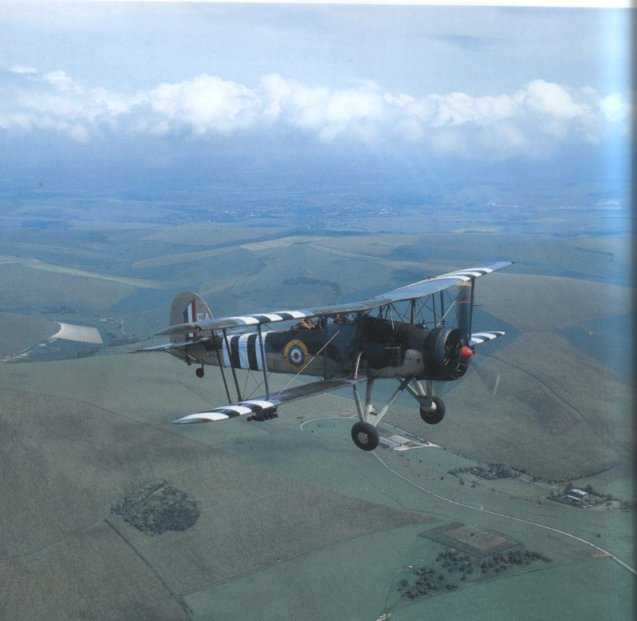
Taking a look at any photograph will show the distant background scenery to be blurred....cloud, mist, fog, smoke, etc...

My scenery distance is set at 5-10 miles maximum for VFR flights.

..as real as it gets...?

Setting the scenery to a realistic distance will reduce the load on your graphics card...

Paul...windscreen wipers on... ;)... ;D...!

For all those who think that you can see clear across the Atlantic Ocean, from one side to the other....
This is what you REALLY see in front of you...>>>

Image

Photograph courtesy of Gordon Blain: "Silvered
Wings".

Re: Scenery Blurring

PostPosted: Sat Jul 23, 2005 5:36 pm
by Clipper
You guys are constantly reminding me why SimV is the ONLY place for a simmer to be. You're all so beautiful...to me...sep my bro' Foz...he's just gnarly.. ;)THANK YOU!

Re: Scenery Blurring

PostPosted: Sun Jul 24, 2005 3:46 am
by Fozzer
LOL...!

Hi Clip....

Wot I wood recommend...>>

Pop a smear of Vaselene on the lenses of your trusty specs.
Turn the Sim on, (with its usual visibility set to infinity, like from one side of the Atlantic Ocean to the other!).
Place the specs on your beak.
Peer through them, and be aware thats what you see out of your windscreen as you potter around the sky.... ;)...!
LOL...!

Cheers Clip... ;D...!

Paul....it's mostly gloomy, up there...you know!... ;)... ;D...!

Re: Scenery Blurring

PostPosted: Sun Jul 24, 2005 12:00 pm
by Foxtrot Sport
Check your Mips in the Settings, if their 4-5, you'll probably want to raise them a little.

-HF

Re: Scenery Blurring

PostPosted: Sun Jul 24, 2005 12:18 pm
by Clipper
Thanks Flyer, my mips setting is 7. The scenery refresh SaVas suggested works wonders!  :)

Re: Scenery Blurring

PostPosted: Sun Jul 24, 2005 2:41 pm
by SaVas
[quote]Thanks Flyer, my mips setting is 7. The scenery refresh SaVas suggested works wonders!

Re: Scenery Blurring

PostPosted: Sun Jul 24, 2005 5:24 pm
by Pyrat
Does that in real life too!

Re: Scenery Blurring

PostPosted: Sun Jul 24, 2005 7:33 pm
by Clipper


Wow one of my suggestions was actually worthwhile? :O

Glad it helped clipper :)


C'mon SaVas, you're being too modest.  ;) I thank you again for that extremely useful solution.. :)