Page 1 of 1

Guages Nightmare

PostPosted: Sat Jul 23, 2005 6:05 am
by Clipper
Whenever the guages are supplied as a seperate folder in downloaded planes, I can never get them to appear on the panel. I copy the folder and paste into fs9 guages folder but nada. Could anyone take a screenshot of their fs9 guages folder open and closed so I can see if I haven't messed mine up? As well what does fsdb guage mean? Help, as usual, would be greatly appreciated...here's what my folder looks like.
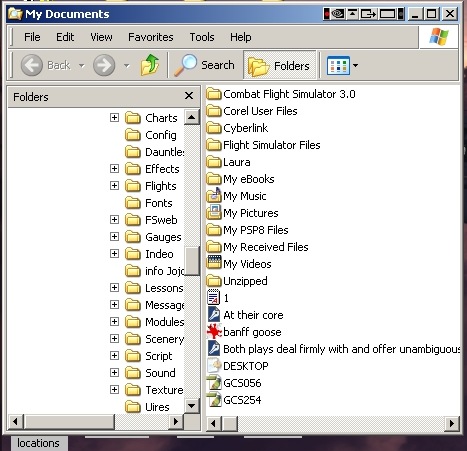
Image
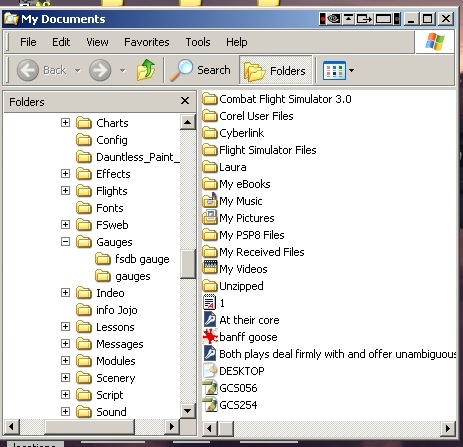
Then when I open the guages folder, I get this:
Image
The second guages folder that is in the main guages folder contained a handful of guages from where I don't know. I've deleted them.

Re: Guages Nightmare

PostPosted: Sat Jul 23, 2005 6:55 am
by OrderMaster
When the gauges are in a folder, you need to copy the gauges, NOT the folder, to the fs9 gauges folder.

HTH
OrderMaster

Re: Guages Nightmare

PostPosted: Sat Jul 23, 2005 7:40 am
by dave3cu
As stated by OM, normal gauge files get copied directly into the main 'gauges' folder. The exception is .xml gauges which remain in their own sub-folder within the 'gauges' folder.

The 'fsdb gauge' folder in your pic may be an example of an .xml gauge.

Image

Note: FS9 allows you to place gauge files in the aircraft's 'panel' folder.

Upside: this makes for easier 'cleanup' if you later decide to delete the a/c.

Downside: the gauges cannot be used by another a/c unless you edit its 'panel.cfg' file.


Dave

Re: Guages Nightmare

PostPosted: Sat Jul 23, 2005 5:31 pm
by Clipper
Thank you both OrderMaster and Dave. You've ended my nightmare!  ;D

Re: Guages Nightmare

PostPosted: Sat Jul 23, 2005 6:32 pm
by Katahu314
I never knew that the panel folder of an aircraft can also be used in that manner. :o

Re: Guages Nightmare

PostPosted: Sat Jul 23, 2005 6:35 pm
by Hagar
I never knew that the panel folder of an aircraft can also be used in that manner. :o

Only in FS9. I check out a lot of aircraft & use this method to try the panels. If I intend keeping the aircraft I then tranfer the gauges to FS9\Gauges. If not, I simply delete the aircraft complete with gauges.