
system crash

Forum dedicated to Microsoft FS2004 - "A Century of Flight".

system crash

Postby alb469 » Mon Jul 04, 2005 9:25 pm

My system partially crashed and fs9 no longer works correctly. having tried restore to no avail I want to reinstall fs9. After doing some research, found you must uninstall the update first. where is the fs9 root directory to take out the update and its backup file as MS noted on their fs9 site. Any help is appreciated. :'( ???
alb469
1st Lieutenant
1st Lieutenant
 
Posts: 320
Joined: Tue Oct 19, 2004 1:20 pm

Re: system crash

Postby legoalex2000 » Mon Jul 04, 2005 10:30 pm

yeah, lies

just uninstall FS9, then delete all files and folders left over. also find fs9.cfg on your computer and get rid of that. then reinstall FS9. if troubles arise again, consult a moderator of admin for help.

:)Ramos
legoalex2000
 

Re: system crash

Postby MattNW » Tue Jul 05, 2005 12:30 am

Have you tried deleting or just moving fs9.cfg and letting the sim rebuild it? I've found that often fixes up to 80% of problems especially if the sim hangs or crashes on the splash screen.
In Memory of John Consterdine (FS Tipster)1962-2003
User avatar
MattNW
Major
Major
 
Posts: 1705
Joined: Tue Mar 25, 2003 2:34 pm
Location: Indiana

Re: system crash

Postby commoner » Tue Jul 05, 2005 2:11 am
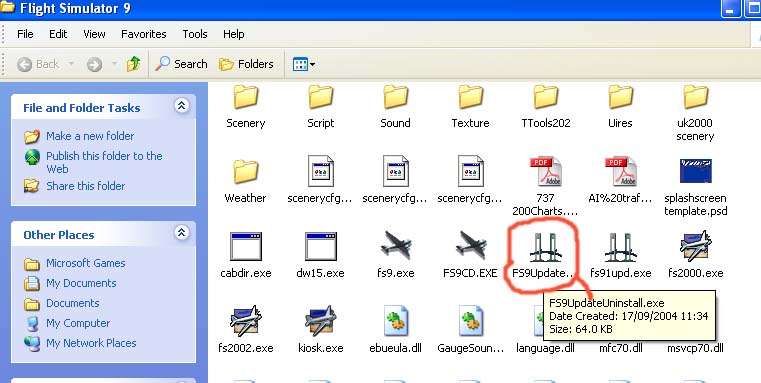
...Hi Alb.........It is recommended, in fact some say essential to uninstall the 9.1 update prior to doing an FS9 complete uninstall.........in the main Fs9 folder there is (should be) an uninstaller for that..it is a sort of suspension bridge icon...Then do the main uninstall from the Add/Remove programs or from the disc.........commoner ;)

...Matt's advice is good......it's always worth a try. ;)

...IMO, deleting files willy nilly is not a good way to uninstall stuff, it can give you hell when you come to reinstall.

Image
Last edited by commoner on Tue Jul 05, 2005 2:16 am, edited 1 time in total.
Image"In theory, there is no difference between theory and practice. But, in practice, there is."
User avatar
commoner
Major
Major
 
Posts: 3221
Joined: Sat Aug 28, 2004 2:26 am
Location: Yorkshire. England. UK.

Re: system crash

Postby alb469 » Tue Jul 05, 2005 8:25 am

Thanks for the help. Found and uninstalled everything (I hope). Will now try a reinstall. The original problem occured with fs9  running when lightning struck close by and knocked out the power. When it came back on we found all the addon a/c had no autopilot and no radios. Nothing I tried could bring them back. After reinstalling fs9 and then the update how do you put in the no cd program? My daughter did it for me the last time but she is not here now.
alb469
1st Lieutenant
1st Lieutenant
 
Posts: 320
Joined: Tue Oct 19, 2004 1:20 pm

Re: system crash

Postby commoner » Tue Jul 05, 2005 8:42 am

...Hi Alb.........get the NO CD file from this link, if you have lost it.....get the right one for FS9.1 if you have reinstalled the update..... Locate FS9.exe in the main FS9 folder..it's one of those black airplane icons you can see in my pic. Replace it with the NoCD file you have just downloaded....rename the original first as a precaution..........commoner
Last edited by commoner on Tue Jul 05, 2005 8:42 am, edited 1 time in total.
Image"In theory, there is no difference between theory and practice. But, in practice, there is."
User avatar
commoner
Major
Major
 
Posts: 3221
Joined: Sat Aug 28, 2004 2:26 am
Location: Yorkshire. England. UK.

Re: system crash

Postby MattNW » Tue Jul 05, 2005 11:34 pm

You are lucky all it messed up was the sim. I've lost a couple computers to lightning strikes. First one wasn't anything left to recover. Every piece of hardware was fried. Second just burned out the MB. Both computers were protected with battery UPS and the lightning got through that like it was nothing. Best to turn the PC off when it starts thundering.
In Memory of John Consterdine (FS Tipster)1962-2003
User avatar
MattNW
Major
Major
 
Posts: 1705
Joined: Tue Mar 25, 2003 2:34 pm
Location: Indiana


Return to FS 2004 - A Century of Flight

Who is online

Users browsing this forum: No registered users and 133 guests

