Page 1 of 1

Noob Questions for FS9

PostPosted: Thu May 19, 2005 9:54 am
by Hai Perso Coyone?
Hello all,
2 questions:

1) How can I make my farther clouds look more like the ones clearer like the ones near me. If you want to post a screenie then tell me just in case you donnt understand.

2) Eveytime I change the water texture to High it automatically reverts back to Low... As a result I can't see enhanced water textures. :'(

Thanks,
Ashar

PS: I am new to FS9 like Fozz 8)

Re: Noob Questions for FS9

PostPosted: Thu May 19, 2005 10:07 am
by Yurei
1) How can I make my farther clouds look more like the ones clearer like the ones near me. If you want to post a screenie then tell me just in case you donnt understand.
try to increase your cloud settings, for example:

cloud draw distance to something like 60 miles

3d cloud percentage 100%

detailed clouds ON, cloud coverage density as high as possible

note that it will depend on your system how well you will be able to display the clouds.


2) Eveytime I change the water texture to High it automatically reverts back to Low... As a result I can't see enhanced water textures.

you need a dx9 compatible video card

hope it helped  :)

Re: Noob Questions for FS9

PostPosted: Thu May 19, 2005 10:15 am
by Hai Perso Coyone?
try to increase your cloud settings, for example:

cloud draw distance to something like 60 miles

3d cloud percentage 100%

detailed clouds ON, cloud coverage density as high as possible

note that it will depend on your system how well you will be able to display the clouds.


you need a dx9 compatible video card

hope it helped  :)


Hi Yurei,
Yes it did help, but how can I know if I have a DX9 compatible video card. I have an integrated Intel Extreme Graphics 2.

Re: Noob Questions for FS9

PostPosted: Thu May 19, 2005 10:16 am
by Hyperion2
CCCP....looking at your system specs, you've got a great setup, but your integrated graphics are really bottlenecking your system.

If you want a great entry level card that gets you some pretty cool water textures, I'd suggest the FX5200 128mb PCI (assuming you don't have an AGP slot).  Not a very high end card, but my screenies tend to get lots of "oohs" and "aaahs".  lol

Re: Noob Questions for FS9

PostPosted: Thu May 19, 2005 10:19 am
by Hai Perso Coyone?
CCCP....looking at your system specs, you've got a great setup, but your integrated graphics are really bottlenecking your system.

If you want a great entry level card that gets you some pretty cool water textures, I'd suggest the FX5200 128mb PCI (assuming you don't have an AGP slot).  Not a very high end card, but my screenies tend to get lots of "oohs" and "aaahs".  lol


Hi Hype,
I do have an AGP slot as I have opened up my Motherboard quite a number of times. Oh and to figure out the DX9 compatability do u go to dxdiag in "run"?

Thanks,
Ashar

Re: Noob Questions for FS9

PostPosted: Thu May 19, 2005 10:25 am
by Hyperion2
I can already tell you that you don't have any DX9 functionality on your system....simply because you've got the integrated chip.

I bumped up from an integrated chip to the FX5200 about a year and a half to two years ago and have been amazed at the difference.

Look around the hardware boards for some video card recommendations for your system.  I don't have an AGP slot, so I wouldn't begin to know what is best for you. ;)

Re: Noob Questions for FS9

PostPosted: Thu May 19, 2005 1:51 pm
by Fozzer
Hi CCCP...!
...dont forget that bumping up your weather/cloud details and water texture details are two of the most Frame Rate hogging changes you can make to the flight sim.... :'(....!

Select: "Clear Weather", then add your own weather/cloud details to represent "real" weather...which is mostly "misty"... ;)... ;D...!
Reduce your "sight distance" to 10-20 miles max...!

...and reducing the water detail to nearly zero with give you proper blue water, instead of green-pea coloured water..
...and improve your frame rates... ;)... ;D...!

LOL...!

Cheers...!

Paul... 8)...!

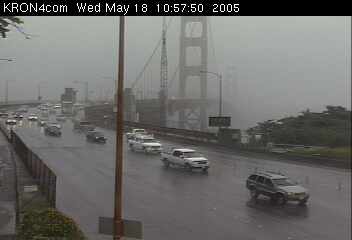
Here is a typical view of Golden Gate Bridge viewed from a Web Cam....note the "Real" weather... ;)... ;D...!

Pic courtesy of...

http://www.kron4.com

Image

Check your windscreen wipers... ;)...!

Re: Noob Questions for FS9

PostPosted: Thu May 19, 2005 2:12 pm
by Hai Perso Coyone?
Hi CCCP...!
...dont forget that bumping up your weather/cloud details and water texture details are two of the most Frame Rate hogging changes you can make to the flight sim.... :'(....!

Select: "Clear Weather", then add your own weather/cloud details to represent "real" weather...which is mostly "misty"... ;)... ;D...!
Reduce your "sight distance" to 10-20 miles max...!

...and reducing the water detail to nearly zero with give you proper blue water, instead of green-pea coloured water..
...and improve your frame rates... ;)... ;D...!

LOL...!

Cheers...!

Paul... 8)...!

Here is a typical view of Golden Gate Bridge viewed from a Web Cam....note the "Real" weather... ;)... ;D...!


Gosh Paul,
Thanks alot!! I noticed increased system performance!! The pea colored water wasn't that bad looking, but the blue is pretty good. The "real" weather is alot better too!!

Thanks alot,
Ashar :-*

Re: Noob Questions for FS9

PostPosted: Thu May 19, 2005 2:33 pm
by Fozzer

Gosh Paul,
Thanks alot!! I noticed increased system performance!! The pea colored water wasn't that bad looking, but the blue is pretty good. The "real" weather is alot better too!!

Thanks alot,
Ashar :-*


Fantastic news... ;D...!

Note that if you back-off the fancy weather detail, (especially the fancy 3d clouds... ;)...)....you can afford to winch up your other details. like autogen scenery, scenery complexity, reflections, shadows, etc, etc....without affecting your frame rates drastically.... 8)...!

Do a "Caps+Z" while you are flying and alter your settings to get the most detail with the best frame rates, and "smooth" flying.....
...using "Captain Sensible" weather details...LOL...!

Mine are ALL maxed with frame rates locked at 30FPS...cool...!

Have fun...!

Paul.