Page 1 of 1
Missing Panel

Posted:
Sun May 08, 2005 12:45 pmby Bubblehead
I downloaded an aircraft from SimViation titled "Bombardier PAD_CRJ700-ER" . All looks fine except that there is no panel. I tried to load various panels but it comes out with nothing but an open view of the strip. It did not make any difference when I deleted the panel file altogether. It still showed the same scene-no panel. Anyone got any ideas to fix this?
Bubblehead
Re: Missing Panel
Posted:
Sun May 08, 2005 1:21 pmby _526th_Fireman
Where did you get the acft. from? A link and I can check it out.
If you dropped a good panel folder in there then it should have displayed..............unless there is something in the acft.cfg that is preventing it from doing so.
Just looked through most of them and appears there are tons of that acft. by PAD, just different textures. States it includes panel.
Which acft. exactly did you get.........page # etc.?
Re: Missing Panel
Posted:
Sun May 08, 2005 1:44 pmby gr31
OK, I'll assume you downloaded one of the "Premier Aircraft Design" versions of the CRJ700-ER. First, they should be unzipped into the main FS-9 directory, not the aircraft directory. Check your folders and if you have the correct folders under aircraft (not \aircraft\aircraft) then look at the panel folder, it should be something like this: panel.UEX_513. The UEX_513 could be different depending on which model you got. Open the Aircraft.cfg file using wordpad, and look at the line for panel, it should look like this : panel=UEX_513, Again with the UEX_513 depending on the model you have but in any case it must be the same as the extention on the folder name. Hope that helps!
Re: Missing Panel
Posted:
Sun May 08, 2005 9:42 pmby Bubblehead
As i said previously that I downloaded this aircraft from SimViation. I have downloaded hundreds of aircraft before and once in a while I'll have a few that gave me problems. such as the Warthog and the SU-27 which did not have wheels. I have many good aircraft in my inventory to choose from so I might just delete this one. I'm not too good in messing around with the files. Thanks anyway.
Bubblehead
Re: Missing Panel
Posted:
Sun May 08, 2005 11:36 pmby gr31
OK, is the one you downloaded the one found here?
http://www.simviation.com/fs2004jets97.htmIf so, what I said applies. Go back and make sure you unzipped it into the FS9 base directory, not the aircraft directory. That is the only major difference with this file.
If all the files are in the correct place, I have no idea, it worked for me.
Re: Missing Panel
Posted:
Mon May 09, 2005 1:53 amby Marlin
Go to there website and check out the destruction there.
One screen comes up and asks a yes or no question, I forgot how to answer it, or what the results are if you answer it wrong?????
But this plane is my most flown and favorite plane !!!!
One of the reasons is the cockpits
Re: Missing Panel
Posted:
Mon May 09, 2005 2:21 amby Hagar
First, they should be unzipped into the main FS-9 directory, not the aircraft directory.
I lose more hair every time I see someone suggest unzipping files direct to the sim. Please don't do it.

I assume this is the aircraft you're talking about.
http://www.simviation.com/fs_pad_crj9.htmIf the aircraft is selectable from the menu the aircraft is obviously installed correctly. The problem is therefore with the panel itself. From the file description & screenshots a comprehensive panel & DVC is included so either it's configured differently from usual or you didn't install the panel correctly. If it was a smaller file I would download it to check it out myself. Copy/paste a Panel folder from any other aircraft into the CRJ & it should have some sort of panel. If not, then Fireman is probably correct & it's configured differently from usual.
[quote]As i said previously that I downloaded this aircraft from SimViation. I have downloaded hundreds of aircraft before and once in a while I'll have
Re: Missing Panel
Posted:
Mon May 09, 2005 3:36 amby Hagar
OK. I just downloaded crj7usax.zip posted here
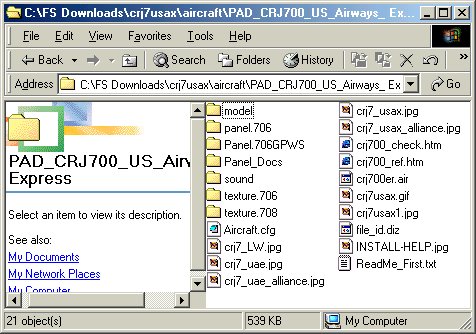
http://www.simviation.com/fs2004jets97.htm to check it out. The CRJ is configured with 4 variations, using one of two different panels. If you open the PAD_CRJ700_US_Airways_ Express folder (in FS9\AIrcraft) you should see something like this. Note there are 2 Panel folders named panel.706 & Panel.706GPWS. They must have these folder names to display. The way this aircraft is configured a folder named Panel will not work.
Re: Missing Panel
Posted:
Mon May 09, 2005 10:14 amby Bubblehead

GR31:
The model I was having problems with was the "Shandong" version of the PAD_CRJ700. However I will load the model you have pointed out and check it out.
Hagar:
Correct me if I am doing it wrong. Typically, after I download files from Simviation, It will first appear on my desktop in its zipped form. Then I unzip it to a "holding folder" I created aptly named "FS9 Downloads 05". From there I copy/paste the aircraft (which included model, panel, sound and texture) directly to the FS9 Aircraft folder. Any other separate files such as gauges, effects, sound, etc I paste them to the appropriate sections of the FS9. Because many of the available downloads now are "textures only", I created various folders of Model, Textures, Panels and Sound, which I can interchange to make the aircraft more realistic. What do you think?
Bubblehead
Re: Missing Panel
Posted:
Mon May 09, 2005 10:20 amby Hagar
Re: Missing Panel
Posted:
Mon May 09, 2005 4:05 pmby Hagar
[quote]The model I was having problems with was the "Shandong" version of the PAD_CRJ700. However I will load the model you have pointed out and
Re: Missing Panel
Posted:
Mon May 09, 2005 7:48 pmby Bubblehead
Hagar:
Thanks for the input. I tried two other PAD aircraft, a CRJ900 and another CRJ700 (United Airlines). In both cases, the panels were missing. I think I'll give up on them. I did'nt have a panel problems with the other Bombardier aircraft such as 145 and 174.
Bubblehad
Re: Missing Panel
Posted:
Tue May 10, 2005 8:23 amby Hagar
I really don't know why you're having a problem. I just installed the Shandong Airlines CRJ700-ER you mentioned & it has an excellent panel & DVC. If you extracted the zipfile as you described earlier, look for a folder named PAD_CRJ700_Shandong Airlines & paste it into FS9\Aircraft. Apart from installing the included gauges, modules, sound & INI files to their correct locations that's all there is to it. The panel displays even without these files installed.
Re: Missing Panel
Posted:
Tue May 10, 2005 8:38 amby commoner
..mmm.....just checked it out as you described and found it just fine.............as you say Hagar you get the panel even if you don't put the gauges etc in.....can't figure that one out at all..............commoner
