Page 1 of 2
Maybe someone can help

Posted:
Fri Apr 22, 2005 8:00 pmby jordonj
I recently upgraded my system to an Athlon 64 (3200+), Raedon X700 (PCIxpress, 256 RAM), and 1 GB DDR ram (dual channel board).
I know FS9 is running faster as I can get playable framerates when landing at Chicago O'hare. I do have an annoying problem as sometimes the game will freeze and there will be a LOT of HDD activity for a bit. Then the game will resume.
Anyone know what I can do to improve this or get rid of this problem?
Re: Maybe someone can help
Posted:
Fri Apr 22, 2005 8:13 pmby Jared
I'm just randomly guessing but you do have the game fully installed to the HD correct?
Another thing to check is what your max frame rates is set at, typically anything over twenty just makes the pc work harder IMHO, if it's higher drop it down to 20...
Also does this happen when you are for example switching views, ie looking out a side window or just when flying straight and level with no other changes?
Re: Maybe someone can help
Posted:
Fri Apr 22, 2005 8:49 pmby jordonj
It can happen anytime (though it does happen when I change views too). I usually fly in VC mode...
I just hope I didn't waste my money on all this...
Re: Maybe someone can help
Posted:
Fri Apr 22, 2005 9:04 pmby Jared
Don't worry about wasting money..

Your word processor works much better now doesn't it? ;D

Is this a fresk install after the updates? I'd be tempted to say it was a video card problem with drivers or the likes IF you hadn't said that it does a lot of stuff on the HD at this time...
Have you tried a new FS9.CFG file yet? Might be worth a quick try...other than that I'm not sure offhand what it might be....

Re: Maybe someone can help
Posted:
Fri Apr 22, 2005 9:06 pmby Jared
Also what kind of other "background" programs are running? I forget what it was, but I once had a program that would eat up lots of resources at random....
Re: Maybe someone can help
Posted:
Fri Apr 22, 2005 9:12 pmby jordonj
Actually, I was running FSAutostart to shut down everything, and It made no difference...
Most of the time, I get about 20FPS (locked) but there are times when it goes below 10FPS. Part of this happens with Add-on scenery, and turning off Building Shadows helped immensely.
I'm beginning to wonder if it's just that no matter what horsepower your machine has, FS can use it up!
I doubt you wasted your Re: Maybe someone can help
Posted:
Fri Apr 22, 2005 10:45 pmby GunnerMan
Well what are your settings... My system is AMD 3200+ overed to 2.2, 512 of PC 3200, 6800 Ultra and my settings are all max with 4x AA and 8x AF, I doubt you wasted your money because FS is a recource hog for sure and in dense areas I am in the 10-20s or higher rarely goes lower and I don't have my FPS locked. Anywas I do get momentary freeze when changing views etc, thats always happened but it only lasts 2 seconds max. So not sure if this is what your getting. I also have no idea what my HDD is ding because I never hooked that wire up...but FS is def a hog because I run HL2, and Doom3 on max no probs but FS can get hairy at times.
Re: Maybe someone can help
Posted:
Fri Apr 22, 2005 11:26 pmby Skittles
You did a reinstall of windows right? Check your swap file (virtual memory). I don't think the problem is with FS at all. Did you get your memory chips in the correct slots? Some boards require the chips to be on the same channel, others, like mine, require the chips on opposite channels to run in dual mode.
Do you have two hard drives? Move your swap file to the second drive and set it to 1536, 1.5 times your memory. Running FSAutostart is a good thing. However, I recommend rebooting your machine before you fly. Kind of like an additional check list item. Sometimes when an application closes, not all of the memory is released and this builds up unused memory. You can verify this by checking the available memory when FSAutostart is done defragging.
Re: Maybe someone can help
Posted:
Sat Apr 23, 2005 12:42 amby GA_Pilot
There have been a few times mine will freeze up, like when I open the kneeboard, or FSNav, it's just like you described, after about 20-30 seconds everything returns to normal, but still annoying, but updating my video drivers corrects the problem.
Re: Maybe someone can help
Posted:
Sat Apr 23, 2005 11:32 amby jordonj
I get the same brief freeze from opening up the kneeboard or FSNav. The freeze I speak of can last maybe 30sec (though it feels longer)...Happens a lot in Toronto (Flight Ontario...yeah, I want my cake and to eat it too), Thunder Bay, Detroit. Also some addons cause slowdown (strange since they don't look that detailed, like the Matching Green from Dave Eckert's Hitchhiker...a couple of Leon Louis' sceneries out in Washington cause a problem as well...).
Here are my settings in FS
.jpg)
.jpg)
.jpg)
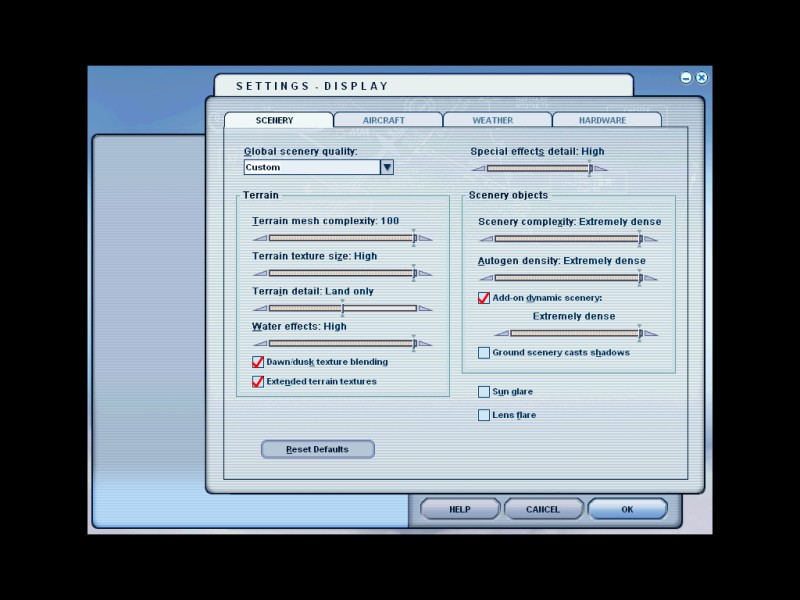
I am using FPS-friendly clouds, PAI (at about 72%, American passengers and GA thus far)
Card settings are 4X AA, 4X ansiotropic filtering...if anyone else has any ideas on what I should do regarding settings, please let me know.
By the way, my computer wouldn't boot if the RAM was in the wrong place...
Thanks for the tips! Let me know if you know of anything else I can do...
Re: Maybe someone can help
Posted:
Sat Apr 23, 2005 12:37 pmby Joe_D
What about your HDD?
FS runs only as good as your system's weakest link.
Data is constantly being retrieved from your HDD.
I found that when I upgraded my HDD to a SATA "Raptor", the ocasional pauses were much minimized.
Adding another Raptor and configuring RAID 0 essentially eliminated them.
Re: Maybe someone can help
Posted:
Sat Apr 23, 2005 12:58 pmby Fozzer
Hi Jordon...!
Reduce your "sight" distance to 10 or 20 miles max...
More realistic, and the computer doesn't have to render complicated scenery into the far distance....!
My flights over 'Frisco Bay are set at 5 - 10 miles max....'cos its quite misty there most of the time.
When you are up in the air in a real G.A. plane it is really quite misty in the distance...
...!
Paul.
Setting the distance to "near" also means you don't have to use complex cloud settings which zap your frame rates...!!
My frame rates are locked at 20 FPS...everything maxed....perfect...

...!
Re: Maybe someone can help
Posted:
Sun Apr 24, 2005 5:28 amby Fozzer
Hi Jordon...!
Reduce your "sight" distance to 10 or 20 miles max...
More realistic, and the computer doesn't have to render complicated scenery into the far distance....!
My flights over 'Frisco Bay are set at 5 - 10 miles max....'cos its quite misty there most of the time.
When you are up in the air in a real G.A. plane it is really quite misty in the distance...
...!
Paul.
Setting the distance to "near" also means you don't have to use complex cloud settings which zap your frame rates...!!
My frame rates are locked at 20 FPS...everything maxed....perfect...
...!
An example of what
real weather looks like...!
This is a shot leaving San Francisco International Airport, heading for San Francisco which you can only just see in front...!
A look at the Kron4 web cams often shows similar weather in the Bay area.
http://www.kron4.comReducing the view to a more realistic 5-10 miles shows real weather and scenery, and places a lesser load on the graphics card and processor...!
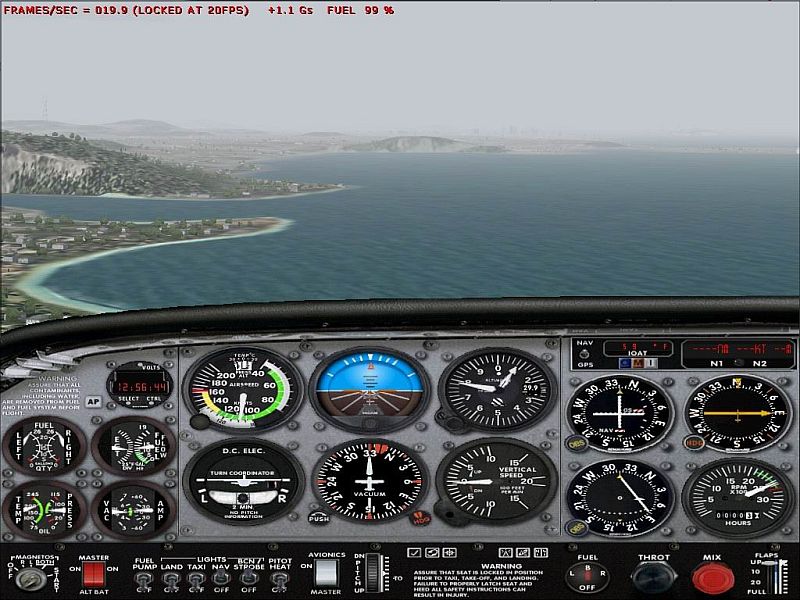
Note that all my hardware/scenery/etc, settings are set at MAX..!
Paul....for REALISTIC weather conditions...

...!
LOL...!
Re: Maybe someone can help
Posted:
Sun Apr 24, 2005 8:27 amby GA_Pilot
The lowest my "sight distance" will go is 60 ???
Re: Maybe someone can help
Posted:
Sun Apr 24, 2005 9:14 amby Skittles
Just a wild guess here, but, I read everywhere about setting MIP Mapping to 4. I've never noticed a difference at anything higher. Try setting it to 4 and see what happens?