Page 1 of 1

cruise ship

PostPosted: Mon Apr 18, 2005 3:13 pm
by trim
hi everyone, i downloaded the cruise ship from this site, but cannot access it. I put it in the aircraft folder  and put the effects in the effects folder. It doesnt really tell you how to install it. Any help would be great, thanks.

Re: cruise ship

PostPosted: Mon Apr 18, 2005 3:27 pm
by the_echo
Someone correct me if im wrong (which i probs am, lol) i think you have to place the ship in the SCENERY folder?

I think anyhow, if this doesnt work im sure someone with more knowledge will help.

Cheers,
Echo.

P.S. Welcome to SimV forums!

Re: cruise ship

PostPosted: Mon Apr 18, 2005 3:43 pm
by trim
ill try that, but i dont know if it will work. Apparently your supposed to navigate the ship, so i figure it has to be the aircraft file where you select your planes.

Re: cruise ship

PostPosted: Mon Apr 18, 2005 4:26 pm
by Woodlouse2002
Whats the readme file say?

Re: cruise ship

PostPosted: Mon Apr 18, 2005 5:09 pm
by Moach
check the folder where you have it installed, sometimes an addon might create a sub-folder inside it's target folder, then, FS is unable to find it ::)

c ya

Moach

Re: cruise ship

PostPosted: Mon Apr 18, 2005 6:43 pm
by trim
all the read me file says is to put the effects file into the fs9 effects folder, which ive done. It doesnt explain how to install it.

Re: cruise ship

PostPosted: Mon Apr 18, 2005 7:06 pm
by Moach
try unzipping all files into the AIRCRAFT folder

most addons will install themselves into the right paths as long as you DONT check the "ignore pathnames" function in winzip (or whatever program you use to unzip it)

then take the effect file and put it in the EFFECTS folder ;)


that works most of the time...

c ya

Moach

Re: cruise ship

PostPosted: Mon Apr 18, 2005 7:15 pm
by Hagar
Sorry to contradict you Moach but I would never recommend unzipping files direct to the sim. So much depends on the way the files are configured & the utility you use for extracting files, even down to the version of something like WinZip.

Trim. It would help to know where this file is posted so someone can check it out for you. From what you're saying I suspect it's configured as an aircraft & will be installed in the usual way. If there's no bug with the file you could either have installed it correctly & simply be looking in the wrong place on the selection menu - OR the actual ship folder is hidden inside another folder. These are the most common causes of installation problems in my experience.

Re: cruise ship

PostPosted: Mon Apr 18, 2005 7:43 pm
by Moach
I would never recommend unzipping files direct to the sim.

 
thats right, it can lead to all sorts of problems...:P

what you CAN do to be sure is to check the file pathnames in winzip before doing that

if the PATH field reads something like simply "panel" or "model" then you must create a folder inside the AIRCRAFT folder for your plane

if it reads "planename\model" or whatever, then unzip straight to the AIRCRAFT folder

when in doubt, always unzip to a temporary folder so your files dont end up all scattered


c ya

Moach

Re: cruise ship

PostPosted: Mon Apr 18, 2005 7:43 pm
by trim
http://www.simviation.com/fs2004misc9.htm

heres the link if you want to try. just scroll down to the bottom and you will find the cruise ship. Thanks

Re: cruise ship

PostPosted: Mon Apr 18, 2005 7:46 pm
by Hagar
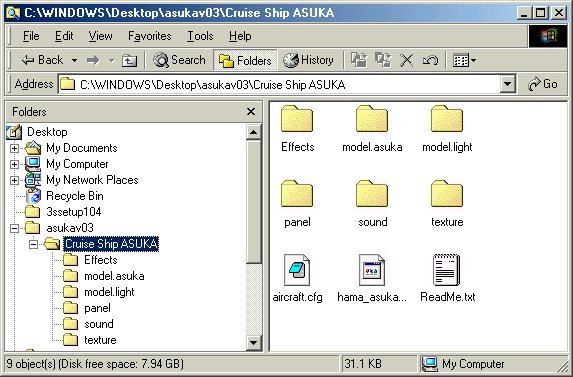
Think I found your ship. If it's the Asuka it should look something like this when you unzip it.

Image

To install it paste the Cruise Ship ASUKA folder into FS9\Aircraft. The 5 files from the Effects folder should be moved into FS9\Effects. It should be listed under "hama" as manufacturer on the aircraft selection menu. There are 2 variations. I didn't have time to install it & try it in FS9 myself but see no reason for it not to work.

Re: cruise ship

PostPosted: Mon Apr 18, 2005 7:49 pm
by Moach
just dowloaded it

as i suspected, the pathnames ARE set so that if you simply unzip to AIRCRAFT, the files will put themselves in the right folders...

then take the files in the EFFECTS folder it will create and move them to the MAIN FS EFFECTS folder

and there you have it

;)

c ya

Moach

Re: cruise ship

PostPosted: Mon Apr 18, 2005 8:43 pm
by trim
thanks , you guys rock