Page 1 of 1
when do I change to approach hold?

Posted:
Thu Mar 24, 2005 7:21 amby belter
When flying a Boing 737 on autopilot, everything is fine until I change to approach hold. Can anyone tell me when I should go to approach hold or tell me if I am doing something wrong?.
Please help me as I keep crashing!
Rae
Re: when do I change to approach hold?
Posted:
Thu Mar 24, 2005 7:53 amby GA_Pilot
Dont know how it is done in the real world, but I always wait until I am close enough to pick up the ILS signal for the localizer, and the glideslope before I turn on the approach hold. In my experience you will pick up the localizer before the glideslope, and if I turn it on before I pick up the glideslope it will go crazy :o
Re: when do I change to approach hold?
Posted:
Thu Mar 24, 2005 8:00 amby ashaman
I can tell you how I do it, if it helps.

When preparing an automatic approach and enter in the localizer range press the NAV button on the autopilot (just be sure that the GPS/NAV switch in on NAV position and that you entered the ILS frequency on NAV1 radio), this helps the plane align to the runway.
Press APR when the glideslope needle begins to move down from its position, this gives the autopilot the time to intercept both the signals correctly and gives you the sureness you'll be landing on the runway.
Doing like this I've never had problems.

Re: when do I change to approach hold?
Posted:
Thu Mar 24, 2005 8:15 amby Nav
belter, you'd better give more details of what goes wrong - nothing should!
You can switch it on as soon as you're reasonably close to the runway line (shown on the VOR). Leave the Heading and Altitude Holds on, the autopilot will switch those off when it's ready to line you up.
Also see my landing tutorial below (page 2) - it might help:-
http://www.simviation.com/cgi-bin/yabb/YaBB.cgi?board=COF;action=display;num=1111322151
Re: when do I change to approach hold?
Posted:
Thu Mar 24, 2005 11:46 amby wji
Engage the APP (APPR) when flying the intercept angle (30deg.) for the assigned approach. If flying IFR in FS9, ATC will instruct to turn to the intercept angle (30deg.) and state: "Cleared for the approach". Once on the intercept angle, engage the APP control.
Bill
P.S. Speed: maneuvering plus ten (see aircraft reference)
Re: when do I change to approach hold?
Posted:
Thu Mar 24, 2005 2:12 pmby willg
approach hold seemed to be working okay for me a while ago, but when ive done it recently, it doesnt seem to be intercepting the glideslope. itll get the localizer and stay in line with the runway, but the airplane will continue to rise and descent as if the autopilot was off.
how do i make sure that i intercept the glideslope. if ive got to wait till im in line with the green ILS feathers on the gps, its too late by then, i need the APP hold to come on well in advance and get me all ready for landing.
another question, will the APP capture the glideslope as long im maintaining the right rate of descent, i.e, can i put the visual flight path on for a while (so i know the correct rate of descent and altitude and path etc), then when im in the red rectangles just put on app hold. (and turn off the VFP)
Re: when do I change to approach hold?
Posted:
Thu Mar 24, 2005 2:13 pmby willg
hey i forgot to mention this in my last post, but, (@ashaman), where are the glidescope needles and how do i read/use them, it would certainly make ILS landings far easier.
Re: when do I change to approach hold?
Posted:
Thu Mar 24, 2005 7:04 pmby RollerBall
You never enter the ILS phase of your flight while you're still descending. It's very important that you intercept the Glide Slope from below so you will always therefore be at a height of something like 2000-2300 ft above airport elevation in a level attitude.
The following is pretty typical for an ILS approach.
Either you will be taking instructions from ATC or you will be using an approach chart (preferably) or just the GPS to get yourself into the right position. ATC will do all of the working out for you and just give you instructions to descend when necessary and the headings to fly. But let's say you're doing it for yourself.
You're aiming to be at say 2100ft (therefore flying at quite a bit less than 250 kts and probably with 1 or 2 notches of flap on depending on what you're flying) flying towards the runway centre line on a relative angle of 30 deg off it. So if the runway heading is 300 deg, depending on which direction you're approaching from, you'll be either on 270 deg or 330.
You'll have 2100 ft cranked into your AP with ALT hold on. You'll have say 270 in the HDG box with HDG hold on. You'll have 300 deg in the CRS box ready for final approach and the ILS frequency set in NAV1.
The aircraft is flying under full AP control assuming you have autothrottle. If not, you are controlling the speed manually and applying flaps as required as you slow down.
You're now watching the ILS bars. In the scenario described the Localiser bar will be skewed off to the right, showing that the extended runway centre line is off to your right ie when you get onto it you will therefore have to turn LEFT onto the runway heading. The GS bar will be up on the top of the gauge showing that the GS line is above us. This is essential. If it isn't, you abort the approach and go around. You're probably now at something like 30-35 nm DME from touchdown.
You're watching the Localiser bar like a hawk and waiting for the first sign of movement back towards the centre of the gauge. This will probably happen at around 20-25 nm DME from touchdown. When it does, this is called being ESTABLISHED on the Localiser. In real life you will report 'Established Localiser' to Approach ATC.
As soon as you are established, you hit the APR button on the AP. HDG will go out and soon the plane will begin to gently bank (unfortunately it can be quite fierce in the sim and it can take 2 or 3 wiggles for the plane to get set up on the centre of the Localiser beam.
Now it just leaves the GS. What do you do? Nothing. You leave ALT hold on. You did all you had to by making sure you were below the GS beam right at the start of the procedure. You watch the GS bar descending on the gauge and when it reaches the centre you will see ALT hold go off and the plane will begin to descend. Now all you will need to do is control speed, add flap, make sure you get the gear down and monitor the approach.
At 1000-1500 feet (if not sooner actually) you'll take manual control of throttles. Approaching Kai Tak, for example, CX Jumbo Captains took AT off at around 10 miles or so out. At say 500 ft you come out of AP completely and take manual control for the flare and landing.
A few guys around here who may not be comfortable with controlling their aircraft via the AP say 'I always approach and land manually - much nore fun'. But they're wrong. It's just as much fun to have complete control of the aircraft systems and know that you can do it all confidently and smoothly. It's not as easy as all that as you've found.
Also you don't get many heavies being landed manually in real life by gung ho jockeys in minimal visibility so if you can't do it like the real pilots do, you're not really cutting it, are you ;)
Re: when do I change to approach hold?
Posted:
Fri Mar 25, 2005 7:18 amby willg
thanks a lot Rollerball
Re: when do I change to approach hold?
Posted:
Fri Mar 25, 2005 8:52 amby RollerBall
OK - here goes ;)
These are 2 very old FS2002 pics of mine. They show a B767 landing on Rwy 8R at Gatwick but they show pretty clearly what you're doing.
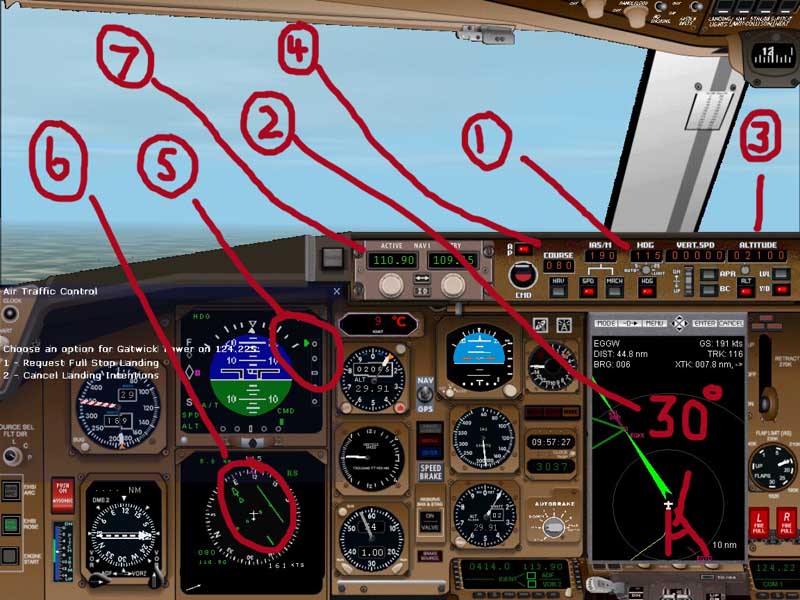
The runway heading is approx 080 deg so (1) shows that we are set up on a heading of 115 with HDG hold on. As you can see from the GPS (2) we're roughy 30 deg off the runway heading. Our altitude (3) is 2100 ft and there's about 2 notches of flap on at a speed of 190 kts. The runway heading is set at (4) in the COURSE box (COURSE would be NAV in other APs). We are below the GS as shown at (5) by the indicator and the Localiser needle (6) is off to right as we expect. The ILS frequency is set at (7) in NAV1 and all is looking good at something like 8 nm DME out with gear down.
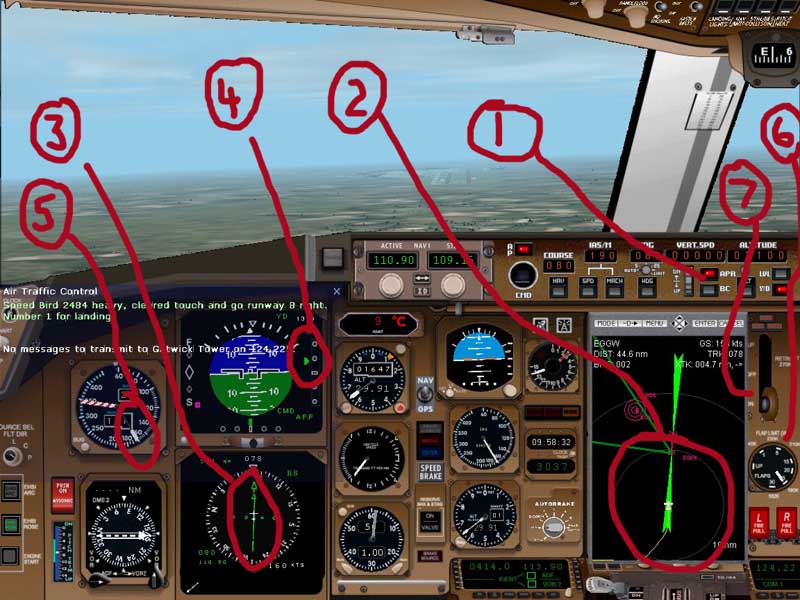
We're now lined up for finals. APR (1) is on. We switched it in when the Localiser bar (3) began to move off the right of the gauge back towards the centre. The Localiser is now holding us on the runway centre line as you can see on the GPS (2). When we intercepted the GS, ALT hold automatically tripped off. At (4) you can see we are just below the GS, but not by an unsafe amount. We are manually controlling AS at a comfortable 169 kts with a notch of flaps (6) still to go at 1600ft. Co-pilot called '3 Greens' to confirm gear down and locked (7) for landing and all is looking real good for us to take manual control at about 1000ft for a flare and landing.
Thank You for Flying British Airways ;)
Re: when do I change to approach hold?
Posted:
Fri Mar 25, 2005 9:51 amby willg
thanks again Rollerball, very good indeed ;D
now I can do a pretty much perfect approach and landing ;D
can I send you a flight vid of me landing?
Re: when do I change to approach hold?
Posted:
Fri Mar 25, 2005 10:02 amby commoner
Hi Roller.....that gps display looks nice.....nice closeup of the feathers....not the FS9 default so just what is that?...commoner ;)
Re: when do I change to approach hold?
Posted:
Fri Mar 25, 2005 10:04 amby ashaman
Sorry for being late, Real Life's issues, you know.
Anyway Rolerball answered for me as well. The needle of the glide is on the right of the HSI, usually. Sometimes it's different than the reference pic, but its use is the same.
Happy Easter to you all.
Re: when do I change to approach hold?
Posted:
Fri Mar 25, 2005 12:47 pmby willg
ya i've realised where it is and am now making perfect landings on a regular basis in the good old BA 777 :)