Page 1 of 2

IAS Hold Problem

PostPosted: Tue Mar 22, 2005 11:25 am
by willg
okay heres the problem.  a few hours ago i took off from NY JFK , after climbing to 10 000 feet manually i turned on the autopilot. its been fine up to now, but all of a sudden, after dialling in 340 knots in the IAS hold menu thing, the plane just wont carry this out. ive been using the IAS hold feature okay so far, if i wanted to go to 200, id just type it in and in a few mins id be at 200, no problem, working fine, but now the IAS is just stuck at its previous hold speed of 315.

Image

Re: IAS Hold Problem

PostPosted: Tue Mar 22, 2005 11:32 am
by willg
by the way, ive just found out that if i enter an Airspeed of below 315 the AP will easily enough get to and hold that airspeed, it just seems like the AP doesnt want to get to and hold a speed of above 315 ???

Re: IAS Hold Problem

PostPosted: Tue Mar 22, 2005 12:11 pm
by wji
Above FL190 use Mach. speeds
bill
P.S. mach speeds for type on in kneeboard reference

Re: IAS Hold Problem

PostPosted: Tue Mar 22, 2005 12:23 pm
by willg
ya but it should still work if im typing in IAS speeds though shouldnt it ?

anyway how do u convert IAS to mach???

Re: IAS Hold Problem

PostPosted: Tue Mar 22, 2005 12:30 pm
by willg
anyway MACH hold doesnt work either, whatever i seem to set it too the aircraft just keeps loosing speed, the only speed the airplane can stay at or get to is 315.
there must be a fault with my autopilot.

besides i cant find a way to convert mach to ias.

in short, nor the mach or ias hold can get past 315knots.

Re: IAS Hold Problem

PostPosted: Tue Mar 22, 2005 12:35 pm
by Papa9571
By the looks of your pic, even with the EICAS covered up, I would say that travelling at Mach.84, or 517 mph ground speed,  is probably as fast as the aircraft will go at 32,000 ft.

It took me a while, and with a lot of help from other members here, to realize that you can not fly by speed alone. You need to balance other requirements such as alitude, weight, and weather. For a given air speed the higher you go the faster your ground speed will be.

To show you how the Mach number, air speed, ground speed, and altitude work together try this.

Set you AP to 250 KIAS and your alitude to say 40,000.

Take off and engage the autopilot, and autothrottle. Sit back and enjoy the view. Keep an eye on your mach number.

Once the aircraft reaches 250 KIAS your airspeed will remain steady. But look at the Mach number on the bottom of the scale. It will be slowly increasing as you climb. Also, if you are flying the same aircraft as you have shown in the pic, you will notice a series of yellow and red lines on the right side of the speed indicator. The yelow lines are a warning that yopu are close to going overspeed and the red ones indicate the maximum air speed the aircraft can safely fly. These lines will adjust up and down, again depending on your altitude.

If you want to progress even further use the concorde, set your airspeed to 350 and your altitude hold to 58,000

As you climb you will pass mach 1 and come close to mach 2 without touching your throttles.

Yes you can take the concorde through mach 1 without using your afterburners is FS2004.

For a more indepth discussion go to this thread. It explains in great detail almost exactly what you are experiencing.

http://www.simviation.com/cgi-bin/yabb/YaBB.cgi?board=COF;action=display;num=1107887786

Hope this helps

P.S. Beefhole....did I get it right?  ;D

Re: IAS Hold Problem

PostPosted: Tue Mar 22, 2005 12:49 pm
by willg
I understand what your saying, but im not sure how to increase my airspeed then, should i lower my altitude or go into a descent?

Re: IAS Hold Problem

PostPosted: Tue Mar 22, 2005 1:04 pm
by Papa9571
You are flying at 315 kts indicated air speed. This is a measurement of the speed of the aircraft as it moves through the air.

You are also flying at 512 kts ground speed. This is how fast your aircraft is moving in relationship to the ground.

Why the big difference?

As you go higher, the air gets thinner. Less air to measure means less air speed.

So to keep your airspeed constant the aircraft has to go faster. Thus the incease in ground speed.

And here is where the Mach number comes in.

Mach 1 is the speed of sound at a given altitude. At ground level you have to travel faster to get to mach 1 that you do at say 40,000 feet. Thats because the air gets thinner as you climb and to keep your air speed up you have to go faster.

In your case you want 340 KIAS at 32,000 ft. Thats how fast you want to go through the air. If you look at yoru GPS ground speed you will find you are actually travelling at 512 kts.

Look at you engine control screen. You will probably find your N2 pressures in the red zone and your throttles all the way at the top. This is all the aircraft has to give and if you keep it up for too long you will damage your engines.

Read the entire thread that I linked to. It is full of usefull information on this particular topic and greatly helped me to understand what I was doing wrong too.

Re: IAS Hold Problem

PostPosted: Tue Mar 22, 2005 1:07 pm
by willg
right right, i get it, thanks for your help, im gonna slow to 250 knots now as not to damage my engines.

by the way, do I still have to remember all this information when im on approach? Or because im so low will all this not matter?

anyway thanks again
willg

Re: IAS Hold Problem

PostPosted: Tue Mar 22, 2005 1:10 pm
by willg
p.s if 315 was my airspeed, how do i find out my groundspeed, as you seemed to know what it was straight away then  ???

Re: IAS Hold Problem

PostPosted: Tue Mar 22, 2005 1:13 pm
by Papa9571
From wht I am told  FS2004 ATC is set up to direct you to landing at 250 KIAS.

When I get the call to contact the tower I have usually slowed down to 220 or so. When I call the tower I am in the process of slowing down to between 150-170, and setting flaps, for my final approach.

You dont have to fly at 250 KIAS all the time.

Once you reach say 20,000 select the mach hold button and set the mach sped to between .75 and .80.

That will maintain your speed and prevent an overspeed condition. Remember that your KIAS will probably go down but thats not a bad thing.

Re: IAS Hold Problem

PostPosted: Tue Mar 22, 2005 1:33 pm
by chomp_rock
Everyone seems to be missing the fact that your image breaks 3 forum rules:

1. Image must be <100k
2. Image must be <800 wide
3. Image may not be hosted on any site other than the Simviation (use the upload page)

Re: IAS Hold Problem

PostPosted: Tue Mar 22, 2005 1:58 pm
by Papa9571
Image

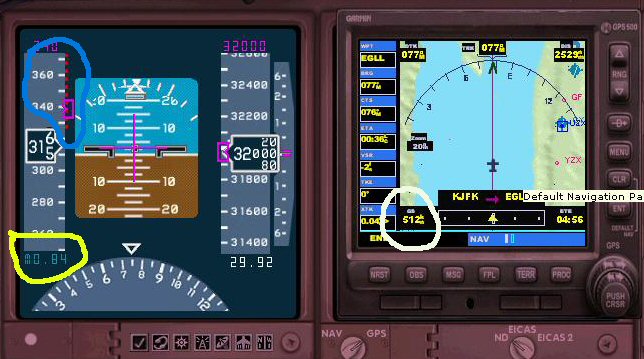
The white circle is your ground speed. It is shown on the GPS screen.

The Yellow circle is your current Mach Speed. Notice it is at .84 and shoud be at .80

The blue circled area are the red bars which denote the overspeed area.

Re: IAS Hold Problem

PostPosted: Tue Mar 22, 2005 1:59 pm
by commoner
Everyone seems to be missing the fact that your image breaks 3 forum rules:

1. Image must be <100k
2. Image must be <800 wide
3. Image may not be hosted on any site other than the Simviation (use the upload page)


...Yes I did notice it too Chomps....'cos I had to slide the pic over to see the other end of the pic and text...just thought it wasn't up to me to gripe about it ...maybe I should have on second thoughts....commoner ;)

Re: IAS Hold Problem

PostPosted: Tue Mar 22, 2005 3:06 pm
by willg
thanks again papa, i thought that number on the GPS might have been my ground speed. anyway, I understand why my aircraft wasnt getting any faster. I know for a fact my AP's okay, as i can happily go from 250 now, to around 300.

thanks for the help everyone, except that snitching moaning weasel who has to pick fault with something.