Page 1 of 2
Why no "Open Multiplayer" in FS9?

Posted:
Sat Mar 19, 2005 8:32 pmby beaky
Trying to figure out the online flying thing... not much luck w/Zone, so tried thru FS9 to get onto an IP game. When I open "Multiplayer" my "Open Multiplayer Session" button is greyed-out and won't work.

Re: Why no "Open Multiplayer" in FS9?
Posted:
Sat Mar 19, 2005 9:04 pmby Scottler
Easiest way is to either do an IP game or use FSHost...I usually do the first...
EDIT: To do an IP game, find who you want to fly with, then one of you host. (Go to ipchicken.com to get your IP) Then just have the others go to that IP to connect to the hosting machine.
Re: Why no "Open Multiplayer" in FS9?
Posted:
Sat Mar 19, 2005 9:08 pmby beaky
But the "Open Multiplayer Session" button in FS9 will not work!
Re: Why no "Open Multiplayer" in FS9?
Posted:
Sat Mar 19, 2005 10:40 pmby rmac
You have to know the host I.P address so once you have that you enter your name and then the hosts I.P Then hit connect on the main screen the scrren should change and ask you for A password if required if you know you own I.P you can enter that to get in and try it out.
RMAC
Re: Why no "Open Multiplayer" in FS9?
Posted:
Sat Mar 19, 2005 10:54 pmby _526th_Fireman
I strongly recommend that you get FSHostSpy. With this program you will see all the FS2k2 AND FS9 servers that are up and running. You can have it filter out all but FS9.
You get tons of info, IP, room info, who's flying/what and where........etc. etc.
Plenty of FS9 servers out there to satisfy you and you never have to go to the Zone, which tends to be a little buggy at times.
FSHostSpy is available here at Simviation.
Re: Why no "Open Multiplayer" in FS9?
Posted:
Sat Mar 19, 2005 10:55 pmby xFLAMESx
I understand where you're coming from and that was my first thought, but the point he's making is : He can't actually open the MP session screen to put in the IP and password, which is a little weird if you ask me

Cheers,
GM
Re: Why no "Open Multiplayer" in FS9?
Posted:
Sun Mar 20, 2005 12:16 amby beaky
Criminey...

Thank you, Gnat Man!
Never said I didn't know where to go; said I couldn't get there.
But thanks, everybody... I know you're trying to help!
Re: Why no "Open Multiplayer" in FS9?
Posted:
Sun Mar 20, 2005 12:29 amby xFLAMESx
Have you done a full install?
In multiplayer settings have you got port (or whatever it is) set to default?
Just trying to think of some ideas until someone knowledgable wakes up!

Cheers,
GM
EDIT* Oh, you can't actually change the FS internal port settings until you enter "open session"

Re: Why no "Open Multiplayer" in FS9?
Posted:
Sun Mar 20, 2005 12:31 amby jordonj
Are you running behind a router perchance? I belive that if Port-forwarding is not enabled, you cannot do Mplayer.
Re: Why no "Open Multiplayer" in FS9?
Posted:
Sun Mar 20, 2005 12:37 amby beaky
Are you running behind a router perchance? I belive that if Port-forwarding is not enabled, you cannot do Mplayer.
Now we're getting somewhere. Yes, the router (also known around here as "the Evil One") is probably behind this. I will check that. Thanx.
Re: Why no "Open Multiplayer" in FS9?
Posted:
Sun Mar 20, 2005 12:44 amby Jared
Check out the following:
www.portfarwarding.comwww.firewalling.comBoth sites have a large selection of routers and configurations and how to set them up right.
Also have you looked at the sticky over in the multiplayer forum? Eno has tons of information posted in there about routers/firewalls and the different ports needed.
Re: Why no "Open Multiplayer" in FS9?
Posted:
Sun Mar 20, 2005 4:37 amby eno
Rotty ...... it would be easier to help if you posted a screenie of the problem.
Is the problem here
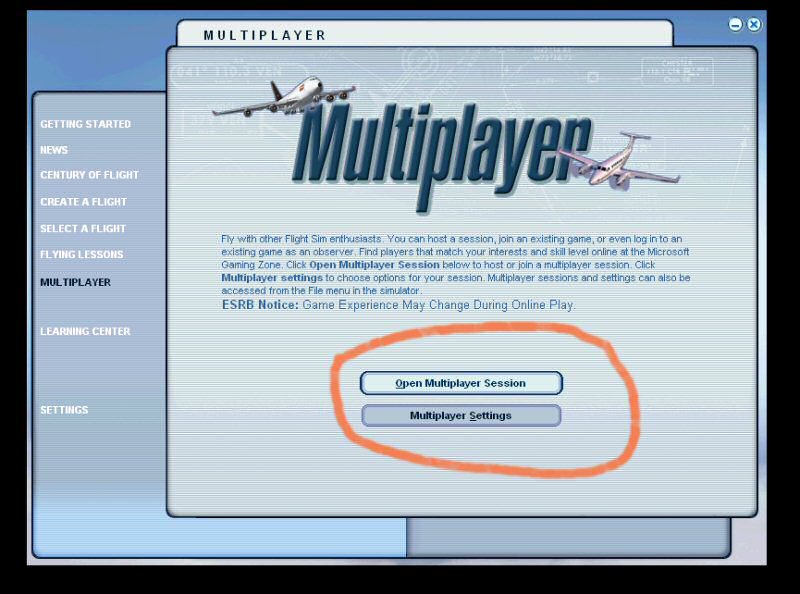
or here
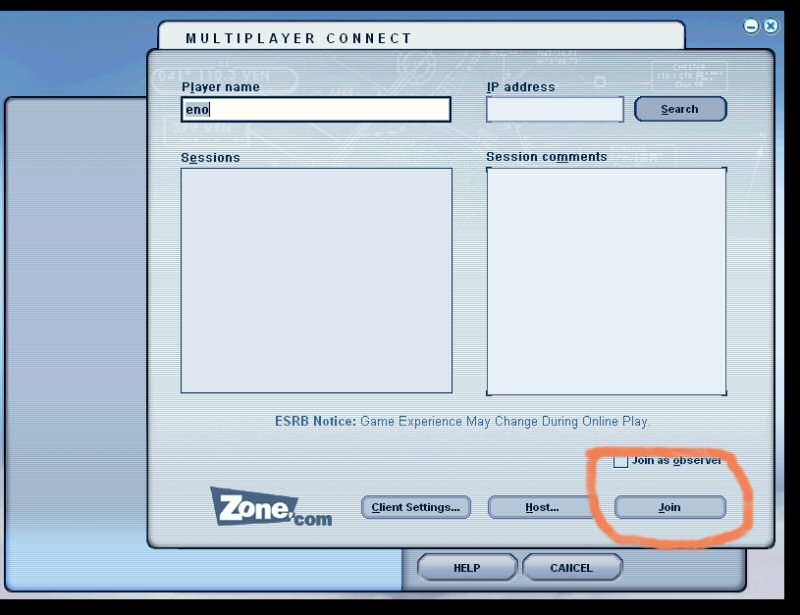
If it is the former then I'm stumped unless you didn't do a full install of FS9.
If its the latter then its probably a router problem unless you have a dud IP which isn't producing a session.
Re: Why no "Open Multiplayer" in FS9?
Posted:
Sun Mar 20, 2005 12:33 pmby beaky
It's the first, because my comment was "no 'Open Multiplayer' ".
Probably need to open ports, but so far can find no tutorial on how to do so with my router (Linksys). The mfr.'s info is vague, and all tuts. I've seen so far are for other routers or other connections. If anybody thinks they can help, I've got a Linksys BEFSR41 piggybacked w/ the equivalent wireless (BEFW11S4). The RF router is only being used as a cabled unit right now, so this is not a wireless connection issue. These two are routing signal from a cable modem to six PCs, including mine. The second one was bought just to get two more ports- the buyer's friend convinced her to get a wireless in case we want to expand along those lines... this is not a true network, we're just all sharing the same connection. No in/out between machines on the network.
I'm not touching any settings in that router until I know exactly what needs to be done, as I have spent many, many hours w/Linksys tech support trying to deal with these things suddenly going offline. Every time, the fix is different. Every time, they will not explain why one of the units 'went to sleep' or why one or the other lost its IP. They insist these two are compatible... I was ready to pass the hat here to buy an 8-port router (from another mfr!!) to simplify matters, but then, on their own, they started working again. So the masses returned to their terminals, thoughts of streamlining forgotten (myself included).
So much as I appreciate any and all offers to help, if you haven't worked with Linksys in a similar configuration, don't bother. I'm taking no chances here; not worth it just to go flying online.
I'd rather slit my wrists than call New Delhi again to wade through at least an hour's worth of stock questions and forced small-talk before the operator understands exactly what I'm trying to do... then spend several more hours going back and forth from my computer to where the routers are located (must've walked 1 1/2 miles the last time I went through that).
Re: Why no "Open Multiplayer" in FS9?
Posted:
Sun Mar 20, 2005 12:57 pmby Jared
Well I went ahead and ubplugged my computer from the network for a minute, totally unconnected to anything besides AC power, and I could stil get to the connect box? Seems like you oughta be able to get to the second box Eno posted without difficulty?
Not sure what's up now...
Re: Why no "Open Multiplayer" in FS9?
Posted:
Sun Mar 20, 2005 1:34 pmby beaky
May be some setting that's established once you're configured w/router properly, I dunno. Networks are not my thing. Thanks a lot, everybody- I'll try some more later.