Page 1 of 3
Aircraft Install problem

Posted:
Tue Mar 01, 2005 11:51 amby chief1995
I have installed the Maule m7260, but it is not showing up in my "select aircraft" window.
I know it is installed; I can see in in my aircraft folder, I rebooted my computer, etc. but still not showing up ???
Help!
Chief
Re: Aircraft Install problem
Posted:
Tue Mar 01, 2005 12:42 pmby Hagar
Tell me the page this aircraft is posted on so I can check it out if it isn't a big download. In the meantime check that folder you have installed to FS9. Make sure the "aircraft container" folder isn't hidden inside another folder or it won't show up. This is one of the most common causes of this problem.
PS. If it's the 60 Mb file posted here I won't download it.
http://www.simviation.com/fs2004props54.htmFar too big for me to even think about. Make sure it's correctly installed. Just because you can see the folder in FS9\Aircraft doesn't mean it's the correct one.
Re: Aircraft Install problem
Posted:
Tue Mar 01, 2005 12:47 pmby commoner
Hiya chief...would that be the 60 Mb download from here on SimV?....that is some download for an FS9 aircraft! What the L do you get for that?....I'll have a look if I get time to download it...meanwhile somebody like Hagar will probably know what to do....commoner ;)
Re: Aircraft Install problem
Posted:
Tue Mar 01, 2005 12:51 pmby commoner
..LOL..there ya go....knew he'd be there with an answer.... quick off the mark is that young fellow...big download that eh Hagar?

Re: Aircraft Install problem
Posted:
Tue Mar 01, 2005 1:15 pmby Hagar
It's a big file alright Commoner but this seems to be the way things are going now. Even if it has several variations I can't imagine how an aircraft download could possibly be that size. I know I'm past it but life's too short to download that on 56k dial-up. I would expect something lke that to install itself.
Chief. I have no idea how it's configured but installation shouldn't be difficult. If it's not auto-install follow the instructions in this tute carefully.
http://www.simviation.com/acinstall.htmNote the folder inside a folder I mentioned earlier. You must install the correct one. That's the highlighted folder in this pic.
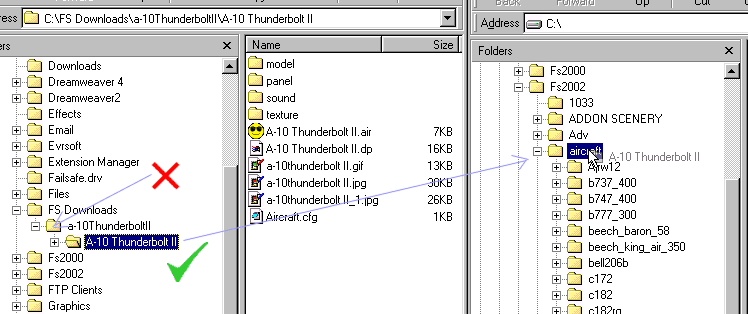
A download this size should come complete with detailed installation instructions so read them carefully. Make sure you're looking in the correct place on the FS9 selection menu. You possibly installed it correctly but looking in the wrong place for it.
Re: Aircraft Install problem
Posted:
Tue Mar 01, 2005 1:22 pmby dyfly

Sounds like you have two folders in one. Click on the Maule folder and see if you see another maule folder if you do then install the second maule to your fs9 aircraft then it will show up. What happen to me before.

Re: Aircraft Install problem
Posted:
Tue Mar 01, 2005 1:32 pmby chief1995
Hi Commomer and Hagar,
After I posted this I downloaded the Pilatus Porter, which is very similar to the Maule.
Thanks for waking me up all I intended to fly was the Maule tail dragger anyway. I dont know why I need such a huge download for the one plane.
I think I will blow off the Maule :-[
Thank you so much for your help and for waking me up!!
Regards,
Chief
Re: Aircraft Install problem
Posted:
Tue Mar 01, 2005 1:37 pmby Hagar
[quote]I think I will blow off the Maule
Re: Aircraft Install problem
Posted:
Tue Mar 01, 2005 2:00 pmby commoner
As you've already downloaded it I would persevere & get it working. It looks a nice aircraft & I wouldn't mind it myself. Don't give up now. It's probably something simple like that hidden folder I mentioned. Most of these things are easy enough to figure out.
..Hagar this is the install instructions..I got the download and it is a superb package..haven't tried the install yet but would appreciate what you think of these instructions...commoner

Re: Aircraft Install problem
Posted:
Tue Mar 01, 2005 2:05 pmby frank_carbon
OK. I now have my modem immersed in liquid nitrogen to cool it. Since I have the file open maybe we can all take a crack at this.
Following the toots instructions (you did read them right?), extract all to a temp folder. Once ALL files have been extracted, it seems pretty straightforward as written in the toots. You should have four folders. One titled aircraft, one titled effects, one titled gauges, and one titled sound. Open the aircraft folder and put those nine(!) folders in the FS9 aircraft folder(they have a separate folder (containing model, texture, sound, etc.) for each version of the airplane along with separate panel and sound folders containing two different panels and sounds that each version is aliased to.)
Then open the gauges folder in the temp folder and put all the gauge files in the main FS9 Gauges folder. Do not try and open the .cab files. They must go in the main FS9 folder as is.
Then open the sound folder in the temp folder and put those two sound files in the main FS9 Sound folder.
Then open the effects folder in the temp folder and put those three effects files in the main FS9 Effects folder.
Take deep breath. Try it out.
Re: Aircraft Install problem
Posted:
Tue Mar 01, 2005 2:15 pmby commoner
..OK Frank I already took a deep breath and followed the original instructions..unzipped to the MAIN FS9 folder...Perfect......just DO IT like it says chief....here's
Re: Aircraft Install problem
Posted:
Tue Mar 01, 2005 2:16 pmby Hagar
[quote]
..Hagar this is the install instructions..I got the download and it is a superb package..haven't tried the install yet but would appreciate what you think of these instructions...commoner
Re: Aircraft Install problem
Posted:
Tue Mar 01, 2005 2:25 pmby frank_carbon
I just did it manually because I didn't know what Chief was using to extract the files. The built in extractor in Windows XP (in case they're using that) doesn't give the option of Use Folder Names. Anyway, same result.
Re: Aircraft Install problem
Posted:
Tue Mar 01, 2005 2:29 pmby commoner
Re: Aircraft Install problem
Posted:
Tue Mar 01, 2005 2:34 pmby Hagar
One thing I have not seen before though...when you select a plane and Fly Now..this checklist comes up and you have to click CONTINUE to get the 2d up....no problem but I just wonder if there is a way to dispense with that...commoner...
I've never seen that feature before. I'm sure there must be a way to disable it but I don't know how. Check out the Aircraft.cfg entries for anything unusual. I wouldn't worry too much. It looks a nice aircraft. Enjoy it.