Page 1 of 1

Adding effects frustration

PostPosted: Sat Feb 19, 2005 7:06 am
by Clipper
Hi gang :) Can anyone either run through the procedure to add effects (afterburner, smoke etc..), or direct me to a tutorial. I have tried seemingly every copy paste configuration imaginable, I still can't see the desired effect. Your help would be greatly appreciated :)

Re: Adding effects frustration

PostPosted: Sat Feb 19, 2005 7:15 am
by commoner
Hi Clipper...without knowing what exactly you are trying to achieve and what you are doing to get the effects it is a bit difficult..usually the readme files are reliable but just one thing...in Settings/Display, have you got the special effects slider turned up to max?..commoner ;)

Re: Adding effects frustration

PostPosted: Sat Feb 19, 2005 8:28 am
by Clipper
Commoner, yes it's turned up to the max. Here's my latest frustration...I downloaded an sst . The model, panel, sound, gauges loaded fine and in the instructions it states just copy the afterburner and smoke files into the main fs9 effects folder. I tried... 1) copy and pasted the cfg afterburner file into the unopened fs9 effects file.(closed fs9 effects envelope), nothing, 2) I pasted the afterburner cfg file into the open fs9 effects file (opened envelope)..nothing, 3) I pasted the afterburner cfg. file directly onto the area that shows all the other fs9 effects (in the fs9 effects folder)..nothing. 4)  I copy and pasted the unopened sst effects folder into the fs9 effects folder ( I tried both the opened fs9 folder and closed fs9 effects folder)..nothing. What more can i tell you to clarify? let me know...Thanks

Re: Adding effects frustration

PostPosted: Sat Feb 19, 2005 12:02 pm
by microlight
clipper - which SST? Let me know and I'll have a look.  Effects (.fx) files usually go in the main effects folder, and they are called from the appropriate aircraft.cfg file.

;)

Re: Adding effects frustration

PostPosted: Sat Feb 19, 2005 1:19 pm
by Hagar
2) I pasted the afterburner cfg file into the open fs9 effects file (opened envelope)..nothing, 3) I pasted the afterburner cfg. file directly onto the area that shows all the other fs9 effects (in the fs9 effects folder)..nothing

Clipper. I haven't tried this particular aircraft so could be quite wrong. It's not usual for CFG files to be in the FS9\Effects folder. I just checked mine & it does not contain a single CFG file athough I must admit to not having installed too many effect files. I'm assuming this afterburner cfg is a sample Aircraft.cfg entry that should be copy/pasted into Aircraft.cfg of aircraft using these effects. Make sure you read the included installation instructions carefully.

Re: Adding effects frustration

PostPosted: Sat Feb 19, 2005 2:17 pm
by commoner
Clipper ..as I said..the readme files are there to help you install the files correctly, and Hagar is right (as usual  ;))  it's more likely to be the CONTENTS of the file you need to paste, not the .cfg file itself..commoner ;)

Re: Adding effects frustration

PostPosted: Sat Feb 19, 2005 2:39 pm
by Clipper
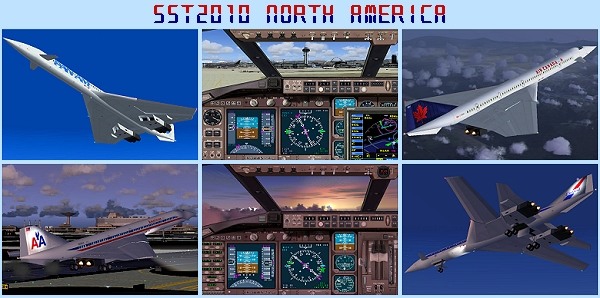
Thank you guys for the help. Here is the sst version I downloaded. I'll try it again and let you know.
Image

Re: Adding effects frustration

PostPosted: Sat Feb 19, 2005 3:22 pm
by Hagar
It might be easier if you posted a link to the page so we can check it out. ;)

Re: Adding effects frustration

PostPosted: Sat Feb 19, 2005 4:05 pm
by Hagar
OK. I found it. Here's what it says in the instructions.

<<<<<  Installation  >>>>>
Simply unzip all the files right into FS2004 Aircraft folder.
Then copy paste fx_sst2010afterburner.fx and fx_sst2010smoke.fx
into FS2004\effects folder. From select aircraft menu, these 4
models show up under "A-ST SST2010 North America" at the top
column of the menu. A-ST for A Shigeru Tanaka production


I strongly suggest you ignore the first part & unzip the file to a Temp folder before manually pasting the sst2010northamerica folder into the FS9\Aircraft folder. The second part should be quite straighforward. Find the 2 FX files named fx_sst2010afterburner.fx and fx_sst2010smoke.fx & move them into the FS9\Effects folder.
I haven't installed the aircraft to check it out but it should now work as advertised. I assume the smoke effects function when the afterburners are selected. You might need to assign a key to this command from FS9.Settings/Assignments

I searched the complete downloaded file & can't find a file named afterburner.cfg. The effects should already be defined in Aircraft,cfg.

Re: Adding effects frustration

PostPosted: Sat Feb 19, 2005 4:18 pm
by Clipper
Thanks for your efforts Hagar and everyone else. I'll try again now and post you guys on the results (hopefully in the freeware screenshot forum).  :)